I Built a Memory System for Coding Agents: ai-memory

Five days ago I wrote a long post on coding-agent memory where I recommended agentmemory as the answer. After a week running it in personal production, I’m walking it back. This post explains what went wrong and the open source project I started building to fix it: ai-memory.
Why agentmemory didn’t pan out
agentmemory has the right ideas (Karpathy’s LLM Wiki, tiered consolidation, automatic-capture hooks, MCP) but the implementation has structural problems that hurt in daily use. The main ones I hit in practice:
- BM25 reindex on every restart. The index persists to a file (
mem:index:bm25.bin) through a remote KV called iii-engine. With few observations it flies, but pass 10K observations andstate::setstarts timing out, the file stays at ~96 empty bytes, and every restart pays ~5 minutes rebuilding from scratch (issue #309, still open). - 5-second data-loss window. All persistence flows through a 5s debounce on
IndexPersistence. When the 30sstate::settimeout blows up, the Node process dies taking everything that was in memory with it (#204). - Two config-read paths in the same codebase.
process.envdirectly in one place,getMergedEnv()in another. The classic “I set the variable and nothing changed” (#456). - Wrong hook key on ~47% of Claude Code tool calls. The hook reads
data.tool_output, but Claude Code sendstool_response. Six weeks of observations silently vanishing (#539). - Engine runs from the caller’s working directory. Windows users thought they’d lost memories because every terminal opened the state store in a different path (#303, still open).
There’s more. I wrote it all up here in my research repo. The author is responsive, the repo has 15.7K stars, and even so the architecture chosen (TypeScript MCP + separate iii-engine Rust binary + 4 ports, 3 processes, in-memory indexes persisted via remote KV) accumulates a class of bug you can’t close without rewriting half the system. The shape of the problem is structural, not a lack of effort from the maintainer.
Same story with every other solution I tried: either it’s incomplete, or too fixated on some specific technology (proprietary vector DB, a knowledge graph that needs Neo4j, an elaborate LLM pipeline), or it demands that the user yell write_note every time something’s worth saving. None of them “stay out of the way” enough for me to trust them in long sessions.
What I wanted from day one
When I started my 37-day vibe coding marathon back in February, I knew I needed some kind of knowledge organizer. It took more than 500 hours of experimentation to crystallize what I actually wanted.
If you use just one of the three (only Claude Code, or only Codex, or only opencode) and stay there, you probably don’t need anything extra. The three of them already do a reasonable job of managing memory within the session. Claude Code has three levels of compaction (time-gap microcompact, token-threshold autocompact, experimental sessionMemoryCompact). Codex has per-model auto_compact_token_limit. opencode has anchored compaction with a 20K buffer. I covered this in detail in the previous post.
The one extra discipline worth adopting in that scenario is to keep a docs/ folder in the project with markdown files organized by topic, and ask the agent to save there when something important happens. Research you don’t want to redo, known gotchas, why you picked option A over B. Works. Takes discipline.
The problem shows up for people like me, jumping between agents in the same project. I use Claude Code by default (I find the harness, the subagent orchestrator, and the long-task planning superior). But when Claude gets stuck, I fire up Codex in the same directory just to “stir things up.” Codex thinks more “outside the box” and sometimes finds a solution Claude didn’t see. Then I go back to Claude to implement carefully.
This back-and-forth between agents is where external memory really matters. Without it:
- You close Claude Code, open Codex in the same directory, and Codex knows nothing about the last 4 hours of discussion.
- You have to manually ask Claude to write a handoff note to
./HANDOFF.md, then ask Codex to read it. Every time. - Projects you left untouched for weeks: you open them again, forgot why you decided against Redis, forgot what the bug in library X was.
Karpathy nailed the concept in his LLM Wiki, which I went deep on in the previous post. But there’s one specific line from the gist that stuck in my head:
index.mdis “surprisingly good at ~100 sources, a few hundred pages, no embeddings needed”.
That line summed up what I wanted. You don’t need complicated technology. Simple storage (markdown in git), simple index (SQLite with FTS5 and links), simple install (a binary or container), automatic use (hooks that fire on their own), zero maintenance (memory decays without the user touching anything).
That’s why I started ai-memory.
Research before code
Instead of just diving into code, we dug through the source and issues of the relevant projects to understand what each one got right and wrong. The research lives in the repo itself:
- research-karpathy-llm-wiki.md — what Karpathy literally wrote, separated from what the community attributes (paraphrasing) to him. Three core principles: compile instead of retrieve, three layers (raw / wiki / schema), three operations (ingest / query / lint). The conceptual blueprint.
- research-agentmemory.md — technical breakdown of agentmemory: four consolidation tiers (working → episodic → semantic → procedural), supersession with
is_latest=falseinstead of delete, exponential decay, cluster reflection. I kept agentmemory’s ideas; I changed the implementation. - research-basic-memory.md — Python, MCP-native, plain markdown on disk. The model is explicitly manual: the agent calls
write_notewhen it decides to save. Good storage model, terrible capture model (it depends on the agent remembering to call). - research-cognee.md — cognify pipeline (extract → chunk → graph + summarize → embed → persist) with a triple knowledge graph + vector + relational store. Excellent for a well-funded enterprise agent that wants semantic relationships between entities. Way too heavy for “coding session memory.”
The synthesis I took away: agentmemory has the right ideas. The rest is execution.
The idea I like most from agentmemory, which it inherited partially from LLM Wiki v2, is the sleep-style consolidation: short memory keeps raw detail, long memory keeps consolidating and summarizing, and long-term memory that nobody touches eventually gets forgotten. It doesn’t pile up cruft. There’s accessCount, geometric exponential decay, spaced-repetition reinforcement. It’s similar to (and inspired by) what a human does while sleeping.
In ai-memory I kept that structure but swapped the engineering underneath:
- TypeScript → single Rust binary. No separate remote KV. No 3 processes. One Rust binary, with a data directory and an Axum server.
- Persistent index in SQLite + FTS5. Native. No reindex on every restart. WAL mode, 5s busy_timeout.
- Single writer in a dedicated thread via mpsc. No 5s loss window, no 30s timeout blowing up.
- Plain markdown on disk as source of truth. SQLite is just a derived index. You can open the wiki in Obsidian. You can
grepit. You can version it with git (and it versions automatically). - Per-project isolation in the physical layout on disk.
<wiki_root>/<workspace_id>/<project_id>/...keyed by stable UUIDs. Renaming a project is a column update. Deleting a project isrm -rfon a subdir. Same page name in two projects doesn’t collide. - Embedding and LLM are optional. Without a provider key, the system still works with FTS5, link expansion, and raw-observation fallback. Add embeddings when you want vector re-ranking, and Claude Haiku or GPT-5.4-mini when you want quality consolidated pages.
How it works day to day
Interaction with the agents happens through two mechanisms: hooks/extensions (automatic capture) and MCP (on-demand query).
Claude Code and Codex use shell hooks. OpenCode uses a TypeScript plugin. OMP/Pi uses a TypeScript extension. Cursor and Gemini CLI use JSON lifecycle config. They all emit equivalent events (SessionStart, UserPromptSubmit, PreToolUse, PostToolUse, PreCompact, Stop, SessionEnd) as fire-and-forget POSTs to ai-memory’s HTTP server (running at 127.0.0.1:49374 by default). The agent never waits. If ai-memory is down, the session continues normally, just without capture. Claude Desktop and OpenClaw are MCP-only: they can query memory, but they don’t automatically capture lifecycle events.
On the agent side, the MCP server exposes tools the LLM can call when it sees fit:
| You say… | Agent calls… | What happens |
|---|---|---|
| “Have we talked about X?” | memory_query | FTS5 + link/graph-neighbour RRF over compiled wiki pages, optional vector re-ranking, and raw-observation fallback when wiki search misses |
| (before proposing architecture) implicit | memory_query | The routing snippet tells the agent to check past decisions before proposing something new |
| “Catch me up” / “I’ve been away” | memory_explore | Prose digest. Verbosity scales with time since last activity |
| “Where did we leave off?” | (handoff already in context) | The SessionStart hook already prepended the handoff before your first prompt |
| “Save context for next session” | memory_handoff_begin | Writes a terse handoff with open_questions + next_steps |
| “Consolidate this session” | memory_consolidate | Manual trigger of what SessionEnd does automatically |
| “Audit the wiki” | memory_lint | Detects stale pages, contradictions, suggests rules |
| “Show me stats” | memory_status / memory_briefing | Counts pages, sessions, observations, and recent activity |
The routing snippet that lands in CLAUDE.md (or AGENTS.md for Codex/OpenCode/Cursor/Gemini/OMP) is what teaches the agent when to call which tool. You install it with one command: ask the agent “install the ai-memory routing in this project” and it invokes the MCP tool memory_install_self_routing, gets back the canonical snippet, and writes it to the right file. Idempotent.
Handoff between agents in action
Here’s the concrete scenario that motivated the project:
$ claude
> "Refactoring auth. JWT rotation is broken; I'm going to try
   session cookies as an alternative."
[works for an hour]
> /exit

$ codex   # same directory, hours or days later
[ai-memory's SessionStart hook fetches the handoff and prepends it to context]
> "Picking up: you were investigating session cookies as an
   alternative to broken JWT rotation. Continue?"
You did nothing special. At Claude Code’s SessionEnd, ai-memory consolidated the session’s observations into a sessions/<uuid>.md page, created a typed handoff with open_questions + next_steps, and marked it “pending.” At Codex’s SessionStart, the server saw the pending handoff, fetched it, and injected it into the initial context. The agent reads and continues.
Same scenario if you abandon the project for two months and come back. memory_explore auto-tunes verbosity: less than an hour since the last session, it returns one line. More than 30 days, it returns a full catch-up of what happened.
Adopting ai-memory on an existing project
If you install ai-memory on a project with months of history, the wiki starts empty and the first sessions break even — you’re populating, not retrieving. ai-memory bootstrap solves this. It collects your git log, README, docs/, module headers, and project-rules files (CLAUDE.md / AGENTS.md), then sends them to the server which uses the LLM to generate seed wiki pages:
cd ~/Projects/my-project
ai-memory bootstrap
Costs about $0.05 with Claude Haiku 4.5 (budget capped at 50K input tokens). Run with --dry-run first to see what would be sent without paying. From there the wiki starts with real context, and every session builds on top.
Install: three commands
I reduced the install to the bare essentials. The recommended path is Docker, because the server stays isolated and updates are one line. Nothing else needed:
# 1. Wrapper script (~3KB) that runs the binary inside the container
mkdir -p ~/.local/bin
curl -fsSL https://raw.githubusercontent.com/akitaonrails/ai-memory/main/bin/ai-memory \
    -o ~/.local/bin/ai-memory
chmod +x ~/.local/bin/ai-memory

# 2. Start the server (loopback-only, no auth — single-user laptop)
docker run -d --name ai-memory \
    --restart unless-stopped \
    -p 127.0.0.1:49374:49374 \
    -v ai-memory-data:/data \
    -e AI_MEMORY_LLM_PROVIDER=anthropic \
    -e ANTHROPIC_API_KEY=sk-ant-... \
    akitaonrails/ai-memory:latest

# 3. Wire up your agent
ai-memory install-mcp   --client claude-code --apply
ai-memory install-hooks --agent  claude-code --apply
Done. Open Claude Code as usual. Every prompt and tool call now lands in ai-memory, and the next session you open in this project will see a handoff with where you left off.
Repeat step 3 with --agent codex, --agent opencode, --agent omp/pi, --client cursor, --client gemini-cli, --client pi/omp, etc. for other agents. Claude Desktop and OpenClaw are MCP-only. Idempotent: re-running replaces only the ai-memory entry, preserving any other hooks/MCP servers you have. It writes a .bak-<timestamp> backup before every modifying write.
The project README covers the variations (Docker compose, homelab on the LAN with a bearer token, no-Docker install, source build). Follow docs/install.md if your setup wanders off the happy path.
Useful commands worth knowing
Once installed, the day-to-day is just using the agents. But it’s worth knowing a handful of commands for when you need them:
ai-memory upgrade— self-upgrades the wrapper +docker pulls the new image + re-stages hook scripts/plugins/extensions. Idempotent. If you have a separate remote server, this only refreshes the local client; you update the server separately.ai-memory bootstrap— seeds the wiki from git log + README + docs/ + project rules. For projects that existed before ai-memory came along.ai-memory purge-project --project <name> --confirm— wipes an entire project. Atomic: SQLite rows, the wiki subdir, neighbors untouched.ai-memory rename-project --from <name> --to <new>— renames. One column in the DB, no file moves on disk. No side effects.ai-memory backup— snapshot of the data directory (wiki + SQLite).ai-memory restoreundoes it.ai-memory lint/ai-memory forget-sweep/ai-memory embed— manual maintenance. Lint and forget-sweep also run on the server schedule by default; embedding backfill exists but stays off by default because it may call a paid provider.ai-memory generate-auth-token— when you’re about to expose the server beyond loopback (seedocs/deploy.md).
Spelunking the wiki in the browser
The server can also mount a read-only web UI at http://127.0.0.1:49374/web when started with --enable-web. Same binary, same port, no extra process. It’s handy for three practical things: auditing what the agent’s been saving, checking whether the consolidated pages still look coherent, and sharing a single page with a teammate without giving them access to the agent.
The homepage lists detected projects, each with a page count and time since last activity:
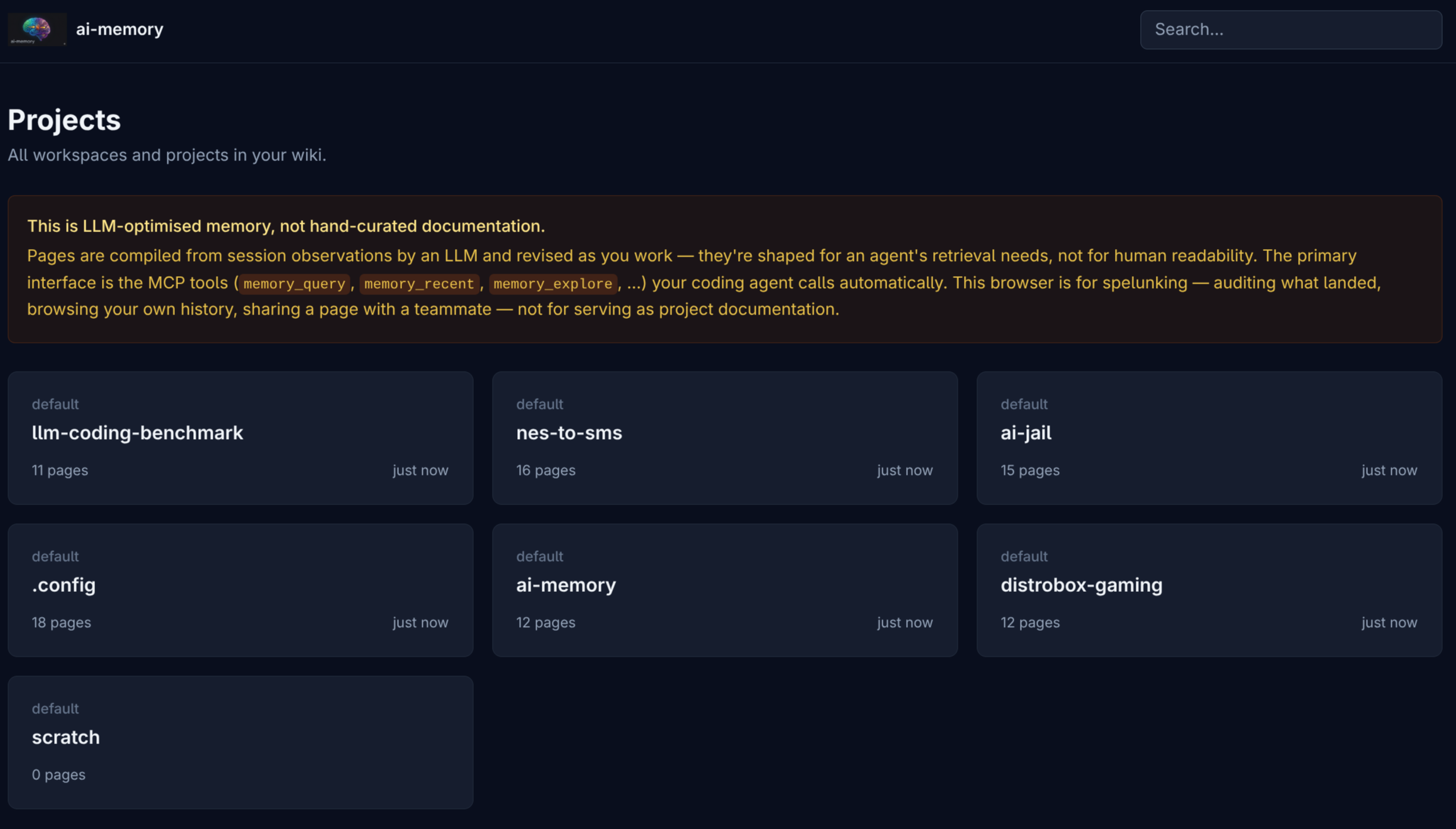
Notice the orange warning at the top: the wiki is optimised for LLM consumption, with pages compiled from session observations by the LLM consolidator. For human-curated canonical documentation, use the project’s own docs/. The /web UI is for spelunking.
Each project is isolated by UUID in the physical layout on disk. Two pages with the same path in different projects don’t collide. Click a card and you land in the project’s page tree:
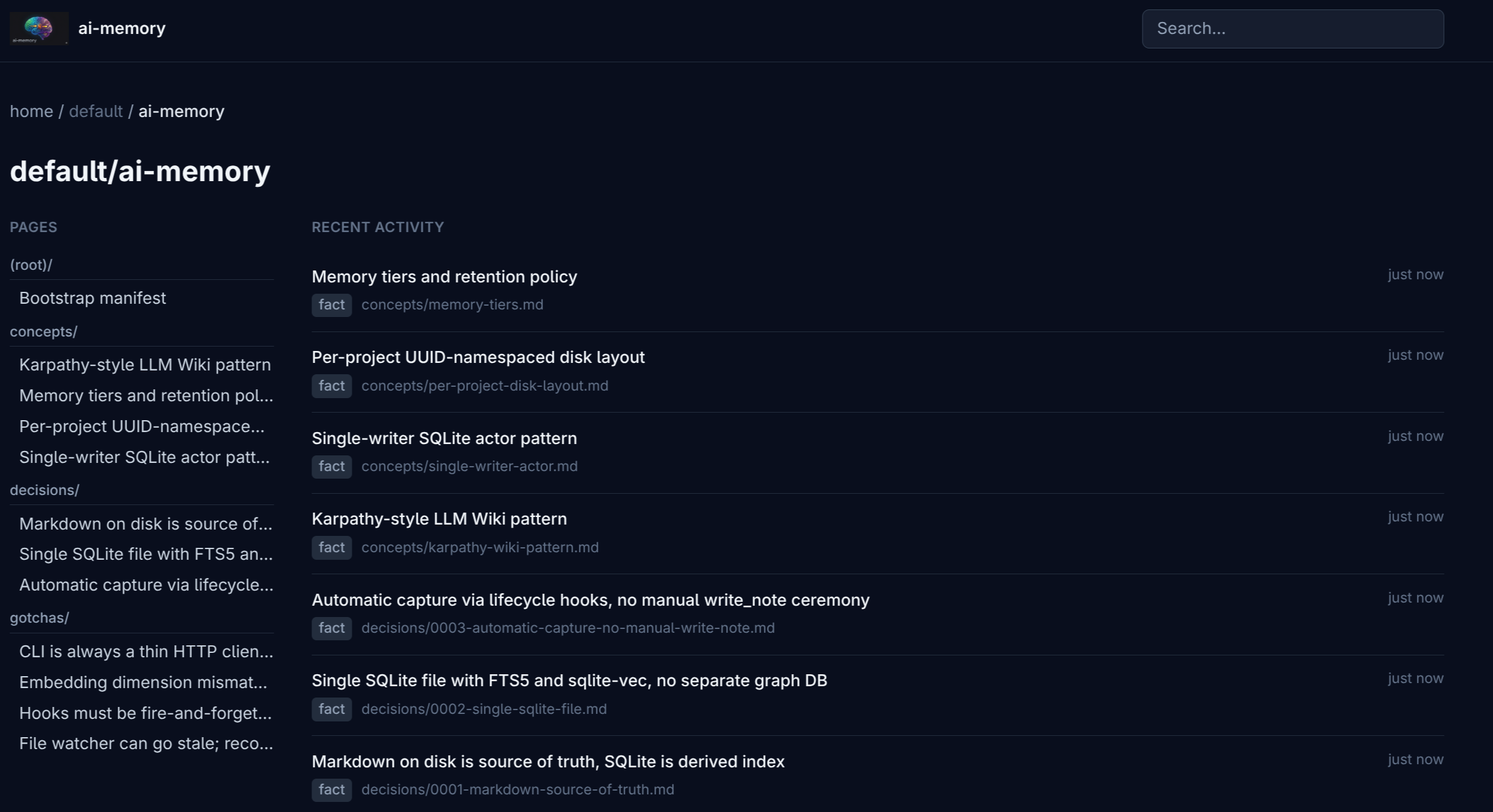
The sidebar groups the tree by kind: concepts/ (durable knowledge), decisions/ (architectural calls), gotchas/ (footguns), _rules/ (project rules suggested for promotion into CLAUDE.md), sessions/ (per-session logs), and bootstrap.md (the manifest generated by ai-memory bootstrap). The right column shows recent activity.
Click any page and you land in rendered markdown:
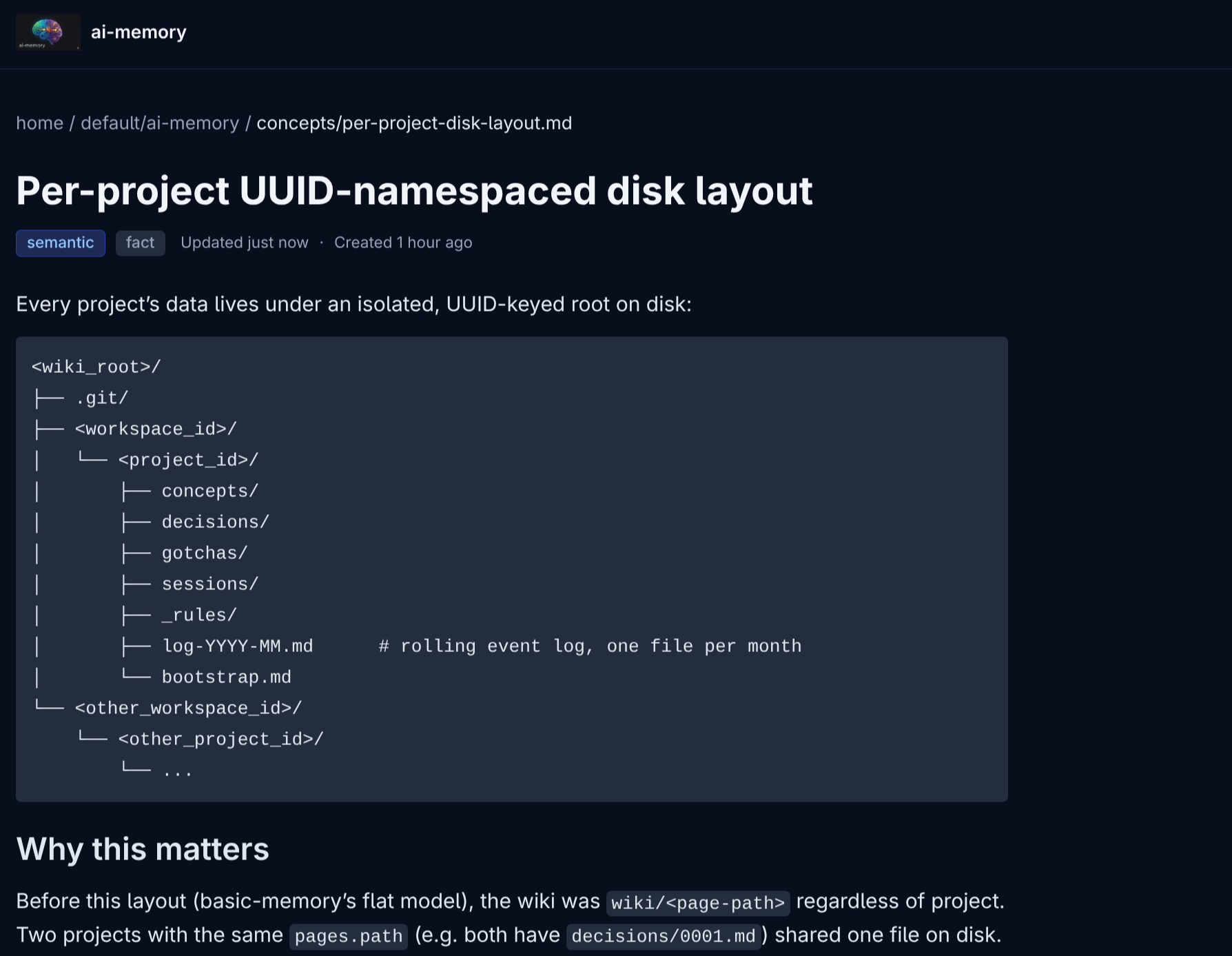
The rendering has syntax highlighting, tier badges (working/episodic/semantic/procedural) and kind badges (decision/gotcha/rule/fact), breadcrumbs, the supersession chain visible. Search combines FTS5, link expansion, and embeddings when configured; light/dark mode follows the OS preference via prefers-color-scheme.
To edit the wiki you open the files directly in any markdown editor (Obsidian works great). The web UI is read-only by design: the LLM consolidator is the one writing, humans just read.
Why Docker
Picking Docker as the recommended path was deliberate. A few practical wins:
- Updates are one line.
ai-memory upgradepulls the new image, refreshes the wrapper, re-stages hooks/plugins/extensions. You don’t compile Rust, don’t manage libsqlite versions, don’t fight with mise/Node version churn the way Node-based solutions force you to. - Real isolation. The server runs in the container, reads only
/data(named volume), doesn’t pollute your system. To clean up, it’sdocker volume rm. - Same image across setups. Laptop, desktop, homelab. Same amd64 or arm64 image.
- Auto restart.
--restart unless-stoppedbrings the server back when you restart Docker, or when the machine boots (assumingsystemctl enable docker). - No source build needed. Compiling the Rust 1.95+ toolchain takes about 3 minutes in release. For end users, that’s unnecessary ceremony. Docker abstracts it away.
There’s a no-Docker path in docs/install.md for anyone who prefers it. But Docker is where the UX is best.
Which LLM for consolidation
This is a case where you don’t need a heavy model. Consolidation is text in, text out: the agent records raw observations during the session, on SessionEnd the LLM compiles 1-5 wiki pages classified as concept / decision / gotcha / rule. No complex reasoning, no code. Opus 4.7 or GPT-5.5 thinking are overkill — expensive and slow for a task that accepts a light model.
To pick the default we ran serious A/B testing across 6 different providers against 5 synthetic fixtures, each designed to stress a specific failure mode: multi-page extraction, restraint (resisting the urge to fabricate a page when the session is trivial), correct classification of rule vs gotcha vs decision, and topic separation. Full writeup with parse-rate, latency, and quality tables per fixture is at docs/llm-provider-comparison.md. The summary table:
| Model | Cost | Latency | Verdict |
|---|---|---|---|
| Claude Haiku 4.5 | ~$0.02/run | 7s | The default I picked. Best classification and restraint, no hallucination. |
| GPT-5.4-mini (OpenAI) | ~$0.005/run | 4s | Cheaper, faster alternative. Mild over-classification on trivial sessions. |
| qwen3:32b (Ollama local) | $0 | 92s | Free if you have a local server. Latency invisible in the background. |
| DeepSeek V4 Flash | ~$0.005/run | 22s | Works, but no edge over GPT-mini or Haiku. |
| Sonnet 4.5 | ~$0.06/run | 11s | Displaced by Haiku. 3× the cost, more hallucination. |
| Kimi-K2.6 | n/a | hangs | INELIGIBLE. Reasoning model burns the token budget internally before emitting content. |
Why Haiku ended up as default: hosted (always available), best at restraint (resists fabricating pages when the session is trivial, crucial for the wiki not to turn into a pile of empty pages), and best at classification (consistently gets kind: rule right, which is what makes auto-routing to _rules/<slug>.md work). $0.02 per consolidation is negligible for personal use.
But the user has legitimate alternatives:
- GPT-5.4-mini if budget is tight (5× cheaper than Haiku, 2× faster). The only measurable defect was fabricating a
decisions/docs-spelling.mdpage on a typo-fix session. Over-classification, but mild. - qwen3:32b on Ollama if you have a local server with ~20GB of RAM/VRAM. Zero cost per consolidation, fidelity comparable to the top hosted models. The ~92s latency doesn’t matter because consolidation runs in the background.
- DeepSeek V4 Flash works, but GPT-mini matches it on quality and beats it on speed.
If you want to test other models, the eval harness is at evals/ as a separate Rust crate. Add a JSON fixture, run cargo run -p ai-memory-eval --release, compare two providers side by side. Outputs land in evals/runs/<timestamp>/{baseline,candidate}/ with the exact .raw.txt the model answered plus .meta.json for latency and parse rate. PRs with new models tested are very welcome.
Status: beta, needs users
ai-memory is at the v0.2-complete tag on GitHub. The main features work: automatic capture, MCP, optional web UI, bootstrap, purge/rename/backup, bearer auth, browsing, FTS5 + graph/link-neighbour RRF search, optional embeddings, consolidation, decay, scheduled maintenance, and handoff across Claude Code / Codex / OpenCode / Cursor / Gemini CLI / OMP-Pi. I’ve been running it in personal production for a few weeks.
But it’s beta. It needs many more users banging on it for me to find the bugs that don’t show up on my machine. Claude Desktop and OpenClaw work as MCP-only clients; some exotic MCP clients still need real testing. The most polished integration today is Claude Code, followed by Codex, OpenCode, and OMP/Pi.
If you’ve made it this far, consider installing and sending feedback. Issues at github.com/akitaonrails/ai-memory/issues. PRs are very welcome — the code is Rust, MIT licensed, and the architecture is documented in docs/ARCHITECTURE.md and docs/design-decisions.md. Even a bug report of “I installed it, it didn’t run on my setup” helps — it means I assumed something about environments that doesn’t match yours.
The core motivation stays the Karpathy line. Agent memory is text. Text lives on disk. You index it with SQLite. You compile with an LLM when the work is worth it. You forget what nobody looks at anymore. You stay out of the way. And when you switch agents in the middle of a project, the next one already knows where you left off.
That’s what ai-memory tries to deliver.