Turning YouTube into a Karaoke App | Frank Karaoke
Project on GitHub: github.com/akitaonrails/frank_karaoke
I’ve always loved karaoke. I go out to sing with family or friends every now and then. In São Paulo there are good places in Liberdade and Bom Retiro, for instance, with private Japanese-style booths. If you’ve never been to a karaoke like that: you rent a private room by the hour, there’s a huge song catalog, two microphones, and a scoring system that grades your singing in real time. The best systems are Japanese, like Joysound and DAM. A score above 90 (out of 100) is considered advanced. DAM, in the LIVE DAM Ai series, even uses AI to give scores that feel more “human.”
But not every place has that level.
The problem with karaoke in Brazil
In Brazil we grew up with Videokê, the brand the Korean Seok Ha Hwang brought to the country in 1996, importing equipment from Korea. It became a craze in the 90s and 2000s, showed up in every bar, barbecue and birthday party. The problem is that those machines stopped in time. The current models, like the VSK 5.0, ship with around 12-13 thousand songs in the catalog, which you expand by buying cartridges or song packs. In practice, the repertoire is old, the interface is straight out of the 2000s, and if the song you want to sing came out after 2015, good luck.
The workaround a lot of bars adopted was to allow Chromecast or screen mirroring so that customers can search for songs directly on YouTube. Makes sense: on YouTube you can find karaoke for any song. With-lyrics version, instrumental version, vocal guide version.
But there’s a downgrade: you lose the scoring. One of the most fun parts of karaoke is the competition. Watching your score climb, comparing with friends, trying to beat the night’s record. If you’re just singing on top of a YouTube video, you get no feedback. It’s like bowling without a scoreboard.
And buying a professional system for home? Importing a Joysound F1 runs north of US$ 2,000 just for the hardware, not counting the monthly catalog subscription. For casual use it makes no sense.
The idea: YouTube with real-time scoring
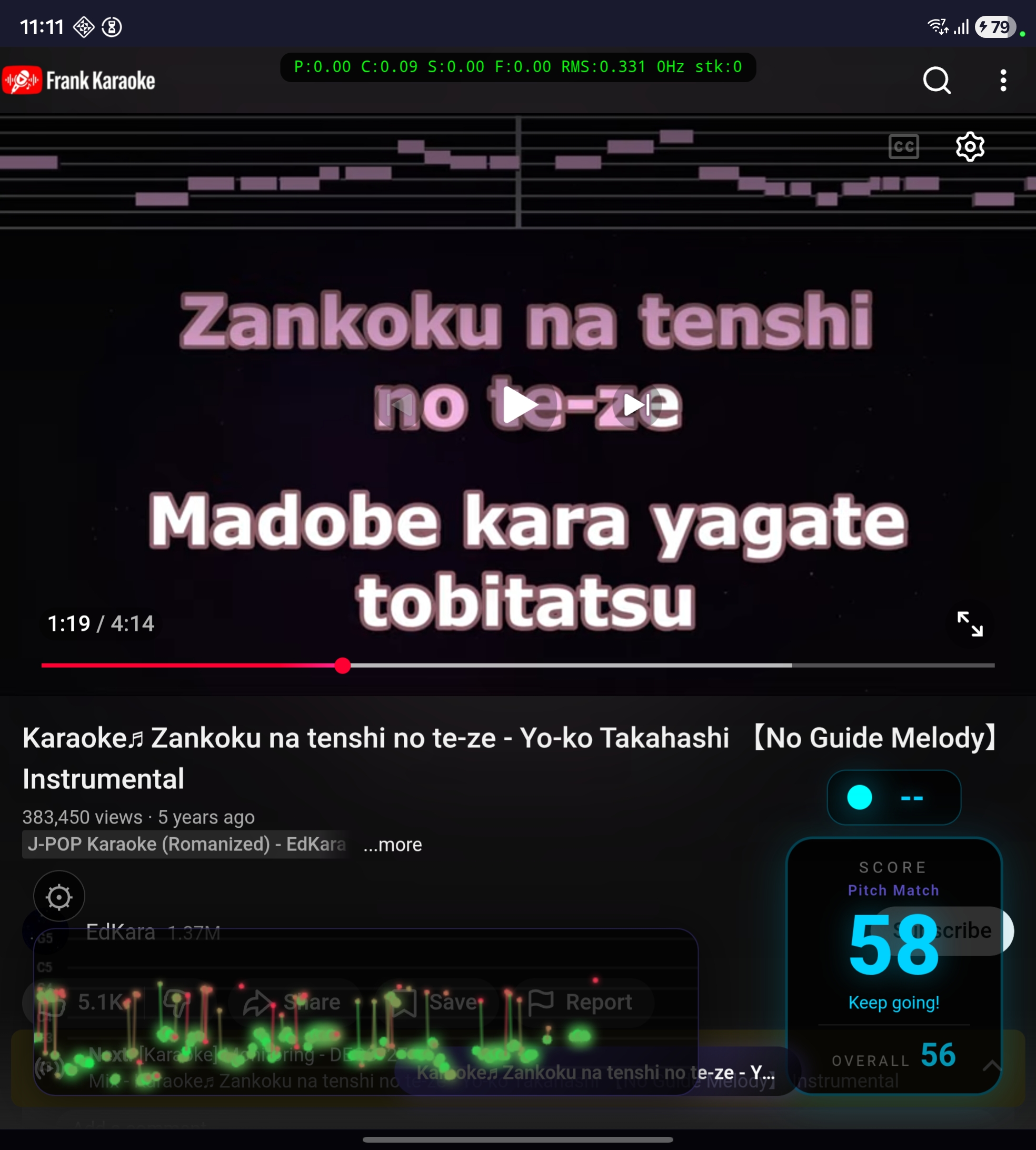
Frank Karaoke came out of that frustration. If YouTube already has every song, why not build an app that works as a YouTube wrapper with a real-time scoring overlay? You search for any karaoke video, sing along, and the app analyzes your voice through the mic and shows a live score.
It’s a Flutter app for Android. Internally it loads YouTube into a webview and injects an overlay in HTML/CSS/JavaScript right into the page. The score display, the pitch trail, the settings panel, the mode selector — all of it rendered inside the webview through JS injection.

Scoring without a reference
Now, the real problem. Every professional karaoke system depends on prebuilt reference files for each song. Every single one.
Sony’s SingStar, which sold over 12 million copies between 2004 and the end of the PS3 era, had a hand-crafted note track for every song. Every note, every syllable, all mapped manually. The mechanism compared the singer’s pitch via FFT against that reference in real time. A detail I thought was clever: octave was ignored. If the right note was a C, it didn’t matter if you sang C3 or C4. Men sing women’s songs no problem.
Joysound and DAM in Japan go further and evaluate three separate dimensions: pitch accuracy (音感), rhythm/timing (リズム感) and expressiveness/dynamic volume (表現力). All based on MIDI data from the operator’s server. The open source equivalent format is UltraStar, where each song has a .txt file like:
: 12 4 5 Hel- (NoteType StartBeat Duration Pitch Syllable)Pitch 5 = MIDI 65 (F4). Scoring compares the singer’s pitch against the note’s pitch, modulo octave, with a tolerance of 1 semitone.
Frank Karaoke works with any YouTube video. There’s no reference file. There’s no MIDI. There’s no melody annotation. Zero metadata about what note you’re supposed to be singing.
I don’t know anything about karaoke scoring. I don’t know anything about audio processing, pitch detection, music theory applied to software. Nothing. So I asked Claude Code to do extensive research on the subject. What it brought back is documented in docs/scoring.md in the repository, and it’s a lot: academic papers on singing evaluation (Nakano et al. 2006, Tsai & Lee 2012, Molina et al. 2013), patents (Yamaha has one from 1999, US5889224A, that details MIDI-based scoring with 3 tolerance bands), and the source code of open source projects like UltraStar Deluxe, AllKaraoke, Vocaluxe and Nightingale.
The conclusion of the research: without a per-song reference, you have to evaluate vocal quality generically. Measure how the person is singing, not what they should be singing. And since no single metric works for every case, we decided to implement four different scoring modes, each measuring a different dimension of vocal quality.
The phone microphone problem
Before the scoring modes, I have to explain a more fundamental problem the research uncovered: the phone microphone.
When you sing karaoke with the phone, the mic picks up three things at once: your voice, the music coming out of the speaker, and ambient noise from the room. Your voice is physically closer to the mic, so it dominates the signal. But not enough for clean separation.
I tried several approaches to isolate the voice:
Spectral subtraction using YouTube’s reference audio. Dropped it. The YouTube CDN blocks direct audio extraction by non-browser user-agents, and even with the reference audio in hand, the speaker’s EQ, the room reverberation and the Bluetooth delay make the signal too different from what the mic captures. Naive subtraction produces artifacts worse than no subtraction at all.
Pre-emphasis + center clipping. Dropped that too. Center clipping destroys the waveform that the YIN algorithm needs for autocorrelation, and pre-emphasis amplifies noise as much as it amplifies voice.
What works is a 200-3500 Hz bandpass filter: a second-order IIR (Butterworth, Q=0.707) in cascade. The high-pass at 200 Hz kills bass, kick drum, bass guitar bleed from the speaker. The low-pass at 3500 Hz kills cymbals, hi-hats, high-frequency noise. Human voice fundamentals (85-300 Hz) and formants (300-3000 Hz) pass through the filter. It’s not perfect isolation, but it improves the voice/music ratio enough for pitch detection.
But the bandpass alone doesn’t solve everything. Guitars, synths and piano produce periodic signals in the same frequency range as voice, and YIN detects pitch in them too. To deal with that, the app does adaptive calibration: in the first 5 seconds of warmup (when nobody’s singing yet), it collects RMS samples from the signal to establish a baseline of the speaker’s level. During the song, it keeps that baseline updated (25th percentile of the last ~4 seconds of frames). For a frame to be scored, the RMS has to be at least 1.3x above the baseline. Your voice is closer to the mic, so it pushes the RMS above the speaker’s level. The instrumental melody stays near the baseline and gets filtered out. In testing, the original singer coming out of the speaker scored around 37 with sparse dots in the trail, while someone actually singing scored ~59 with dense dots.
Another annoying detail: on Android, specifically on Samsungs, the DSP’s AutomaticGainControl (AGC) attenuates the signal instead of amplifying it. On Galaxies, enabling AGC drops the mic peak from ~0.06 to ~0.003. Silence as far as pitch detection is concerned. So the app disables AGC, echo cancellation and noise suppression. When the peak falls below 0.01, it applies software gain (up to 30x) to bring the signal up to usable levels.
The YIN algorithm
To detect the voice’s pitch I use YIN, by Alain de Cheveigné (IRCAM-CNRS) and Hideki Kawahara (Wakayama University). It’s a fundamental frequency estimator in the time domain. The central idea is the Cumulative Mean Normalized Difference Function (CMNDF), which basically measures how periodic the signal is at each lag, normalizes it to reduce false positives, and uses parabolic interpolation to refine the result. It’s lightweight enough to run in real time on a phone, which is what matters here.
In the app, the YIN threshold is 0.70 (tuned for mixed voice + music signals), and frames with confidence below 0.3 get discarded. Below that, it’s probably noise or an instrument.
The 4 scoring modes
Each mode evaluates a different aspect of vocal quality. They all share the same audio pipeline (bandpass → YIN → confidence gate). The difference is how they interpret the detected pitch.
Pitch Match
Measures how cleanly you sustain notes. Uses Gaussian decay based on the standard deviation of MIDI values in a rolling ~15-frame window. Steady notes (deviation < 0.3 semitones) score 85-100%. A trembling voice (deviation > 2 semitones) scores near zero. Good for songs you already know well.
Contour
Measures the melodic shape of your singing. It doesn’t matter which exact note you hit, only the direction and the flow. Evaluates the pitch range and melodic movements (jumps > 0.5 semitone) in a rolling window. Monotone singing scores ~10%. Smooth melodic movement with a 2-6 semitone range scores 70-100%. Good for when you’re learning a new song.
Intervals
Measures the musical quality of jumps between consecutive notes. A whole tone (2 semitones) scores highest. Thirds and fourths score well. Wild jumps of an octave or more score low. Uses a Gaussian curve centered on the whole tone. Works when you’re singing in a different key from the original.
Streak
It’s Pitch Match with a combo multiplier. Each consecutive frame with a score above 0.4 increments the streak counter. The streak adds bonus points (up to +0.4 on a streak of 30+). Breaking a streak > 5 frames pushes a 0.05 penalty into the EMA. Silence freezes the streak, so instrumental breaks don’t hurt you. The most fun mode for parties.
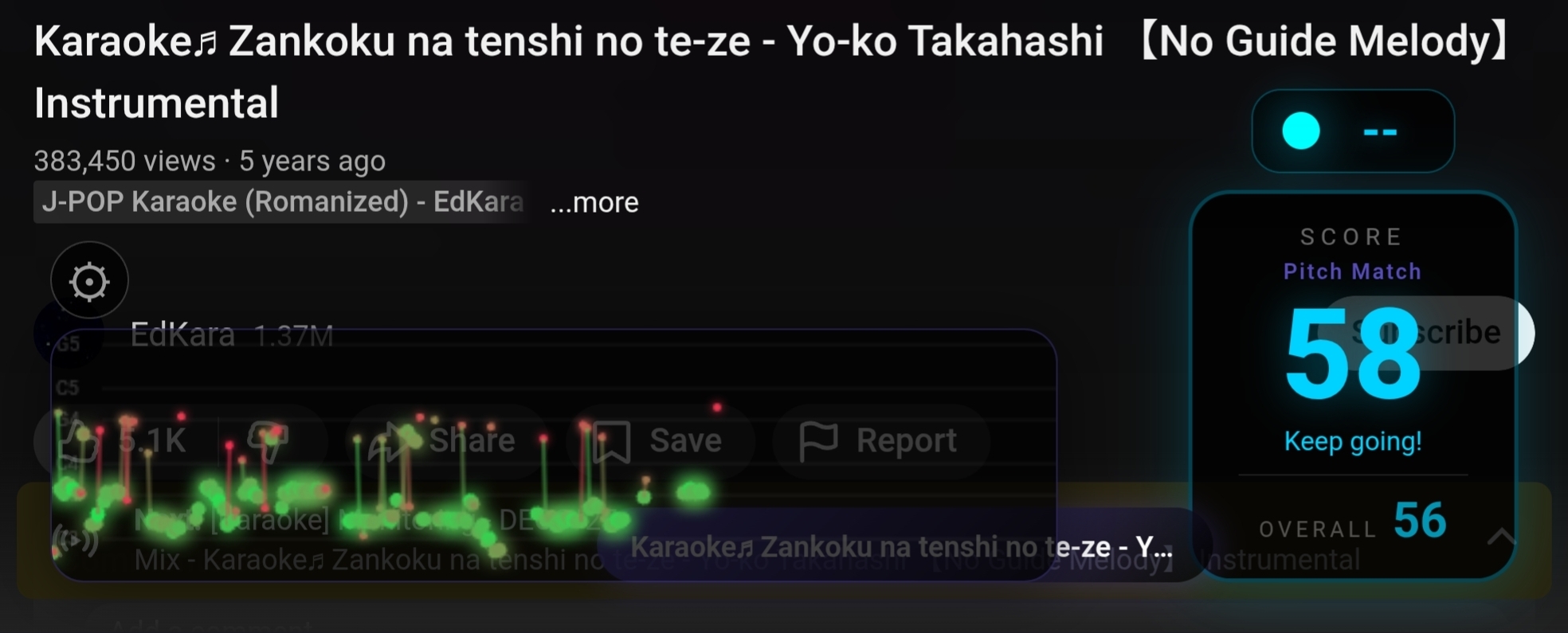
The logic behind these four modes came from the research Claude did across academic papers. Each one measures a different dimension: pitch accuracy, melodic contour, phrasing and consistency. None of them is sufficient on its own, but together they cover, reasonably well, what you can evaluate without having the song’s reference melody.
The Pitch Oracle
Beyond the four purely vocal modes, the app has what I call the Pitch Oracle. The idea: instead of evaluating your voice in isolation, the app downloads the video’s reference audio via youtube_explode_dart, decodes it to PCM, runs YIN on it, and builds a timestamped pitch timeline of the entire song. During scoring, if the mic’s pitch matches the reference’s pitch at that moment in the video, it’s probably speaker bleed, and gets ignored. If it differs, it’s your voice, and gets scored.
The synchronization works through the currentTime of the HTML5 video element, sent to Dart through a JS timeupdate listener every ~250ms. The oracle queries the reference pitch at the exact playback position, accounting for pause, seek and speed change.
The first time you play a song, the oracle takes 5-15 seconds to download and analyze the audio. But the timeline is saved as JSON in the app’s local cache (pitch_oracle/<videoId>.json). If you play the same song again, it loads instantly from cache, no network request. That also fixes YouTube’s rate limiting problem for the songs you sing the most.
With the oracle active, the modes change behavior. Pitch Match compares the singer’s pitch class against the reference’s, agnostic to octave (like SingStar). Contour uses cross-correlation between the singer’s pitch movement and the reference’s. Intervals compares semitone jumps against the reference’s.
When YouTube blocks the download with rate limiting (happens after many consecutive requests from the same IP, clears in 15-30 minutes), the oracle silently fails and the modes fall back to purely vocal analysis.
The road to here
The app you see now went through a lot of iteration before reaching this state.
First, I tried to make a Linux desktop version to make debugging easier. Makes sense, right? Test on the desktop, iterate fast, then port to mobile. The problem is that Flutter has no webview backend for Linux desktop. webview_flutter simply doesn’t work. I tried webview_cef, which is based on the Chromium Embedded Framework. CEF spawns its own GPU process, and on Hyprland (a Wayland compositor based on wlroots) that conflicts with the compositor’s render pipeline. On my NVIDIA setup, the entire Hyprland session froze. Locked screen, no keyboard response, I had to kill it from a TTY. On top of that, CEF requires downloading a ~200MB binary on the first build. I gave up on CEF and wrote a native bridge in C++ with Claude using WebKitGTK and Flutter method channels. It worked, but every YouTube quirk required separate code for Linux and Android. just_audio also has no Linux desktop implementation. The Linux version turned into dead weight. I deleted ~1,500 lines of Linux-specific code and focused only on Android.
Then came the Samsung mic saga. On my Galaxy Z Fold, the mic was capturing an absurdly low signal. Peaks of ~0.005, basically silence as far as pitch detection was concerned. I spent two hours trying to figure it out. I lowered thresholds, raised software gain to 50x, disabled audio preprocessors. Nothing was working right. Until I figured out the real problem: Android’s AutomaticGainControl. The name says “automatic gain control,” which suggests it amplifies weak signals. In the Samsung DSP implementation, it does the opposite. It attenuates the signal to a low reference level, optimized for voice calls. With AGC on, the peak dropped from ~0.06 to ~0.003. Disabling AGC fixed it. But then the audio_session package was re-enabling AGC under the hood. I removed that one too. It was three rounds of fixes, each finding one more layer of the problem.
And the scoring. The scoring took longer than everything else combined. The first implementation used a cumulative average, which kept the score stuck at one value and never responded to live singing. I switched to a rolling window. Then the score was stuck at ~50% because of a bug in the primary score weight. I fixed it, and it started showing 70% even with nobody singing. Fixed it again. Streak mode wasn’t resetting properly during silence. The chromatic snap was giving high scores for anything. The pitch history wasn’t being cleared on silence gaps and the modes were going stagnant. Every fix revealed another bug. It took more than 25 commits just on the scoring, from the first prototype to the current state.
The result isn’t perfect. I know. But it works well enough to be fun, which was the goal from the start.
Settings
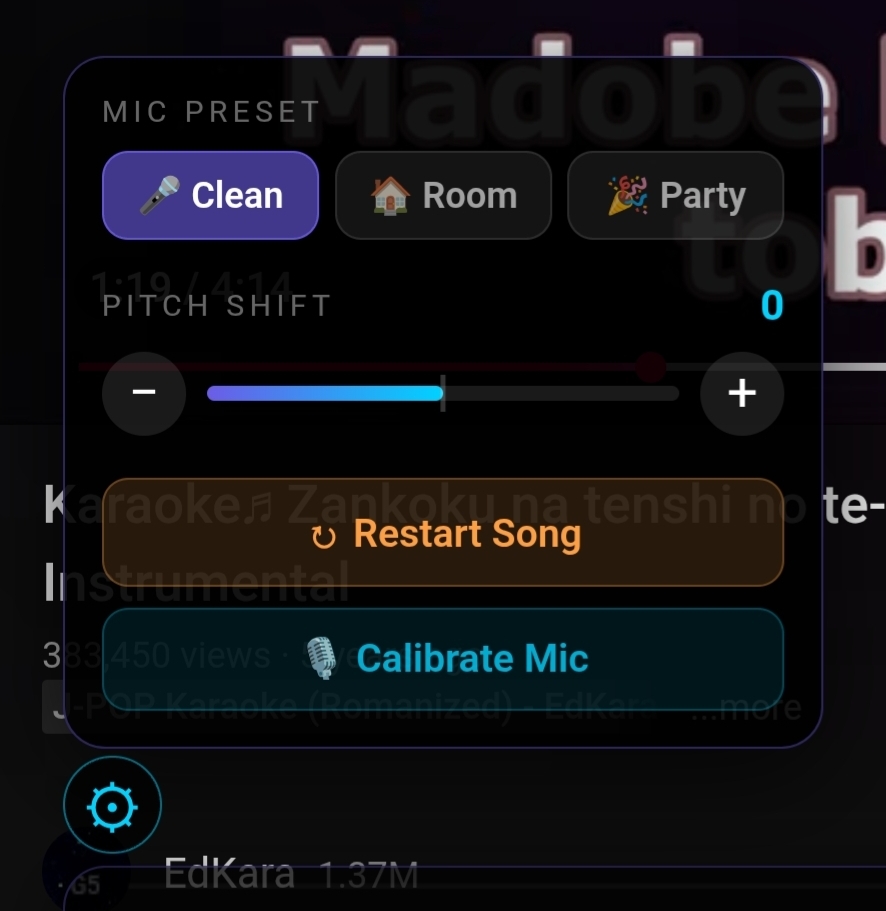
The settings panel lives behind the gear icon on the overlay. There are three mic presets for different environments (clean external mic, normal room, loud party), each adjusting confidence and amplitude thresholds. There’s a pitch shift for when the song is too high for your vocal range. The shift moves both the video audio and the scoring at the same time: it uses the HTML5 element’s playbackRate with preservesPitch=false, so +2 semitones speeds the audio up to 1.12x (pitch goes up) and -2 semitones slows it down to 0.89x (pitch goes down). The scoring compensates for the offset, so you sing in your comfortable range and the system grades you correctly. There’s mic calibration, a 3-second process that measures the room noise and adapts the thresholds. And there’s a restart to reset the score without reloading the video.
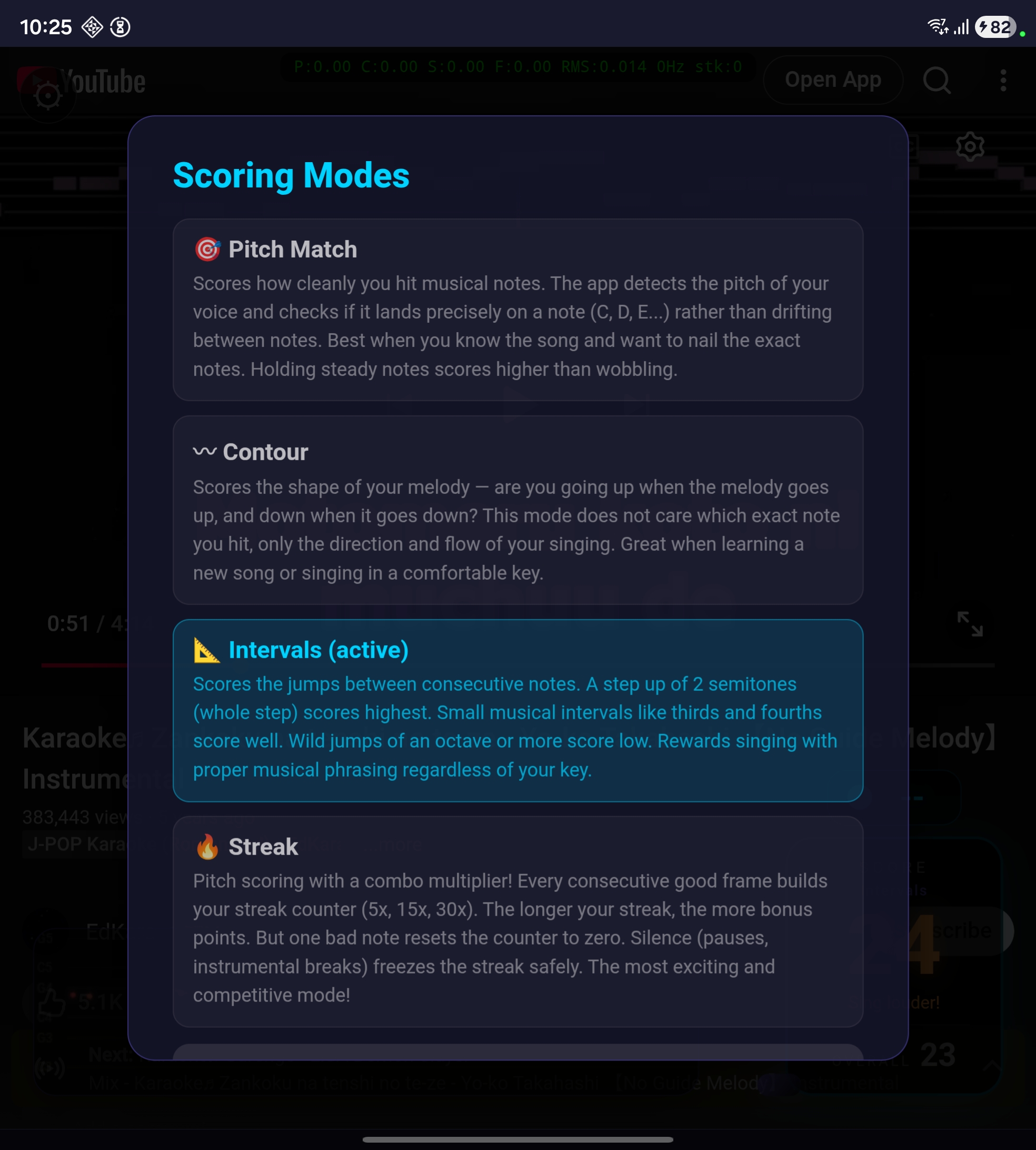
To switch scoring modes, tap the score box during playback.
Usage flow
- Open the app. YouTube loads inside the app with the Frank Karaoke logo.
- Search for a karaoke video. Any video works, but instrumental tracks with on-screen lyrics give better results.
- The video pauses briefly to initialize the mic, download the song’s data for the pitch oracle, and prepare the overlay. The first time with a new song this takes 5-15 seconds. If you’ve played it before, it loads from cache instantly.
- Sing. The “live” score reflects your current performance (exponential moving average with alpha 0.15, ~1 second response). The “overall” score is the cumulative average of the entire song.
- When the video pauses, scoring pauses with it (so it doesn’t score ambient noise). If you seek, the score resets and gets a 5-second warmup.
How to install
The app isn’t on the Play Store yet, I’m waiting for Google to verify my developer identity. It should show up there in the next few days. In the meantime, it’s an open project and you can install it directly.
The easiest way is to download the signed APK directly from the GitHub releases page. On your Android phone or tablet, download FrankKaraoke-0.2.0-android.apk, open it and tap Install. If Android complains about “unknown sources,” enable it under Settings > Security for your browser. On the first run the app will ask for mic permission. Then go into settings (the gear icon) and calibrate the mic before singing — three seconds.
If you want to compile from source or contribute, the repository is on GitHub. You’ll need Flutter SDK 3.10+, Android SDK API 24+, and a physical device for mic testing (an emulator doesn’t give representative results).
git clone https://github.com/akitaonrails/frank_karaoke.git
cd frank_karaoke
flutter pub get
flutter run -d <device_id>
The README has the rest.
Stack: Flutter + Riverpod for state management, webview_flutter for YouTube, youtube_explode_dart for audio extraction, record for PCM mic capture, audio_decoder for reference decoding via Android MediaCodec, and the YIN algorithm implemented in pure Dart.
The technical documentation for the scoring system is in docs/scoring.md in the repository. It covers how SingStar, Joysound and DAM work, the academic papers, the pitch oracle architecture, the voice isolation problems on Android, and the roadmap.
The scoring is experimental
I have to be straight: the scoring system is experimental. Without per-song reference files, the evaluation is approximate. The app measures whether you’re in tune, whether you follow a melodic contour, whether your intervals are musical, whether you’re consistent. But it doesn’t tell you whether you’re singing the correct melody for this specific song (unless the pitch oracle manages to download the audio, and that doesn’t always work).
If you have experience with audio processing, pitch detection, or music evaluation, the repository is open and the research documentation in docs/scoring.md details what was tried, what works and what doesn’t. In particular: tuning the modes’ thresholds, improving voice isolation, and integrating with UltraSinger (which generates reference files from songs using Demucs + basic-pitch + WhisperX) are areas where contribution from people who know the subject would make a real difference. I’d appreciate any help from specialists on calibrating these systems.
Oh, and the name. Frank Karaoke. It’s a tribute to Sinatra. Who else?
Project on GitHub: github.com/akitaonrails/frank_karaoke