Testing Open Source and Commercial LLMs - Can Anyone Beat Claude Opus?
TL;DR: If you don’t want to read the whole analysis: the only models that produced code that actually works in our benchmark were Claude Sonnet 4.6, Claude Opus 4.6, GLM 5 and GLM 5.1 (from Z.AI, ~89% cheaper than Opus), and GPT 5.4 (which failed the benchmark due to runner incompatibility but which I tested extensively in Codex and works as well as Opus). Everything else — Kimi, DeepSeek, MiniMax, Qwen, Gemini, Grok 4.20 — invented APIs that don’t exist or ignored the gem we asked for.
There’s a new wrinkle in this update: I redid the local part of the benchmark on an RTX 5090 (instead of the AMD Strix Halo) and added a fresh batch of Qwen models, including a Qwen 3.5 27B distilled directly from Claude 4.6 Opus. That reopened the conversation on running open source models locally. The 5090’s memory bandwidth flips the game from “unworkable” to “workable with 1-2 follow-up prompts.” The bottleneck for open source models has moved to a lack of factual knowledge about specific libraries, which I unpack in detail in the new section on the Qwen family. The Claude distillation gamble, by the way, gave a pretty frustrating result that I haven’t seen documented in these terms before.
If you’ve been following my previous vibe coding pieces, you know I spent the last two months in a 500-hour marathon using Claude Opus as my main coding agent. The results were good, as I reported in the conclusion about business models. But there was an itch I couldn’t scratch: am I locked into one model? Is there a real alternative to Claude Opus for daily use on real projects?
I’ve got an RTX 5090 with 32 GB of GDDR7. I know I can run the latest open source models. I bought a Minisforum MS-S1 with an AMD Ryzen AI Max 395 and 128 GB of unified memory, and built a home server with Docker to serve local models. The infrastructure was ready. What was missing was actually testing it.
I built an automated benchmark to compare open source and commercial models under identical conditions. 33 models configured in total (25 from the original run plus 8 added in the NVIDIA rerun), 27 executed, 16 completed in some form. The code is on GitHub.
The bottleneck nobody explains: VRAM and KV Cache
Before getting to the results, I have to explain why running large models locally is much harder than it looks.
Take Qwen3 32B. The model in FP16 (full precision) takes ~64 GB. Quantized to Q4 (4 bits), it drops to ~19 GB. So it fits in my RTX 5090’s 32 GB, right? Wrong. That’s just the model weights. There’s a part nobody tells you about: the KV Cache.
KV Cache is the memory the model uses to “remember” what it has already read. Every time it processes a token (a word or piece of a word), it computes two vectors — K (key) and V (value) — for every attention layer. Those vectors stick around so the model doesn’t have to recompute everything when it generates the next token. Without that, generation would be quadratically slow.
The KV Cache scales linearly with the size of the context. The formula:
KV Memory = 2 × Layers × KV_Heads × Head_Dimension × Bytes_per_Element × Context_TokensFor a model like Llama 3.1 70B in BF16, that comes out to ~0.31 MB per token. Sounds tiny, until you realize that a 128K context eats 40 GB of KV Cache alone. The model itself plus KV Cache adds up to way more VRAM than most GPUs have.
And for actual coding agent use, 128K tokens isn’t a luxury, it’s the bare minimum. The agent has to read files, keep conversation history, receive command output. In long benchmark sessions, our models consumed between 39K and 156K tokens. Less than 100K of context isn’t practical for day-to-day project work.
Google published TurboQuant (ICLR 2026), which compresses the KV Cache to 3 bits without accuracy loss — a 6x memory reduction and up to 8x speedup. It uses random vector rotation (PolarQuant) followed by a 1-bit algorithm on the residuals. Works online during inference, compressing on write and decompressing on read. Not yet implemented in the runtimes we use (llama.cpp, Ollama), but when it lands it’ll change the equation a lot.
For anyone wanting to dig deeper into the VRAM math, I recommend this link from Ahmad Osman for the article “GPU Memory Math for LLMs (2026 Edition)”.
The hardware problem: not all memory is created equal
“But I have 128 GB of RAM!” Cool, but that’s not what matters. What matters is memory bandwidth, and the difference between types is wild:
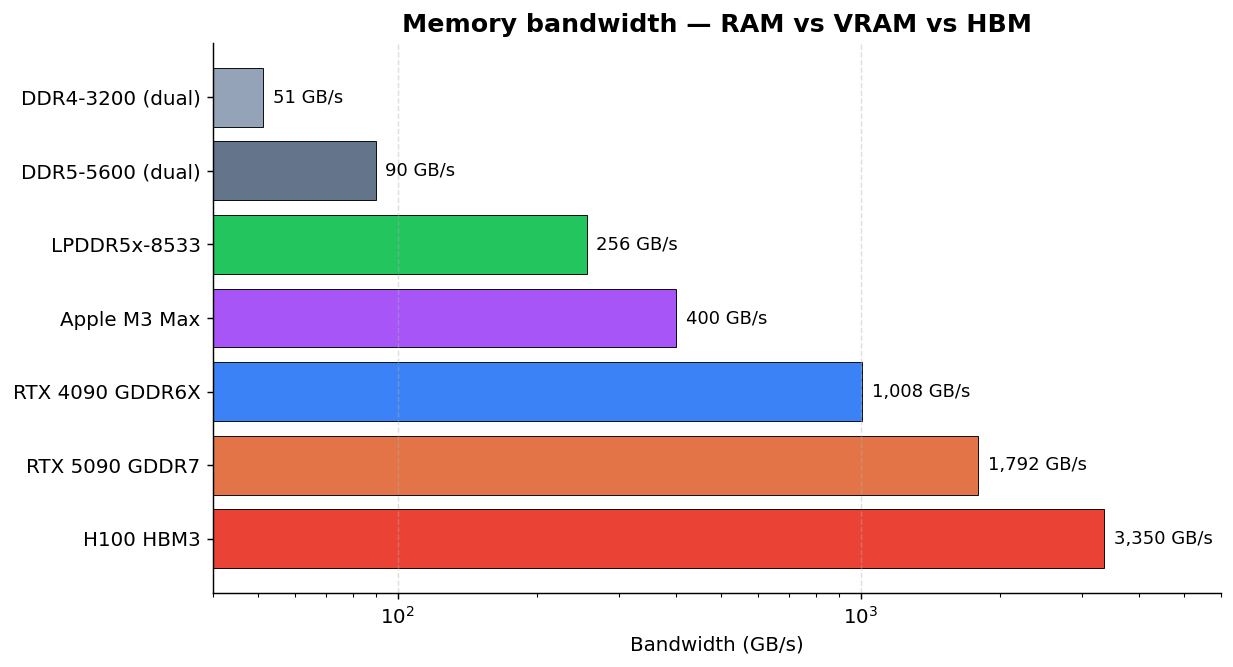
The RTX 5090 has 7x the bandwidth of the LPDDR5x memory in my Minisforum. That means even if a model fits in the AMD’s unified RAM, inference will be proportionally slower. On my Minisforum with LPDDR5x at 256 GB/s, Qwen3 32B runs at ~7 tok/s. On the RTX 5090 at 1,792 GB/s, it’d be much faster — if it fit entirely in VRAM alongside the KV Cache.
Most folks running local models are still on DDR4. At 50 GB/s, 32B models are basically unusable. And there’s another factor people forget: storage. When the RAM can’t keep up and the system swaps, the storage speed becomes the bottleneck:
| Storage | Sequential Speed |
|---|---|
| SATA SSD | ~550 MB/s |
| NVMe Gen3 | ~3,500 MB/s |
| NVMe Gen4 | ~7,000 MB/s |
| NVMe Gen5 | ~12,000 MB/s |
From SATA to NVMe Gen5 you’re looking at a 22x difference. If you’re doing partial offloading to disk (which is common when the model doesn’t fit entirely on the GPU), NVMe Gen4 or Gen5 makes a real difference. SATA is a non-starter.
To sum up: running local models isn’t just “having enough RAM.” You need the right kind of memory, with the right bandwidth, and fast storage as a fallback. For a lot of people, a Mac Studio with high-bandwidth unified memory (up to 800 GB/s on the M4 Ultra with 512 GB) would be the more practical option, but it costs more than US$ 10,000. The AMD Ryzen AI Max is the cheaper alternative with unified memory, but its LPDDR5 caps out at 256 GB/s.
Ollama vs llama.cpp: why Ollama falls apart on benchmarks
Ollama is the most popular way to run local models. Install, pull the model, run. For casual use it works. But when I tried to use it for automated benchmarks with long unattended sessions, it broke in 6 different ways across 8 models:
- Unloads the model mid-session. On long runs, Ollama decides the model isn’t being used and unloads it from the GPU. The agent sits there waiting for a response from a model that no longer exists.
- Ignores the requested context. You ask for
num_ctx=131072, Ollama accepts, then halfway through the run it reverts to the default without warning. - Unstable lifecycle. Asking for
keep_alive: 0to unload doesn’t always work. The model stays resident and blocks the next one. - Incompatible formats. Native bf16 variants on Ollama failed, while the same model as a Q8 GGUF from HuggingFace worked fine.
The fix: migrate to llama-swap, a Go wrapper that manages llama.cpp processes with hot-swap. A request comes in for a different model than the one currently loaded, it kills the current process and starts the new one. No context negotiation, no flaky lifecycle.
llama-swap fixed the loading of 6 of the 8 models that had failed under Ollama:
| Model | Ollama | llama-swap |
|---|---|---|
| Gemma 4 27B | HTTP 500 | 47.6 tok/s |
| GLM 4.7 Flash | No output | 47.4 tok/s |
| Llama 4 Scout | Unloaded | 17.5 tok/s |
| Qwen 3.5 35B | Output off-spec | 49.7 tok/s |
| Qwen 3.5 122B | Context drift | 23.1 tok/s |
| GPT OSS 20B | Model not found | 78.3 tok/s |
But llama-swap isn’t magic.
Why “just use llama.cpp” doesn’t fix everything
llama.cpp solves Ollama’s lifecycle problems but brings its own:
Each model needs specific flags. GLM and Qwen 3.5 emit <think> tags that break clients if you don’t pass --reasoning-format none. Gemma 4 needs build b8665+ for the tool call parser to work.
Not every model supports tool calling. llama.cpp needs a dedicated parser for each model’s tool call format. Llama 4 Scout uses a “pythonic” format ([func(param="value")]) that llama.cpp simply doesn’t parse and emits as plain text. vLLM has a parser for it, llama.cpp doesn’t.
And then there are the repetition loops. Gemma 4, even with the right parser, gets into an infinite loop after ~11 tool calls in long sessions. It’s a known bug that PR #21418 didn’t fully fix.
Tool calling compatibility per model:
| Model | Tool Calling | Required Flags | Benchmark Result |
|---|---|---|---|
| Gemma 4 27B | Partial (b8665+) | --jinja --reasoning-format none | Infinite loop after ~11 steps |
| GLM 4.7 Flash | Yes | --jinja --reasoning-format none | 2029 files, ended mid-tool-call |
| Qwen 3.5 (35B, 122B) | Yes | --jinja --reasoning-format none | Completed successfully |
| Qwen 3 Coder Next | Yes | --jinja | Completed (best local result) |
| GPT OSS 20B | Yes | --jinja | Tool calls ok, but app in wrong directory |
| Llama 4 Scout | No | — | No parser in llama.cpp |
At the end of the day, llama.cpp is better than Ollama for automated runs, but “plug and play” it ain’t. Each model requires specific configuration, and some just don’t work for agentic coding yet.
Reasoning: models that think vs models that wing it
There’s one difference between models worth explaining: reasoning. The idea is that the model “thinks before answering” instead of generating tokens straight from left to right. Models with reasoning go through an internal chain-of-thought step where they evaluate the problem, consider alternatives, plan, and only then emit the response.
In practice this shows up as <think>...</think> tags in the output, blocks of text the model writes to itself that shouldn’t go to the end user. Claude Opus 4.6, GPT 5.4, DeepSeek V3.2 and the Qwen 3.5 line support reasoning natively. The smaller ones (Gemma 4, GPT OSS 20B, older models) don’t have that capability.
Why does it matter for coding? When a coding agent gets “build a Rails app with 9 components,” it has to decompose the task into steps, decide the order, anticipate dependencies, adapt when something fails. Without reasoning, the model generates code sequentially with no planning. It works for simple tasks, falls apart on projects with interdependent parts.
In the benchmark, the difference was clear:
- GPT OSS 20B (no reasoning, 20B parameters) created the app in the wrong directory. Couldn’t keep workspace instructions in mind while generating code.
- Qwen 3 32B has reasoning, but at 7 tok/s it was too slow. The “thinking” tokens drag out the generation time.
- Gemma 4 31B, with no reasoning trained for agentic use, fell into repetitive tool calling loops.
- GLM 5 (cloud, 745B MoE) with reasoning and 44B active parameters, finished cleanly and used the correct API.
There’s a trade-off: reasoning consumes extra tokens (the <think> blocks), which take up VRAM in the KV Cache and slow generation down. That’s why flags like --reasoning-format none are needed in llama.cpp. Some clients don’t know what to do with reasoning tokens and break. Models that emit reasoning when the runtime isn’t expecting it can produce garbage in the output.
And reasoning isn’t something you “turn on” in any model. It’s a capability trained with reinforcement learning on top of the base model, using data from problems that require multi-step thinking. The smaller open source models (20B-35B) typically didn’t go through that training, or went through it on a smaller scale. They know how to generate code, but they don’t know how to plan code. On tasks that require 50+ coordinated tool calls, that difference is fatal.
The benchmark: methodology
To compare models fairly, I built an automated harness in Python. Each model gets the exact same prompt: build a complete Ruby on Rails application, a ChatGPT-style chat SPA using the RubyLLM gem, with Hotwire/Stimulus/Turbo Streams, Tailwind CSS, Minitest tests, CI tools (Brakeman, RuboCop, SimpleCov, bundle-audit), Dockerfile, docker-compose and README.
The runner is opencode, which at the time of the benchmark was the most popular open source coding CLI, competing with Claude Code and Codex. Since then the project has been archived and development continued as Crush, maintained by the original author together with the Charm team (the folks behind Bubble Tea, Lip Gloss and several other Go terminal tools). If you read my piece on Crush, you already know it. Crush inherits everything from opencode — support for 75+ providers, LSP, MCP, persistent sessions — and adds the polished aesthetic that’s a Charm trademark. It runs everywhere: macOS, Linux, Windows, Android, FreeBSD.
I actually tried to use Crush for the benchmark first. The problem: it advertised a --yolo flag in its help to auto-approve every action (essential for unattended automated runs), but at runtime it rejected the flag. Without auto-approve there’s no way to do an unattended benchmark. opencode, on the other hand, had the opencode run --agent build --format json mode that emits JSON events with session IDs and token counts, perfect for automation. So we went with opencode.
I picked opencode (and not Claude Code or Codex) for two reasons:
- Neutrality. Claude Code is optimized for Anthropic models. Codex is optimized for OpenAI models. opencode is agnostic, same interface for all.
- Automation. opencode exposes a machine-readable JSON format. Claude Code and Codex don’t have an equivalent interface for external benchmarking.
Cloud models ran in two phases: phase 1 (build the app) and phase 2 (validate local boot, docker build, docker compose). Local models only ran phase 1.
Worth mentioning: the entire benchmark cost less than $10 in tokens on OpenRouter. Apart from GPT 5.4 Pro which torched $7.20 to fail, the other 11 cloud models added up to about $2.50 total. Local models cost only electricity. The point is: running your own benchmark is cheap. If you want to know whether a model works for your use case, drop the $2 and test it. The harness code is on GitHub, just swap the prompt for your own project.
Why GPT 5.4 failed the benchmark (but not in real life)
GPT 5.4 Pro is the only cloud model that consistently failed our benchmark. Two separate runs, same result: the model generated files but never reached finish_reason: stop. It always ended on finish_reason: tool-calls — wanted to keep calling tools but the loop kept breaking.
For folks who don’t know: tool calling is when an LLM needs to perform an action (read a file, run a command, edit code) and emits a “tool call” in a structured format. The client (opencode, Claude Code, Codex) interprets it, executes it, and returns the result back to the model. Each provider has its own format: Anthropic uses tool_use blocks, OpenAI uses function_calling with proprietary JSON schemas, Google uses FunctionCall.
GPT 5.4 is heavily trained for OpenAI’s native function calling format — tool_choice, tools with proprietary JSON schemas. When the benchmark routes through opencode → OpenRouter → GPT 5.4, the tool schemas get translated at every hop. If GPT emits tool calls in a format that OpenRouter or opencode doesn’t parse correctly, the agent loop breaks.
The evidence: every other cloud model (Claude Opus, Claude Sonnet, Kimi K2.5, DeepSeek V3.2, MiniMax M2.7, GLM 5, Qwen 3.6 Plus, Step 3.5 Flash) ended on finish_reason: stop. Only GPT ends on finish_reason: tool-calls.
A fair comparison for GPT 5.4 would require running it in its native environment — Codex or ChatGPT Pro ($200/month). On opencode through OpenRouter, this isn’t a fair test of GPT’s coding ability. That said, I used Codex extensively during my vibe coding marathon and I can vouch that GPT 5.4 is as good as Opus for real projects. In some ways I actually prefer Codex: it tends to think more “outside the box” and arrives at more creative solutions than Opus. On the other hand, it’s less disciplined — tends to forget previous instructions in long sessions and sometimes wanders off scope. Opus is more predictable and methodical. For me, that predictability is worth more day to day.
Sonnet and Opus through opencode/OpenRouter were probably also not pushed to their limits. Claude Code offers native tool support that opencode doesn’t replicate — meaning the benchmark results represent a floor, not a ceiling, for those models.
Open source models: reality vs the narrative
A lot of people are saying open source models have already caught up with the commercial ones and you can run your own “Claude” at home. In practice, not really.
The scale isn’t comparable. Frontier models like Claude Opus 4.6 and GPT 5.4 are closed-source, but estimates put them in the hundreds of billions to trillions of parameters range, trained with compute and data no open source company can replicate. The best models that fit on reasonable hardware are:
| Model | Total Parameters | Active Parameters | Architecture |
|---|---|---|---|
| Qwen 3.5 35B-A3B | 35B | 3B | MoE (A3B) |
| Qwen 3.5 27B | 27B | 27B | Dense |
| Qwen 3 32B | 32B | 32B | Dense |
| Qwen 3.5 122B | 122B | 122B | Dense |
| GPT OSS 20B | 20B | 20B | Dense |
| Gemma 4 31B | 31B | 31B | Dense |
Post-publication correction: Qwen 3.5 35B is actually the 35B-A3B, an MoE with only 3B active parameters per token (not dense, as I’d originally written). That’s why it runs relatively fast for its size. And for folks with 24 GB of VRAM, the model recommended by Unsloth themselves is the Qwen 3.5 27B dense — that one I didn’t get around to testing in the benchmark, but it’s worth a look. For anyone wanting to dig deeper into local models, @sudoingX has been doing some serious experimentation in this space. Thanks to @thpmacedo for the heads-up.
Even the largest open source MoE (Mixture of Experts) models that companies make publicly available activate only a small fraction of parameters per token:
| Model | Total Parameters | Active Parameters | Notes |
|---|---|---|---|
| Kimi K2.5 | 1T | 32B | 384 experts, top-8 + shared |
| GLM 5 | 745B | 44B | 256 experts, 8 activated |
| DeepSeek V3.2 | 671B | 37B | Sparse Attention |
| Qwen 3.5 397B | 397B | 17B | MoE, cloud-only |
These large models aren’t self-hostable. Kimi K2.5 with 1T parameters needs GPU clusters with hundreds of GBs of VRAM. GLM 5 with 745B is the same. Even if Alibaba or Z.AI release the weights (and some do), nobody has home hardware to run them.
What fits on your home GPU are the 20B-35B models — and those have real limitations.
What each local model did in the benchmark
Results from the original run on the AMD Strix Halo:
Qwen 3 Coder Next (30B) — Completed in 17 minutes on the Strix, generated 1675 files, Rails app with all the artifacts. But only 3 tests. And more importantly: it invented RubyLLM::Client.new, a class that doesn’t exist in the gem. The app doesn’t run.
Qwen 3.5 35B — Completed in 28 minutes on the Strix, 1478 files, 11 tests. Used RubyLLM.chat without a model parameter — works only if the default is configured. No LLM mocking in the tests.
Qwen 3.5 122B — Completed in 43 minutes on the Strix, 1503 files, 16 tests. But it ignored the RubyLLM gem completely and built a custom HTTP client for OpenRouter. The prompt explicitly asked for ruby_llm.
GLM 4.7 Flash (local, Strix) — Produced 2029 files with all the artifacts, but the session ended mid-tool-call. The cloud version (GLM 5) works perfectly.
Gemma 4 31B (Strix) — Infinite tool call loop after ~11 productive steps. Known llama.cpp bug.
GPT OSS 20B (Strix) — Created the Rails app in the wrong directory (project/app/ instead of project/). A 20B model doesn’t follow workspace instructions reliably.
Qwen 3 32B (Strix) — Way too slow (7.3 tok/s). The hardware can’t keep up.
And the results from the rerun on the NVIDIA RTX 5090 (all with Q3_K_M or Q4_K_M and contexts between 64k and 128k to fit the 32 GB of VRAM):
Qwen 3.5 35B-A3B (5090) — 5 minutes at 273 tok/s. Recognizable Rails project, entry point RubyLLM.chat(model:) is right, but it hallucinates chat.add_message(role:, content:) and chat.complete instead of .ask. Fixable in 1-2 follow-ups. The best candidate for “OSS local that’s actually worth trying.”
Qwen 3.5 27B Claude-distilled (5090) — 12 minutes at 129 tok/s. Impeccable Claude style, total API hallucination (RubyLLM::Chat.new.with_model{}, add_message, response.text). More details in the distillation section below.
Qwen 3 Coder 30B (5090) — 6 minutes at 145 tok/s. Returned a hardcoded mock string instead of calling the API. Tier 3 unusable.
Qwen 2.5 Coder 32B (5090) — 90 minutes of timeout, zero files. The model spun without ever calling a write tool.
Qwen 3 32B (5090) — 4 minutes at 69 tok/s, partial scaffold, errors. The general version is better than the Coder one but still breaks.
Gemma 4 31B (5090) — 8 minutes at 213 tok/s. Same repetition loop it had on the Strix. The llama.cpp bug isn’t a hardware issue.
Qwen 3.5 27B Sushi Coder RL (5090) — Infrastructure failure (ProviderModelNotFoundError), couldn’t be evaluated. Redo on a future run.
GPT OSS 20B (5090) — Pulled from this run because of a recent llama.cpp main regression in the harmony family tool call parser. The logs show Failed to parse input at pos 755: <|channel|>... in multi-turn sessions. It worked on the Strix with llama.cpp b8643, broken on today’s main. Waiting on upstream to fix it.
Cloud models: what actually works
Of the 12 models that completed the benchmark, all of them generated a recognizable Rails project with all the requested artifacts (Gemfile, routes, views, JS, tests, README, Dockerfile, docker-compose). 9 out of 9 on the completeness checklist.
But here comes the question that matters: does the code run?
The correct RubyLLM API is simple:
chat = RubyLLM.chat(model: "anthropic/claude-sonnet-4")
response = chat.ask("Hello")
response.content  # => "Hi there!"
8 of the 12 models invented APIs that don’t exist. The most common pattern: hallucinating an interface that doesn’t match the actual gem:
| Model | What It Invented |
|---|---|
| DeepSeek V3.2 | RubyLLM::Client.new — nonexistent class |
| Qwen 3 Coder Next | RubyLLM::Client.new — same error |
| Qwen 3.5 122B | Openrouter::Client — nonexistent gem |
| Kimi K2.5 | add_message() and complete() — nonexistent methods |
| MiniMax M2.7 | RubyLLM.chat(messages: [...]) — nonexistent signature |
| Qwen 3.6 Plus | chat.add_message() — nonexistent method |
| Gemini 3.1 Pro | RubyLLM::Chat.new() and add_message() — internal API, not public |
| Grok 4.20 | Ignores the gem completely — uses OpenAI::Client (ruby-openai) hitting the OpenRouter URL directly |
The models that got it right — both Claudes, GLM 5 and GLM 5.1 — used the simple two-step pattern (chat = RubyLLM.chat(model:) then chat.ask(message)). The ones that got it wrong tried to make RubyLLM look like the OpenAI Python SDK, which is a different thing. Grok 4.20 was the most brazen case: it didn’t even try to use the gem, it went straight for OpenAI::Client pointing at the OpenRouter URL, ignoring the explicit prompt.
And the tests? Only Opus, Sonnet, GLM 5 and GLM 5.1 did proper mocking of the LLM calls. All the others either hit the real API (which fails without a key) or mocked the invented API (tests pass but prove nothing). Test count is a misleading metric: Kimi K2.5 wrote 37 tests, more than anyone else, but none of them test real functionality because the API it uses doesn’t exist.
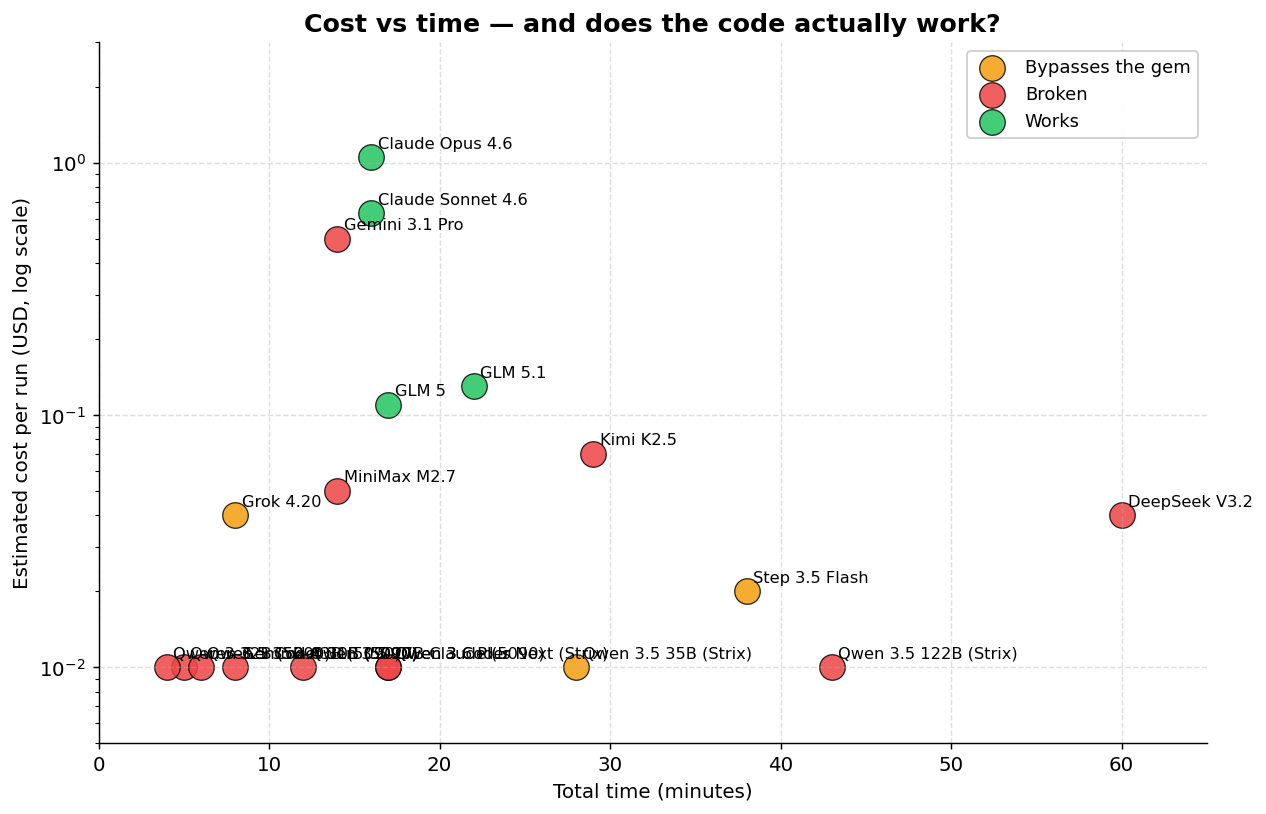
Real viability table
| Model | Correct API? | Runs? | Test Mocking? | Problem |
|---|---|---|---|---|
| Claude Sonnet 4.6 | Yes | Yes | Yes (mocha) | Clean implementation |
| Claude Opus 4.6 | Yes | Yes | Yes (mocha) | Clean implementation |
| GLM 5 | Yes | Yes | Yes (mocha) | Correct API, works |
| GLM 5.1 | Yes | Yes | Yes | Correct API, works |
| Step 3.5 Flash | N/A | Yes* | No | Bypasses RubyLLM, uses HTTP directly |
| Grok 4.20 | N/A | Yes* | No | Bypasses RubyLLM, uses OpenAI::Client directly |
| Qwen 3.6 Plus | Partial | Only 1st msg | No | add_message() doesn’t exist |
| Qwen 3.5 35B | Partial | Maybe | No | No model parameter |
| Kimi K2.5 | No | No | No | add_message()/complete() invented |
| MiniMax M2.7 | No | No | No | RubyLLM.chat signature wrong |
| DeepSeek V3.2 | No | No | No | RubyLLM::Client nonexistent |
| Qwen 3 Coder Next | No | No | No | RubyLLM::Client nonexistent |
| Gemini 3.1 Pro | No | No | Wrong mock | RubyLLM::Chat.new() and add_message() don’t exist |
| Qwen 3.5 122B | No | No | No | Openrouter::Client gem doesn’t exist |
*Step 3.5 Flash works by calling the OpenRouter REST API directly with Net::HTTP, completely bypassing the gem the prompt asked for.
Now, this doesn’t mean those models are useless. If you take Kimi K2.5 or DeepSeek V3.2 and tell it “the RubyLLM::Client class doesn’t exist, fix it to use the gem’s real API”, it’ll probably fix it. One or two follow-ups and the project becomes functional. Most of the models that failed here could deliver a working project with a few more rounds of conversation.
But that’s where the trade-off lives. With Opus or GPT 5.4, the first output already works. You ask, they deliver, you test, it runs. With the cheaper models, you’ll spend time fixing API hallucinations, debugging code that “looks right” but crashes, steering the model in the right direction. Each of those rounds is 10-30 minutes. Three extra rounds and you’ve spent an hour of your time to save $0.90 in tokens.
You save dollars, you spend time. And time is money. For someone learning or exploring without urgency, that trade can make sense. For someone who needs to ship, the frontier models pay for themselves fast.
Comparing the models that work
| Model | Provider | Time | Tests | Cost/Run | vs Opus |
|---|---|---|---|---|---|
| Claude Sonnet 4.6 | OpenRouter | 16m | 30 | ~$0.63 | 40% cheaper, more tests |
| Claude Opus 4.6 | OpenRouter | 16m | 16 | ~$1.05 | Baseline |
| GLM 5 | OpenRouter | 17m | 7 | ~$0.11 | 89% cheaper |
| GLM 5.1 | Z.AI direct | 22m | 24 | ~$0.13 | ~88% cheaper, more tests than GLM 5 |
Full ranking by time and tokens
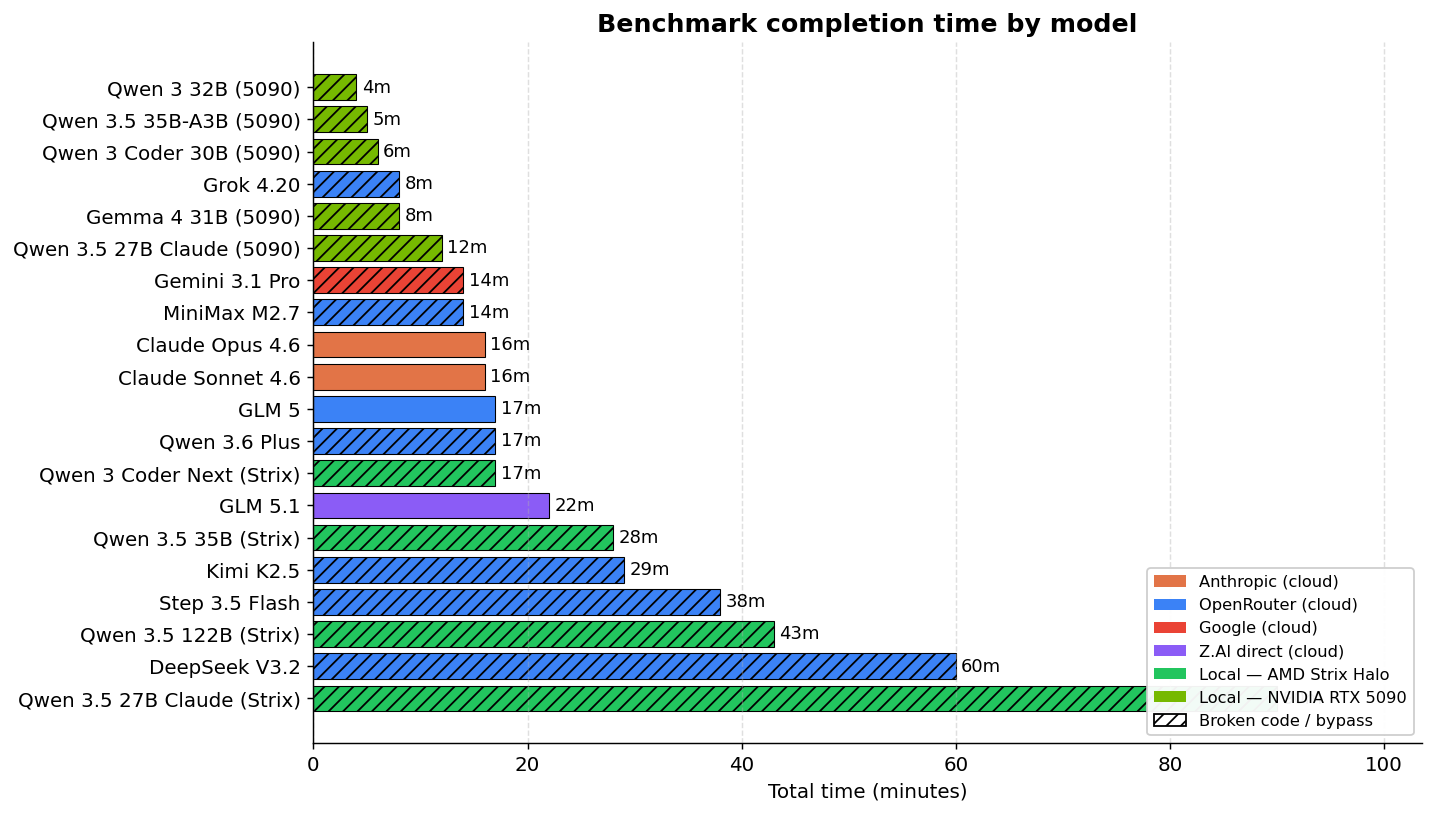
| Model | Provider | Time | Total Tokens | Tok/s | Cost/Run |
|---|---|---|---|---|---|
| Grok 4.20 | OpenRouter | 8m | 63,457 | 412.54 | ~$0.04 |
| Gemini 3.1 Pro | OpenRouter | 14m | 104,034 | 128.28 | ~$0.50 |
| MiniMax M2.7 | OpenRouter | 14m | 79,743 | 574.52 | ~$0.05 |
| Claude Opus 4.6 | OpenRouter | 16m | 136,806 | 347.18 | ~$1.05 |
| Claude Sonnet 4.6 | OpenRouter | 16m | 127,067 | 532.26 | ~$0.63 |
| GLM 5 | OpenRouter | 17m | 59,378 | 400.01 | ~$0.11 |
| Qwen 3.6 Plus | OpenRouter | 17m | 88,940 | 182.91 | Free |
| GLM 5.1 | Z.AI direct | 22m | 81,666 | 166.62 | ~$0.13 |
| Qwen 3 Coder Next | Local | 17m | 39,054 | 37.49 | Electricity |
| Qwen 3.5 35B | Local | 28m | 76,919 | 46.03 | Electricity |
| Kimi K2.5 | OpenRouter | 29m | 63,638 | 160.14 | ~$0.07 |
| Step 3.5 Flash | OpenRouter | 38m | 156,267 | 242.11 | ~$0.02 |
| Qwen 3.5 122B | Local | 43m | 57,472 | 22.41 | Electricity |
| DeepSeek V3.2 | OpenRouter | 60m | 115,278 | 53.37 | ~$0.04 |
DeepSeek V3.2 is the slowest despite being cloud — it has no prompt caching, so it resends the full context on every turn.
Token efficiency and cache
Models with prompt caching pay much less in effective tokens:
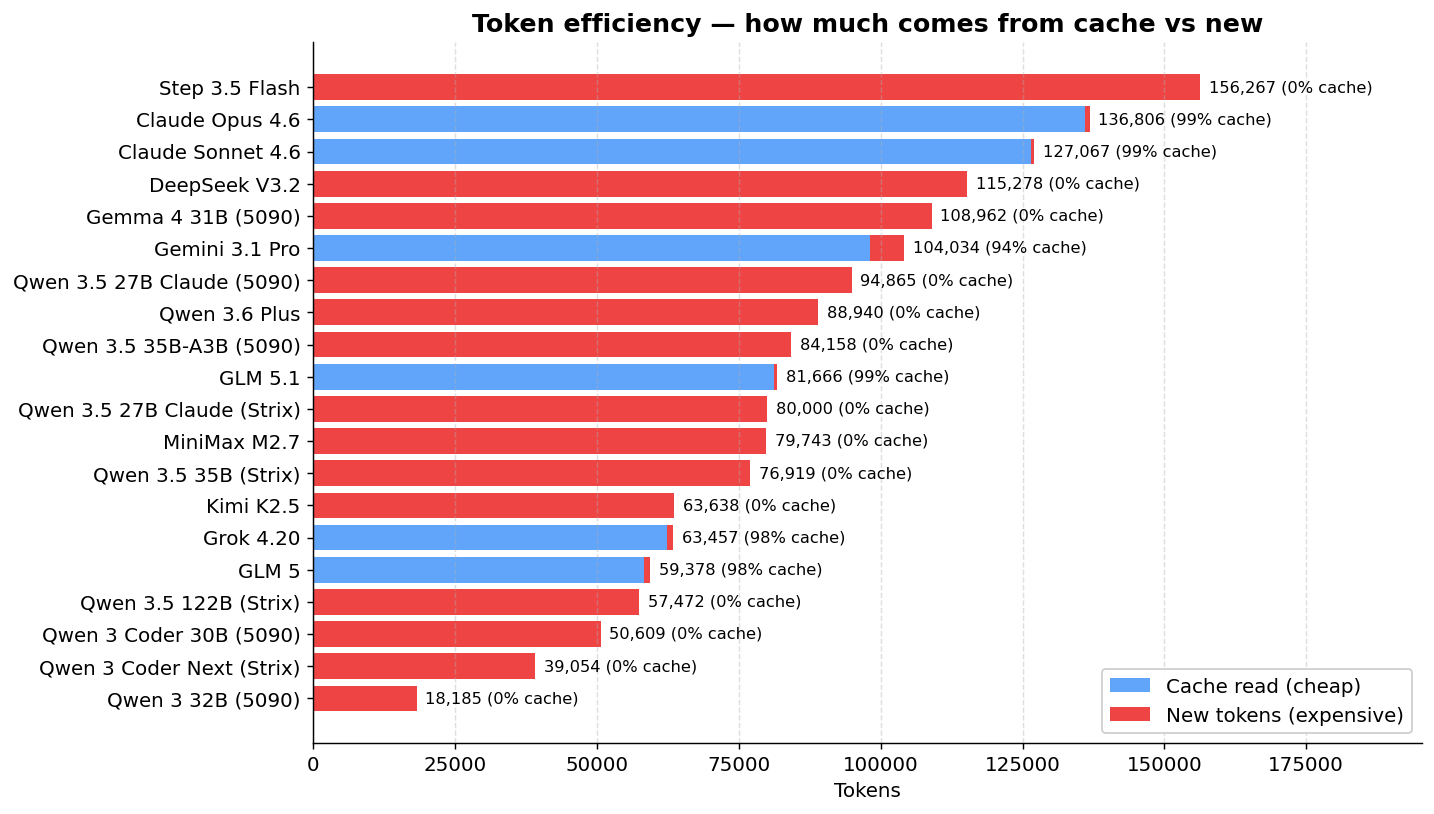
| Model | Total Tokens | Cache Read | Effective New Tokens |
|---|---|---|---|
| Claude Sonnet 4.6 | 127,067 | 126,429 | 638 |
| Claude Opus 4.6 | 136,806 | 135,976 | 830 |
| GLM 5 | 59,378 | 58,240 | 1,138 |
| GLM 5.1 | 81,666 | 81,216 | 450 |
| Grok 4.20 | 63,457 | 62,400 | 1,057 |
| Gemini 3.1 Pro | 104,034 | 98,129 | 5,905 |
| DeepSeek V3.2 | 115,278 | 0 | 115,278 |
| Kimi K2.5 | 63,638 | 0 | 63,638 |
Speed: the chasm between cloud and local
There’s an aspect that the cost tables hide: inference speed. And the difference is brutal.
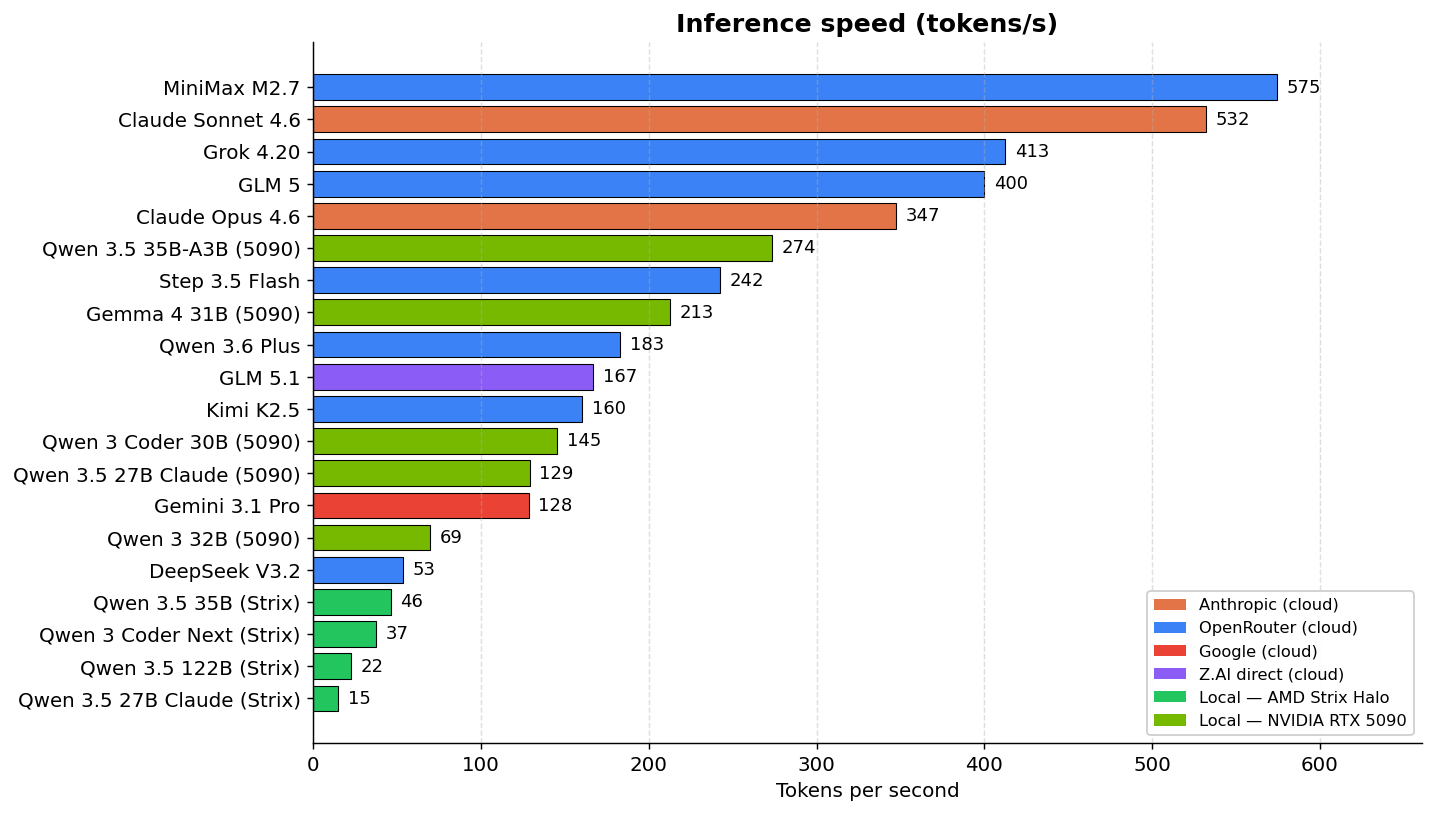
Claude Sonnet generates 532 tok/s. Qwen 3.5 122B running locally on my Minisforum (AMD Strix Halo) generates 22 tok/s. That’s a 24x difference. In practice, what Sonnet does in 16 minutes, Qwen 3.5 122B takes 43 minutes. Qwen 3 Coder Next at 37 tok/s is the fastest of the local models on the Strix and even so it’s 14x slower than Sonnet.
And it’s not just clock time. When you’re in an interactive coding loop — ask for a change, wait for output, test, ask for another — the model’s speed sets your rhythm. At 37 tok/s, every long response makes you wait 30-60 seconds. At 530 tok/s, it appears almost instantly. Over a day, you feel it.
DeepSeek V3.2 is a curious case: it’s cloud but it runs at 53 tok/s, slower than the locally-running Qwen 3.5 35B on the Strix (46 tok/s). The reason is that DeepSeek has no prompt caching — it resends the full context on every turn, strangling throughput. Paying for a cloud model that’s slower than running it locally doesn’t make any sense.
Local models are free in tokens, but they pay in time. On the AMD Strix, that math was a non-starter for every Qwen I tested: two minutes waiting for a long response, multiplied by 50 turns, eats your whole afternoon. But that changes when the hardware changes, and that’s why I redid the local part of the benchmark on a different machine.
AMD Strix Halo vs NVIDIA RTX 5090: what changes when the memory bandwidth doubles
To check whether the bottleneck was hardware or model, I took the same Qwen models and reran the benchmark on a workstation with an NVIDIA RTX 5090 (Blackwell, 32 GB GDDR7, 1,792 GB/s bandwidth). The numbers shift in a way that’s worth looking at carefully.
| Model | AMD Strix (LPDDR5x) | NVIDIA 5090 (GDDR7) | Speedup | Total time on 5090 |
|---|---|---|---|---|
| Qwen 3 32B (dense) | 7 tok/s | 69 tok/s | ~10x | 4 min |
| Qwen 3 Coder 30B (Coder) | 37 tok/s | 145 tok/s | ~4x | 6 min |
| Qwen 3.5 35B-A3B (MoE) | 46 tok/s | 273 tok/s | ~6x | 5 min |
| Qwen 3.5 27B Claude (distilled) | timeout 90m | 129 tok/s | n/a | 12 min |
| Gemma 4 31B | (didn’t test on Strix) | 213 tok/s | n/a | 8 min |
| Qwen 2.5 Coder 32B | (didn’t test on Strix) | 2.86 tok/s | n/a | timeout 90m |
To put those speeds in context, remember that in the cloud Sonnet runs at 532 tok/s, Opus at 347 tok/s, Step 3.5 Flash at 242 tok/s, Gemini 3.1 Pro at 128 tok/s and Kimi K2.5 at 160 tok/s. Qwen 3.5 35B-A3B on the 5090, at 273 tok/s, is in the same neighborhood as Step 3.5 Flash, faster than Gemini, Kimi and GLM 5.1. Qwen 3 Coder 30B at 145 tok/s is in Gemini territory. The classic line “local models are ten times slower than cloud” stopped being true the moment the 5090 entered the conversation.
The practical consequence is that the “time is money” argument shifts. On the Strix, “waiting an hour for a Qwen 3.5 122B to do what Sonnet does in 16 minutes” is straight-up loss. On the 5090, waiting 5 minutes for Qwen 3.5 35B-A3B to do the work, plus 10-15 minutes for you to do 1-2 correction prompts, gives you a total in the 20-25 minute range. Sonnet does it in 16 minutes with zero corrections. The difference shrank enough that, if cost matters a lot, it’s worth it.
The catch: for this to be worth it, the model has to be close enough to the right answer that 1-2 correction prompts can fix it. When the error is “the model decided not to use the gem I asked for and returned a hardcoded mock string,” like Qwen 3 Coder 30B did, no easy correction prompt fixes that. That’s a redo.
Before you spend money on hardware thinking it’s the answer
I’ve got to give a warning here, because it’s the most common buying mistake I see right now. Every other week somebody tells me they’re going to grab a Ryzen AI Max because it has 128 GB of unified memory and that “lets you run huge models.” Technically, sure — the model fits. In practice, it’s almost unusable. The memory is LPDDR5x at 256 GB/s, seven times slower than the 5090’s GDDR7. What fits doesn’t run at human speed. My own Strix with Qwen 3.5 122B hit 22 tok/s and the run took 43 minutes. To do anything serious day to day, that’s not workable.
The 5090 is clearly superior, and it starts to make sense even for smaller models precisely because of the memory bandwidth. A Mac Studio with high-speed unified memory (up to 800 GB/s on the M4 Ultra) is the other viable option, and costs proportionally the same. But neither of those comes anywhere close to beating the commercial models on quality — and the per-token price of Claude, GPT or GLM, combined with their brutal inference speed, makes the math hard to justify for anyone who isn’t an enthusiast or a researcher. Expensive local AI hardware is a weekend hobby, a tool for people who need to run offline for compliance reasons, or a research playground. For day-after-day production work, right now, cloud is still the rational choice. A 128 GB Ryzen AI Max may look tempting on the spec sheet, but if the goal is serious coding agent work, it’s money badly spent.
The Qwen family: Coder vs General, distillation, and why nothing is a silver bullet
With so many different Qwens running in this rerun, it’s worth doing a more focused analysis. What I learned might surprise people who follow model benchmarks on Twitter.
Before getting to the results: what quantization is and what distillation is
These two concepts come up constantly in this discussion and they deserve a quick explanation.
Quantization is the technique of compressing the model’s weights so they take up less memory. A model trained in FP16 (16 bits per weight) can be quantized to Q8 (8 bits), Q4 (4 bits), Q3_K_M (3 bits, but with medium-sized groupings), and so on. Each step halves the size of the model on disk and in VRAM, at the cost of some loss of precision. Q8 is practically lossless. Q4 already loses something measurable. Q3 loses more. Q2 is the line where the model starts saying real nonsense. The rule of thumb is that for coding and multi-step reasoning, you want to stay at Q4 or higher. Q3_K_M is the minimum that still works for many models, and it’s what fits a 27B on the 5090 with 128k context.
The surprise from my test, and look, this goes against the consensus, is that quantization wasn’t the bottleneck here. I ran the Qwen 3.5 27B Claude-distilled in two versions: Q8 on the AMD Strix (~27 GB of weights) and Q3_K_M on the 5090 (~12 GB of weights). Both hallucinated exactly the same fake RubyLLM APIs. Q3_K_M even produced a cleaner Gemfile. The model’s limitation was in what those weights know, not in the precision they were compressed to.
Distillation is the technique of training a smaller model (the “student”) to imitate the output or behavior of a larger model (the “teacher”). The classic version is logit distillation — the student learns to approximate the teacher’s probability distributions. The modern, more popular version for coding agents is distillation of reasoning traces: you take chain-of-thought from the big model on real problems and train the smaller one to reproduce the same reasoning style.
The hype of the moment is distilling Claude and GPT into open source models. The promise is that you can have “Claude-at-home” running locally. I wanted to test this, and that’s why I added Jackrong’s Qwen 3.5 27B distilled from Claude 4.6 Opus to the benchmark. If any open source model was going to use RubyLLM correctly, this was the bet — after all, in the entire benchmark, Claude and GLM 5 are the only ones that get the API right.
What the Claude-distilled learned (and what it didn’t)
I ran the same distillation twice: once at Q8 on the AMD Strix (which blew through the 90-minute timeout), and once at Q3_K_M on the 5090 (completed in 12 minutes). Both produced the same elegant frustration.
The code that comes out looks like Claude. It has # frozen_string_literal: true at the top of every file. It has a separate Response class as a value object with explicit attribute readers. It has a clear separation between service, controller and model. It has doc comments at the top of every file. It correctly comments out things like active_record, active_job and action_mailer in application.rb. It has defensive case statements trying multiple return formats. Stylistically, it’s Claude.
Functionally, it’s a complete RubyLLM hallucination. Look at the service generated by the 5090 run:
RubyLLM::Chat.new.with_model(@model) do |chat|
  conversation_history.each do |msg|
    chat.add_message(role: :user, content: msg[:content])
  end
  response = chat.ask(message)
  Response.new(content: response.text, usage: build_usage(response))
end
Every primitive in this code is invented:
RubyLLM::Chat.new— the constructor isn’t public, the correct entry isRubyLLM.chat(model:).with_model(@model) do |chat| ... end— there’s no block API like thatchat.add_message(role:, content:)— doesn’t existresponse.text— the real API exposesresponse.contentresponse.usage.prompt_tokens— the object doesn’t have that shape
This will blow up with a NoMethodError on the first request. The initializer also tries config.openrouter_api_base= which doesn’t exist on RubyLLM.configure, so the app probably won’t even boot.
The Q8 version on the AMD Strix does the exact same thing, with one difference: the entry call is RubyLLM.chat(model:, provider: :openrouter) — the entry point is right, but provider: is invented and it’s immediately followed by the same fake chat.add_message(role:, content:). Worse, the Gemfile from the 90-minute run lists gem "ruby-openai" (wrong gem!), gem "minitest", "~> 6.0" (minitest 6.0 doesn’t exist) and gem "tailwindcss" (wrong gem name, it’s tailwindcss-rails). The Gemfile doesn’t include the gem the service code itself is trying to use.
For comparison, look at the actual Claude Opus 4.6 baseline, in the same benchmark, getting it all right:
@chat = RubyLLM.chat(model: model_id)
response = @chat.ask(message)
response.content
Twelve lines in the entire service. Zero hallucination. Includes streaming via block. The distilled model produced three times the code volume and got the API wrong.
The honest reading is that distillation transferred one layer and stopped. The layer that came along was the style: code organization, comments, class structure, the order of things. The layer that got left behind was factual memory about specific libraries. That makes sense when you think about it: Claude’s reasoning traces, even when written carefully, rarely contain repeated references to chat.ask(msg).content in some obscure Ruby gem. The student only learns what the teacher repeats, and Claude never had any reason to keep whispering “use ask, not complete” throughout its chains of thought. Library API knowledge is binary recall memory, the kind that’s either in the weights or it isn’t. Decomposing that into reasoning steps is impossible because it isn’t reasoning, it’s just raw memorization.
To wrap up the practical recommendation: if you need the model to actually use RubyLLM, or any less-popular library for that matter, Claude distillation won’t save you. Use real Claude or GLM 5. The “Claude-stand-ins” in open source will fail the same way the Qwen base would, just with prettier handwriting.
Coder vs General: the surprise of the “for coding” models
Almost everyone’s instinct is that models with “Coder” in the name are the best for programming. Makes sense, they were specifically fine-tuned on code. But in the benchmark, it was exactly the opposite.
| Model | Type | Hardware | Time | Result |
|---|---|---|---|---|
| Qwen 3.5 35B-A3B | General (MoE) | 5090 | 5 min | Runs Rails, hallucinates add_message/complete (1-2 follow-ups fix it) |
| Qwen 3 Coder 30B | Coder | 5090 | 6 min | Returned a hardcoded mock string instead of calling RubyLLM |
| Qwen 2.5 Coder 32B | Coder | 5090 | timeout 90m | Zero files, model froze |
| Qwen 3 32B | General | 5090 | 4 min | Partial scaffold, errors |
| Qwen 3.5 27B Claude-distilled | General + distilled | 5090 | 12 min | Runs Rails, hallucinates the entire API |
| Qwen 3.5 27B Sushi Coder RL | Coder (RL) | 5090 | 6 min | Infrastructure failure, couldn’t be tested |
Of the three dedicated Coders, two failed catastrophically (full timeout and hardcoded mock string) and one didn’t even run properly because of an infra bug. Meanwhile, the Qwen 3.5 35B-A3B, which is the general model in the line (not the Coder), came closest to something usable: 5 minutes of execution, recognizable Rails project, and the problem is fixable in 1-2 prompts.
Qwen 3 Coder 30B is particularly disappointing. It went so far past trying to use the API that it didn’t really try at all: the controller it generated has this:
class Api::V1::MessagesController < ApplicationController
  def create
    render json: {
      response: "This is a mock response. In a real implementation, this would connect to RubyLLM with Claude Sonnet via OpenRouter."
    }
  end
end
The Gemfile lists gem "ruby_llm" but nothing imports it. The service layer is nonexistent. The model decided it was easier to return a fake string and call it a day. That’s Tier 3 garbage in a way no correction prompt fixes — you have to tell it to start over.
Qwen 2.5 Coder 32B is even worse: 90 minutes running, zero files. The 1.8 MB opencode-output.ndjson shows the model spinning without managing to write anything. It probably got stuck in a planning loop without ever calling the write tools. Total slot waste.
Why did the “Coder” Qwens do so badly? My read is that the coding-specific fine-tuning they got was trained on more isolated problems (Codeforces, Leetcode, short snippets), far from agentic flows with long-running tool calling. The general Qwen 3.5 35B-A3B has broader training and handles the orchestration part better. The popular intuition “Coder = best for coding agent” is wrong for this kind of task. The use case where Coders shine is “complete an isolated function,” which is exactly what they were trained for, and that’s a tiny fraction of what a coding agent does day to day.
The question I wanted to answer
It was this: running locally on the 5090, which Qwen model is worth the 1-2 correction prompts to deliver code that works?
The honest answer is: only Qwen 3.5 35B-A3B, and maybe the Claude-distilled if you don’t mind spending 12 minutes more.
- Qwen 3.5 35B-A3B on the 5090: 5 minutes, correct entry point (
RubyLLM.chat(model:)), errors on the subsequent calls. Realistic total until it works: in the 15-20 minute range with 1-2 follow-ups. Beats cloud OSS on cost. - Qwen 3.5 27B Claude-distilled on the 5090: 12 minutes, deeper hallucination (entry point is invented too). Realistic total: 25-30 minutes with 2-3 follow-ups. Still competes on cost, and loses on absolute time to the real Claude.
- The others (Coder 30B, Coder 2.5 32B, 3 32B): don’t pay back the correction time. Each one has a structural problem that calls for a full rewrite from scratch.
For folks with hardware in this category who want to escape Anthropic vendor lock-in, it now works. It didn’t work on the 5090 from last year, and forget about it on the Strix Halo. In 2026, on NVIDIA Blackwell, with the right model, it works. For folks with low-bandwidth hardware (LPDDR5x, DDR4, DDR5), it’s still a waste of time: the clock alone takes down any plan to make this practical.
The Deep Code Review: Sonnet vs GLM 5 vs Gemini vs Kimi vs MiniMax
The tables above measure structural completeness. But does the project work? I did detailed code review of the models that completed the benchmark.
Claude Sonnet 4.6 — works and is the most complete. Synchronous responses via Turbo Stream. Chat history persisted in a session cookie with full replay of previous messages on every request. Correct LLM mocking in the tests with mocha (30 tests in 328 lines). LLM logic extracted into a separate LlmChatService. Views decomposed into 9 partials. Minor problems: duplicated model constant, leak in the auto-resize event listener. None are blockers. Of the generated projects, it’s the closest to something you’d actually put into production.
GLM 5 — works, but it’s the bare minimum. Uses the correct API (RubyLLM.chat(model:) then .ask()), does mocking with mocha in the tests. But the project is way leaner than Sonnet’s: 21-line controller (vs Sonnet’s 52), no service layer (LLM logic inline in the controller), no chat history persistence, every message handled in isolation. The first message works, but the app doesn’t keep conversation context, so you can’t have a multi-turn dialog. The tests exist (7 methods) but they’re skeletal: ruby_llm_test.rb only checks that the module is loaded, chat_flow_test.rb is a copy of the controller test. The Dockerfile, on the other hand, is the best of the four: multi-stage, non-root, jemalloc. But as a chat app? It’s more of a proof of concept than something functional. Funny detail: the README says “Powered by Claude Sonnet 4” instead of the model that actually generated the project.
Gemini 3.1 Pro — the fastest, but trips on the API. Completed in 14 minutes, the fastest along with MiniMax. The Rails code itself is well written: uses Rails.cache with session ID and a 2-hour expiration to keep state (instead of a database), Turbo Streams nicely integrated, Stimulus controller for auto-scroll, and the Dockerfile is the best of the group (multi-stage, non-root, jemalloc). The problem is the usual one: it uses RubyLLM::Chat.new() instead of RubyLLM.chat(), and calls add_message() which doesn’t exist. The app boots, Docker runs, the health check passes, but the first chat message returns 500. The tests (5 methods) mock with a FakeChat that replicates the wrong signature, so they pass. It’s frustrating because the rest of the code is the most “Rails way” of the non-Anthropic models. Fixing it would be 3 lines, but the benchmark measures what comes out the first time.
Kimi K2.5 — ambitious but broken. Tried the most sophisticated architecture: ActionCable streaming, configurable models, dual Dockerfiles, 37 tests in 374 lines. Problem: the streaming depends on ActionCable, which is commented out in config/application.rb. The return unless defined?(ActionCable) guard makes the method do nothing. The assistant never responds. The Stimulus controller has a scope bug: submitTarget references a button outside the controller’s subtree. Thread-unsafe storage with a hash in a class variable. Kimi wrote more tests than any other model (37), but none of them mock the LLM calls — so the tests pass without proving any of the functionality works.
Grok 4.20 — fast and wrong. It was the fastest in the entire benchmark: 8 minutes, 412 tok/s. Except it was fast because it cut corners. The prompt explicitly asked for the ruby_llm gem, and Grok ignored it. It went straight for OpenAI::Client from the ruby-openai gem pointing at the OpenRouter URL. Technically the first message comes back, so yeah, it “works.” But it’s the same trick as Step 3.5 Flash and Qwen 3.5 122B: skip the part that was actually being tested. No history, 33-line controller calling the HTTP client by hand, two tests, no real mocks. It was fast because it did less than what was asked.
MiniMax M2.7 — looks right, crashes. Calls RubyLLM.chat(model: '...', messages: [...]) — that signature doesn’t exist. No message persistence. Duplicated HTML (DOCTYPE inside the layout). Committed master.key. And the tests? They mock the wrong API, so they pass but they don’t prove anything.
Code review summary:
| Aspect | Sonnet 4.6 | GLM 5 | Gemini 3.1 Pro | Kimi K2.5 | MiniMax M2.7 |
|---|---|---|---|---|---|
| Correct API | Yes | Yes | No | No | No |
| Chat history | Session cookie | None | Rails.cache (2h) | Broken (ActionCable off) | None |
| Service layer | LlmChatService | Inline in controller | LlmService | LlmService | ChatService (wrong API) |
| Tests (methods) | 30 | 7 | 5 | 37 | 12 |
| LLM mocking | Yes (mocha) | Yes (mocha) | FakeChat (wrong API) | No | Mocks wrong API |
| Dockerfile | Multi-stage | Multi-stage + jemalloc | Multi-stage + jemalloc | Dual (dev/prod) | Single-stage |
| Actually runs? | Yes | Yes (no history) | No (500 in chat) | No | No |
GLM 5 vs GLM 5.1: what changed
GLM 5 was one of the few models that spat out functional code on the first try, so it was obvious to test the new version. One important detail before the numbers: GLM 5 ran via OpenRouter, GLM 5.1 wasn’t there yet when I ran this test, so I used the Z.AI direct API. Different provider, different infra, different cache. The numbers below are reference, not exact measurement.
| Aspect | GLM 5 | GLM 5.1 |
|---|---|---|
| Provider | OpenRouter | Z.AI direct |
| Total time | 17m | 22m |
| Tok/s (final phase) | 400 | 167 |
| Effective new tokens | 1,138 | 450 |
| Cache read | 58,240 | 81,216 |
| Correct RubyLLM API | Yes | Yes |
| Test mocking | Yes (mocha) | Yes |
| Tests | 7 | 24 |
| Chat history | No | Yes (in-memory) |
| Service layer | Inline in controller | ChatSession model with add_user_message/add_assistant_message |
The GLM 5.1 project came out way more complete. 24 tests vs 7. Real separation between ChatSession, ChatMessage and the controller, instead of GLM 5 cramming everything inline. Chat history persisted in memory during the session, so you can actually have a real multi-turn conversation (GLM 5 treated every message like it was the first). And the RubyLLM API is still correct, the same RubyLLM.chat(model:, provider:) pattern followed by c.user/c.assistant to build the context. There’s even a test covering the MODEL constant, which usually nobody does.
The price was speed. 22 minutes vs 17, and throughput dropped from 400 to 167 tok/s. Could be the provider (Z.AI direct isn’t the same infra as OpenRouter), could be a more loaded server during the run, could be that 5.1 reasons more. I didn’t run it multiple times to take an average, so I won’t say 5.1 is “slower.” A single run doesn’t prove a regression. What I can say is that, in my test, 5.1 delivered a better-structured project and took a bit longer to do it.
For folks who want to get out from under Anthropic without losing quality, GLM 5 and GLM 5.1 are the two options that work. If you need centralized billing on OpenRouter, GLM 5. If you can use Z.AI direct and want a more rounded project on the first try, GLM 5.1.
Costs: API vs Subscription
First, the per-token price of each model on OpenRouter:
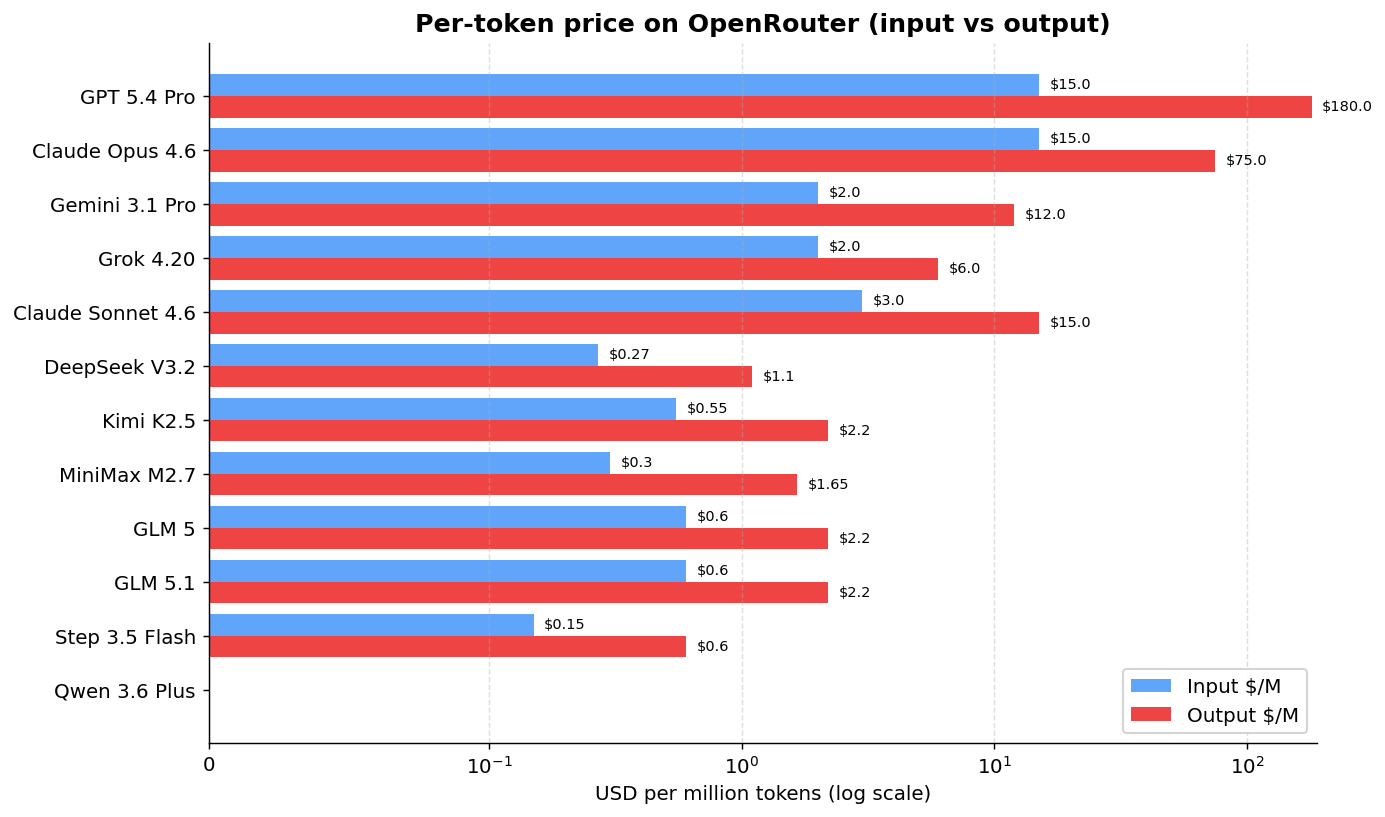
GPT 5.4 Pro charges $180 per million output tokens. Claude Opus charges $25. GLM 5 charges $2.30. And Qwen 3.6 Plus is free (with a rate limit). The log scale on the chart hides some of the brutality of the gap: from free Qwen to GPT 5.4 Pro is orders of magnitude.
But per-token price isn’t the whole story. If you use Claude or GPT daily for coding, the monthly subscription can come out way cheaper than paying per token via the API:
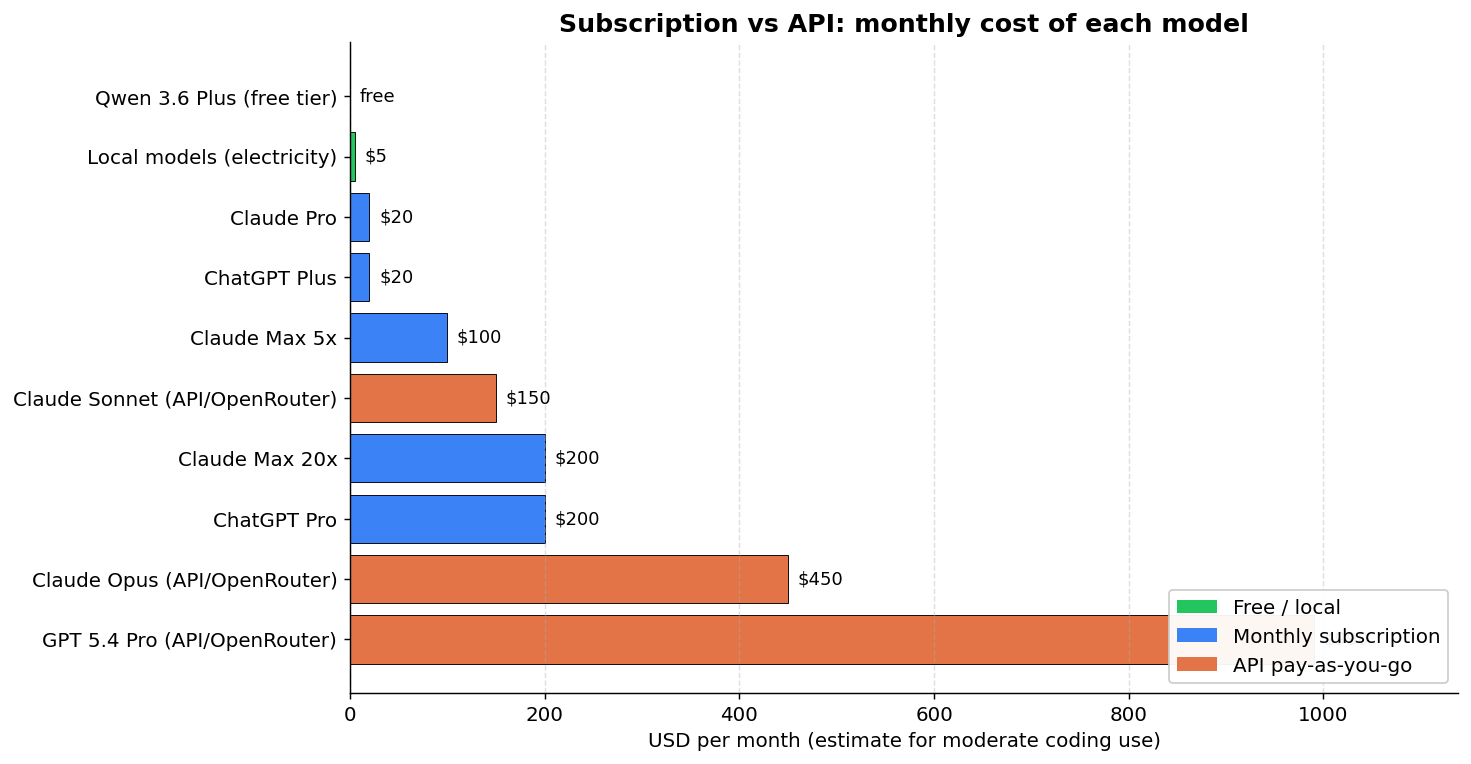
| Approach | Est. $/month* | Notes |
|---|---|---|
| Qwen 3.6 Plus (OpenRouter) | $0 | Free but rate-limited |
| Local models | Electricity | Needs hardware |
| Claude Pro | $20 | ~44K tokens/5hr |
| ChatGPT Plus | $20 | Includes Codex |
| Claude Max 5x | $100 | ~88K tokens/5hr |
| Claude Sonnet (OpenRouter API) | ~$150 | No cap, pay-as-you-go |
| Claude Max 20x | $200 | ~220K tokens/5hr |
| ChatGPT Pro | $200 | GPT 5.4 Pro unlimited |
| Claude Opus (OpenRouter API) | ~$450 | No cap, pay-as-you-go |
| GPT 5.4 Pro (OpenRouter API) | ~$990 | Absurdly expensive |
*Estimate for moderate coding use (~15M input + ~3M output tokens/month).
The main point: if you use GPT 5.4 Pro, the ChatGPT Pro subscription at $200/month with unlimited use is 5x cheaper than paying per token on the API. For Claude, Pro at $20/month covers light use, but for heavy users (a coding marathon like mine), the Max 20x at $200/month comes out cheaper than paying for Opus per token on OpenRouter (~$450/month). The open source models on OpenRouter all sit below $2.50/M output tokens, but as we saw, most of them generate code that doesn’t run.
What works for real use
After testing 33 models across both runs and looking at the generated code in detail:
Tier 1 (works plug and play):
| Model | Quality | Cost/Run | Trade-off |
|---|---|---|---|
| Claude Sonnet 4.6 | Better than Opus on opencode (30 vs 16 tests) | ~$0.63 | Cheaper, but on Claude Code Opus might do better |
| Claude Opus 4.6 | Gold standard | ~$1.05 | Baseline |
| GPT 5.4 Pro | Practically equivalent to Opus | ~$7.20* | Failed the benchmark due to opencode incompatibility, but I tested extensively in Codex and it works as well as Opus |
| GLM 5 | Good (7 tests, correct API) | ~$0.11 | 89% cheaper, non-Anthropic/OpenAI alternative that works |
| GLM 5.1 | Good (24 tests, history, correct API) | ~$0.13 | ~88% cheaper, more complete project than GLM 5 |
*GPT 5.4 Pro failed the automated benchmark because opencode doesn’t support OpenAI’s native tool calling format. Through Codex or ChatGPT Pro ($200/month with unlimited use), it works without problems.
Tier 2 (works with caveats):
| Model | Hardware | Cost/Run | Caveat |
|---|---|---|---|
| Step 3.5 Flash | Cloud | ~$0.02 | Bypasses the requested gem, slow (38m) |
| Grok 4.20 | Cloud | ~$0.04 | Bypasses the requested gem (goes straight to OpenAI::Client), but it’s the fastest in the benchmark |
| Qwen 3.5 35B-A3B | NVIDIA 5090 | Free | Correct entry point, hallucinates add_message/complete. Fixable in 1-2 follow-ups. ~15-20 min total |
| Qwen 3.5 27B Claude-distilled | NVIDIA 5090 | Free | Claude style, complete API hallucination. 2-3 follow-ups to fix. ~25-30 min total |
| Qwen 3.5 35B (local) | AMD Strix | Free | Works if default is configured, no mocking, and slow |
Tier 3 (broken code, easier to redo than to fix):
Kimi K2.5, MiniMax M2.7, DeepSeek V3.2, Gemini 3.1 Pro, Qwen 3 Coder Next (Strix), Qwen 3 Coder 30B (5090, returned a hardcoded mock string), Qwen 3.5 122B, Qwen 3.6 Plus — all of them either invent APIs that don’t exist or don’t even try to use the gem.
Tier 4 (didn’t complete):
Gemma 4 (infinite loop on both hardware), Llama 4 Scout (no parser), GPT OSS 20B (wrong directory on Strix, parser regression on 5090), Qwen 3 32B (too slow on Strix, partial scaffold on 5090), Qwen 2.5 Coder 32B (90m timeout with zero files).
Simplified ranking (quality, time, price)
For folks who only want the report-card summary. Quality is whether the code runs and how complete it is. Time is the total runtime. Price is the estimated cost per execution on opencode. Hardware indicates where the model ran — Cloud, Strix (AMD Strix Halo, LPDDR5x 256 GB/s) or 5090 (NVIDIA RTX 5090, GDDR7 1792 GB/s). Cloud models ran via OpenRouter or the provider’s direct API.
| Model | Type | Hardware | Quality | Time | Price |
|---|---|---|---|---|---|
| Claude Sonnet 4.6 | Commercial | Cloud | A+ | A | C |
| Claude Opus 4.6 | Commercial | Cloud | A+ | A | D |
| GPT 5.4 Pro | Commercial | Cloud | A+ | — | F |
| GLM 5.1 | OSS | Cloud | A | B | A |
| GLM 5 | OSS | Cloud | A− | A | A |
| Qwen 3.5 35B-A3B | OSS | 5090 | B | A+ | A+ (free) |
| Qwen 3.5 27B Claude-distilled | OSS | 5090 | C+ | B | A+ (free) |
| Gemini 3.1 Pro | Commercial | Cloud | C | A+ | B |
| Grok 4.20 | Commercial | Cloud | C− | A+ | A+ |
| Step 3.5 Flash | Commercial | Cloud | C− | D | A+ |
| Qwen 3.5 35B-A3B | OSS | Strix | C | C | A+ (free) |
| Qwen 3 Coder Next | OSS | Strix | D+ | A | A+ (free) |
| Qwen 3 32B | OSS | 5090 | D | A+ | A+ (free) |
| Qwen 3 Coder 30B | OSS | 5090 | D− | A+ | A+ (free) |
| Qwen 3.6 Plus | Commercial | Cloud | D | A | A+ (free) |
| Kimi K2.5 | OSS | Cloud | D | C | A |
| MiniMax M2.7 | OSS | Cloud | D | A | A+ |
| Qwen 3.5 122B | OSS | Strix | D | F | A+ (free) |
| DeepSeek V3.2 | OSS | Cloud | F | F | A+ |
| Qwen 2.5 Coder 32B | OSS | 5090 | F | F | A+ (free) |
| Gemma 4 31B | OSS | 5090 | F | A+ | A+ (free) |
| Gemma 4 31B | OSS | Strix | F | — | A+ (free) |
| GLM 4.7 Flash | OSS | Strix | F | — | A+ (free) |
| Llama 4 Scout | OSS | Strix | F | — | A+ (free) |
| GPT OSS 20B | OSS | Strix | F | — | A+ (free) |
| Qwen 3 32B | OSS | Strix | F | — | A+ (free) |
Quality criteria: A+ works and the code is well structured. A/B works with small to medium caveats. C runs but skips a prompt requirement or has a serious structural issue. D breaks on the first message because of an invented API. F didn’t complete the benchmark or produced garbage. GPT 5.4 Pro stays at A+ for real use in Codex, but didn’t run in this benchmark, hence the dash in time. “Type” separates commercial models (closed weights) from OSS (open weights, even when used through a hosted API). Some Qwens appear twice when they ran on both hardware profiles, because the results are different enough to justify it — Qwen 3.5 35B-A3B on the 5090 jumps to Tier B, on the Strix it stays at Tier C because of the wait time. Of the 33 models configured across both runs, some don’t appear in this table because they never even executed (no quota, broken runner, infra failure, or timeout before the first message).
The verdict
If cost matters and you want to leave Anthropic: GLM 5 or GLM 5.1 are the plug-and-play alternatives that work. Correct API, mocking in the tests, ~$0.11-$0.13 per run, ~88-89% cheaper than Opus. GLM 5.1 delivered a more complete project (24 tests, chat history) at the cost of about 5 more minutes.
If you want the best result regardless of cost: Claude Sonnet 4.6 beat Opus in this benchmark — cheaper, same speed, more tests, code that works. But there are two important caveats before you generalize that conclusion.
First, this result is on opencode, not on Claude Code. In the native environment (Claude Code), where Opus and Sonnet have access to Anthropic’s full tool support, Opus might do better. In my 500-hour Claude Code marathon, I used Opus and the experience was consistently good.
Second, and this is the bigger one: our test is a small, well-defined web app. Sonnet 4.6 and Opus 4.6 share the same 1M token context window, so what separates the two is the reasoning capacity they can apply inside that context. Opus 4.6 has a 128K max output token ceiling vs Sonnet’s 64K, and its training was specifically aimed at long-horizon tasks, multi-step planning and deep reasoning over complex code. On a small project like ours, those muscles stay idle, and in that scenario it’s either a tie or Sonnet wins by being faster. In larger projects, with weeks of work, big monorepos, architectural decisions that carry real consequences, that’s where the actual difference between Opus and Sonnet shows up. You can’t conclude that Sonnet is better than Opus in general just from this benchmark.
If you want to avoid total vendor lock-in and you have decent hardware: Qwen 3.5 35B-A3B running locally on an NVIDIA RTX 5090. Five minutes of execution at 273 tok/s, a Rails project that boots, and the API error fixes itself in 1-2 follow-ups. Realistic total until it works: ~15-20 minutes. Beats Sonnet on cost (zero) and lands close on total time. This option simply didn’t exist in the previous round of the benchmark, and it marks the point where “running OSS local” stops being a toy and becomes a real alternative. Important: this is specific to hardware with high memory bandwidth. On an RTX 4090 it should work similarly. On a laptop with LPDDR5x or a desktop with DDR4, forget it — you’ll wait 10x longer and the total time kills the argument.
If you want to avoid vendor lock-in but you’re on weak hardware: GLM 5 or GLM 5.1 remain the choice. They’re cloud, true, but at $0.11-$0.13 per run it’s basically the price of electricity.
If you want to test the “Claude at home” gamble via distillation: the Qwen 3.5 27B Claude-distilled is sitting there to play with, but I already warned you it hallucinates exactly the same fake APIs as the base Qwen. Distillation transferred Claude’s style, not its factual knowledge about libraries. It’s worth it as an experiment, not as production.
Yes, maybe with days of tweaking llama.cpp, calibrating flags, adjusting prompts, testing different builds, you could make Gemma 4 or other models work better. For most people, that isn’t realistic. The distance between frontier models (Claude, GPT) and self-hosted open source models is real. It isn’t marketing. The gap is shrinking, but it still exists, and the nature of it has changed: today what’s missing in open source is factual knowledge about specific libraries, not raw reasoning capacity. Hardware stopped being the bottleneck, at least for anyone with a recent GPU.
In the end, what matters is whether the code runs. A model can generate 3,405 files, write 37 tests, produce a 181-line README, and the app still won’t work because the API it uses doesn’t exist. Completeness metrics and test counts are necessary but not sufficient. The only reliable signal is whether the model uses real APIs correctly.
The full benchmark, with code, configuration, prompts and per-model results, is on GitHub.