Serving AI in the Cloud: My Personal TTS | Behind the Scenes of The M.Akita Chronicles
This post is part of a series; follow along via the tag /themakitachronicles. This is part 3.
And make sure to subscribe to my new newsletter The M.Akita Chronicles!
I’ll talk about the podcast today; remember that the pilot episode is already live (transcripts and RSS to subscribe) and on the channel on Spotify.
–
Every AI tutorial starts with “install the model, run inference, done!”. None of them tell you what happens when you need to run this in production with real uptime, controlled cost, and consistent quality.
I’ll tell you how it was to put a TTS (Text-to-Speech) model into production on a GPU in the cloud. Because if you’re thinking about serving AI models, you need to know what you’re getting yourself into.
The Scenario
The goal: generate a ~30-minute podcast from text, with two distinct voices, broadcast quality, ready for Spotify. Every week, automatically, with no human intervention.
The chosen model: Qwen3-TTS, a text-to-speech model that supports voice cloning and fine-tuning. It runs on GPU — needs at least 6GB of VRAM for inference.
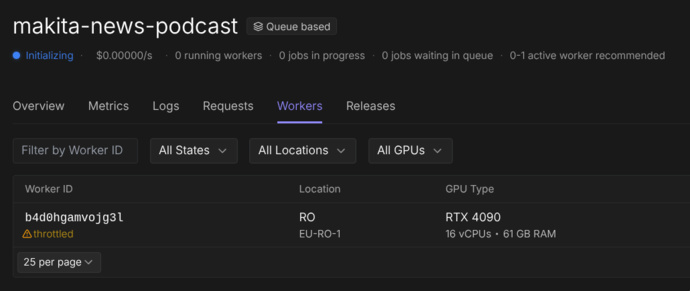
The platform: RunPod, which offers serverless GPUs with billing by the second of usage.
Sounds simple, right? Well, hold on.
Problem 1: Cold Start — The Silent Killer
Serverless GPU works like this: when there’s no request, the worker shuts down. When a request comes in, it boots up, loads the model into VRAM, and processes.
The time to “load the model into VRAM” is the cold start. For a ~4GB model, we’re talking 30 to 90 seconds. Your HTTP request sits there hanging, waiting. If your timeout is 30 seconds, you don’t even get to see the model work — you just see a timeout.
The naive solution: “bump the timeout!”. The real solution: health check with polling.
@app.get("/health")
async def health():
    if not model_loaded:
        return JSONResponse(
            status_code=503,
            content={"status": "loading", "detail": "Model loading..."}
        )
    return {"status": "ready"}
The client (in this case, a Rails job) polls /health before sending the actual request:
def wait_for_server(max_wait: 180)
  deadline = Time.current + max_wait
  loop do
    response = http_get("/health")
    return if response.code == 200
    raise "Server não iniciou a tempo" if Time.current > deadline
    sleep 5
  end
end
Sounds primitive? It is. But it works better than any sophisticated “warm pool” solution that costs 10x more.
Problem 2: Where Do the Model Weights Live?
A 4GB model needs to be available when the worker starts. Three options:
- Bake into Docker: 4GB+ image. Slow build. Slow push. Slow pull.
- Download from HuggingFace on boot: Network-dependent. Can fail. Adds minutes to the cold start.
- Network Volume: Persistent disk mounted on the worker.
Option 3 is the correct one. RunPod offers Network Volumes that persist between runs. The model sits there, always ready. The cold start is just the time to load from disk to VRAM, no download.
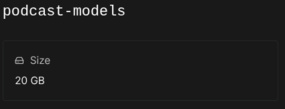
But there’s a catch: the volume may or may not be mounted, depending on how the worker is configured. So the setup code needs to be resilient:
NETWORK_VOLUME = "/runpod-volume"
LOCAL_FALLBACK = "/workspace/models"

def resolve_model_path():
    if os.path.isdir(NETWORK_VOLUME):
        base = os.path.join(NETWORK_VOLUME, "huggingface")
        os.environ["HF_HOME"] = base
        return os.path.join(base, "hub", "models--Qwen--Qwen3-TTS")
    # Fallback: local download
    return LOCAL_FALLBACK
Auto-detection. If the volume exists, use it. If not, it works the same way (slower on the first boot). Never assume your infrastructure is perfect.
Problem 3: Two Voice Modes, Two Sets of Parameters
Here’s something no documentation will tell you: TTS models with voice cloning and fine-tuning need completely different sampling parameters depending on the mode.
With a fine-tuned voice (trained specifically on the model), you want conservative parameters:
temperature: 0.5
top_p: 0.8
repetition_penalty: 1.1
With voice cloning (base voice + reference audio), the same parameters produce white noise. Literally. White noise. Because the clone model needs more “creativity” to reconstruct the vocal characteristics:
temperature: 0.9
top_p: 0.95
repetition_penalty: 1.05
I discovered this after hours generating unusable audio. The model’s documentation doesn’t mention it. The academic papers don’t mention it. It’s the kind of knowledge that only comes from experimentation in production.
Problem 4: The Reference Audio Matters More Than the Model
Voice cloning uses an audio clip as a reference to replicate the voice. Sounds simple: record 10 seconds, feed it to the model, done.
Except if the reference audio starts with speech immediately — without even 200 milliseconds of silence at the beginning — the model learns that “the audio starts with no onset”. And every subsequent generation will clip the first syllable.
This is not a model bug. It’s the model doing exactly what you asked for: “generate audio that starts just like this reference”. If the reference starts clipped, the generation starts clipped.
The fix is not post-processing (the audio has already been generated without the syllable). It’s fixing the reference: ensuring at least 300ms of silence before the speech.
For those coming from the software world, this is counterintuitive. We’re used to treating input data as immutable and fixing things on the output. With generative models, input quality is everything.
Problem 5: Timeout and Generation Limits
A TTS model generates audio token by token. If you don’t cap it, it can generate indefinitely — and on RunPod, you pay by the second of GPU. A 30-word turn of dialogue shouldn’t generate 3 minutes of audio, but without a limit, it can.
MAX_NEW_TOKENS = 720  # ~60 seconds of audio at 12Hz
GENERATION_TIMEOUT = 180  # 3 absolute minutes

with ThreadPoolExecutor(max_workers=1) as executor:
    future = executor.submit(model.generate, **params)
    result = future.result(timeout=GENERATION_TIMEOUT)
Double protection: token limit on generation and absolute timeout on the process. If either one trips, the turn fails and can be retried with adjusted parameters.
Problem 6: Post-Processing Is Half the Work
The model generates raw WAV. To get to podcast-quality audio, the path is long:
- Loudness normalization: Spotify requires -14 LUFS. Without normalization, every turn has a different volume.
- Re-encoding: The model’s WAVs can have subtly different formats (sample rate, bit depth). Concatenating with
-c copycauses silent segments. You need to re-encode everything to the same format. - Conversion to MP3: CBR 192kbps, 44.1kHz, with ID3 metadata.
And loudness normalization needs to be two-pass: first measure, then apply. Single-pass is a guess — and guessing in production generates audio with inconsistent volume across episodes.
# Pass 1: analysis
ffmpeg -i input.wav -af loudnorm=I=-14:print_format=json -f null -

# Pass 2: applying the measured values
ffmpeg -i input.wav -af loudnorm=I=-14:measured_I=-18.5:measured_TP=-2.1:... output.wav
All of this runs on the server, after TTS generation. And it needs ffmpeg installed in the container — one more dependency to manage.
Problem 7: The Script Matters More Than the Voice Model
After solving GPU, cold start, voice cloning, sampling, normalization — the podcast comes out. And it sounds… robotic. Not because of the TTS. The TTS is excellent. It sounds robotic because the text is robotic.
This is the problem nobody mentions in TTS pipelines: audio quality starts in the script, not in the voice model. A perfect TTS reading a dry, formal text produces dry, formal audio. Garbage in, garbage out — but at a level you wouldn’t expect.
Two Passes: Draft and Refine
The solution is to generate the script in two LLM passes:
Pass 1 (Draft): Turns the newsletter into dialogue. Here the LLM gets the full content and creates the structure — who says what, in what order, with what transitions. Without changing the content, only the form!
Pass 2 (Refine): Takes the draft and makes it natural. Adds hesitations, reactions, interruptions, self-corrections. Turns “read script” into “real conversation”.
Why not do it all in a single pass? Because these are cognitively different tasks. Structuring content and adding naturalness at the same time results in a text that does neither properly. Two specialized passes consistently produce a better result.
Personality Needs Brutally Specific Instructions
“Make Akita sound confident” doesn’t work. The LLM will produce generic confidence — motivational phrases, positive tone. That’s not it. Akita is confident because he’s assertive and impatient. The difference is in the prompt details:
## Akita Delivery Style

- **Declarative, not tentative**: "Isso é óbvio" not "Eu acho que talvez isso seja..."
- **Dismissive of nonsense**: "Isso é bobagem", "Não tem nenhum mistério aqui"
- **Owns his track record**: "Eu avisei", "Quem assistiu meu canal já sabe"
- **Never hedges**: No "talvez", "quem sabe", "pode ser que"
- **Impatient with the obvious**: "Vocês já sabem como funciona"
And for Marvin (the robot co-host):
- **Filler words** (Marvin only): "bom...", "olha...", "enfim", "pois é"
- **Self-corrections** (Marvin only): "quer dizer...", "ou melhor..."
- Akita doesn't second-guess himself — if he corrects, it's
  "Não, peraí" and he restates with even MORE conviction
Without this level of specificity, both characters sound the same. The LLM needs concrete examples of how each one talks, not abstract personality descriptions.
Normalization for Speech: What Looks Right in Text Sounds Wrong in Audio
Acronyms. The invisible enemy of TTS. “EUA” in text is perfectly readable. Spoken by TTS, it comes out “éu-á” — incomprehensible. The prompt needs explicit normalization rules:
## Spoken Text Normalization (MANDATORY)

- `EUA` → `Estados Unidos`
- `UE` → `União Europeia`
- `IA` → `inteligência artificial`
- `LLM` → `modelo de linguagem`
- `API` → `interface de programação`
This needs to be in the prompt for both passes (draft and refine), because the LLM tends to reintroduce acronyms it removed in the previous pass.
The LLM Will Rewrite Your Opinions (If You Let It)
This was the most subtle lesson. The newsletter has opinion commentary from Akita and Marvin in each section. When the LLM turns it into dialogue, it substitutes the opinions with more “balanced” and “nuanced” versions. Akita, who said “isso é bobagem”, becomes Akita saying “isso tem seus méritos, mas…”. Pessimistic Marvin becomes “mildly skeptical” Marvin.
The LLM does this because it was trained to be helpful and balanced. Strong opinions seem “unhelpful” to the model, so it softens them. The original instruction — “use the newsletter comments as seeds for the conversation” — was too vague. It gave the model freedom to reinterpret.
The fix is to be explicit and inflexible:
**PRESERVE THE ORIGINAL OPINIONS**: The newsletter contains Akita and
Marvin commentary on each topic. These opinions are the author's real
voice — you MUST preserve their substance, stance, and conclusions.
Make the delivery conversational, but do NOT change what they actually
think. If Akita's comment says "isso é bobagem", the podcast version
must convey the same dismissal. Rephrase for spoken delivery, but
never substitute a different opinion.
It’s the difference between “adapt it for conversation” (LLM understands: “rewrite however you want”) and “change the HOW, never the WHAT” (LLM understands: “keep the opinion, swap the packaging”).
And this applies to any prompt engineering with authored content: the LLM will homogenize your voice if you’re not explicit about preserving it. And in a podcast where the hosts’ personality IS the product, losing the voice means losing everything.
The Real Cost of AI in Production
Let’s get practical about costs on RunPod:
| Resource | Cost |
|---|---|
| GPU L40 (serverless) | ~$0.39/hour |
| Network Volume 20GB | $1.40/month |
| Generation of 1 episode (~30 min audio) | ~$0.50–1.50 |
The cost per episode is low. The cost of figuring out how to make it work is high. It took dozens of hours of experimentation, incomprehensible CUDA logs, failed generations, and unusable-quality audio before landing on a stable pipeline.
And the cognitive cost: keeping two ecosystems (Python for ML, Ruby for the application) in sync, with HTTP interfaces between them, and debugging that crosses language boundaries.
Anyway, for those who thought “Why not Elevenlabs?”, well, I got similar quality at a fraction of the cost, and I learned a lot in the process (and so did you, reading this).
Lessons
Cold start is a requirement, not a bug. Design your system expecting that the model will take time to load.
Network volumes are mandatory for large models. Don’t bake weights into Docker, don’t download on boot.
Sampling parameters are not universal. Each operation mode of the same model may need completely different configuration.
Input quality dominates output quality. Both for the TTS reference audio and for the script. If the reference clips the first syllable, every generation clips. If the script is generic, the audio is generic.
Timeouts at every layer. Token limit, process timeout, HTTP timeout. If you don’t cap it, cost scales and generation hangs.
Post-processing is half the pipeline. The model generates raw material. Normalization, encoding, metadata — all of that is real work.
Separate the ML server from the application. Python for inference, Ruby for orchestration. Trying to do everything in one language is a recipe for frustration.
Prompts need two passes for complex content. Structuring and naturalizing are different tasks. Forcing both into one pass produces mediocre results in both.
The LLM will homogenize your voice. Strong opinions turn into “nuanced takes” if you’re not explicit about preserving them. Instruct the model to change the packaging, never the content.
Conclusion
AI in production is not a 10-line HuggingFace tutorial. It’s infrastructure, it’s experimentation, it’s debugging problems that don’t exist in traditional software. But when it works — when your system generates an entire podcast automatically every week, with broadcast quality, no human intervention — the feeling is that it was worth every hour of headache.
The trick is not to underestimate the complexity. And to have a robust system (like the Rails jobs I mentioned in the first post) orchestrating it all — because AI without reliable orchestration is just an expensive script that hangs.