Vibe Code: I Built a Little App 100% with GLM 4.7 (TV Clipboard)
Yesterday I posted the following on X:
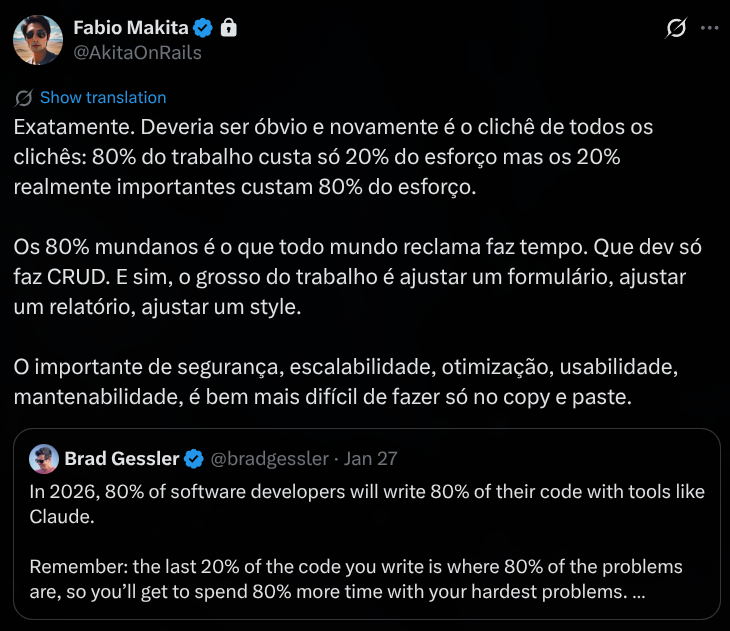 This is a concept I’ve talked about multiple times in videos on my channel and in talks. Everything in programming happens more or less at the Pareto ratio: 80/20:
- 80% of the code is “easy” and usually gets done in 20% of the time. The most important 20% will eat up most of the remaining 80% of total time.
- For bugs and issues like performance or security, if you fix the top 20% you solve 80% of the general problems.
- 20% of the scope is truly important, which is why you can always simplify, replace, change, or even cut 80% of it - and that’s how you squeeze a project into budget/deadline.
Everything is based on Top X. Learning to prioritize is learning to identify the 20%. The difference between someone senior/experienced and someone amateur/beginner is that beginners think 100% is important and can’t pick the 20%. What experience brings is the ability to isolate that 20% faster and faster.
HOWEVER, it’s very easy to just say this. Everyone has heard it at least once, but most likely still doesn’t understand what it means. That’s why I decided to write this (LONG) article: I’ll show you in practice what the easy 80% and the hard 20% are, and how that actually affects code quality, time spent and cost.
This article is for beginners mainly, but also for you: the senior who has juniors to mentor, or the teachers with students. Use it as discussion and study material with your apprentices. This is the kind of thing that should be taught.
Since this is going to be long, remember that on desktop, on the right side there’s a menu with the sections so you can jump straight to each topic and study it piece by piece.
The App: TV Clipboard
I picked a little app I had been wanting for a while for my personal use. It’s simpler than a to-do list, it doesn’t need a database or any other external service. In practice it’s a peer-to-peer (p2p) communicator over websockets.
The use case is this: I have a gamer mini-PC that I hook up to the living room TV. I usually leave a mouse by the armchair to navigate on it (it’s a damned Windows 11). But occasionally I need to type something (passwords, fill out some form). And I don’t want to leave my important accounts logged into that PC (I don’t trust gamer PCs).
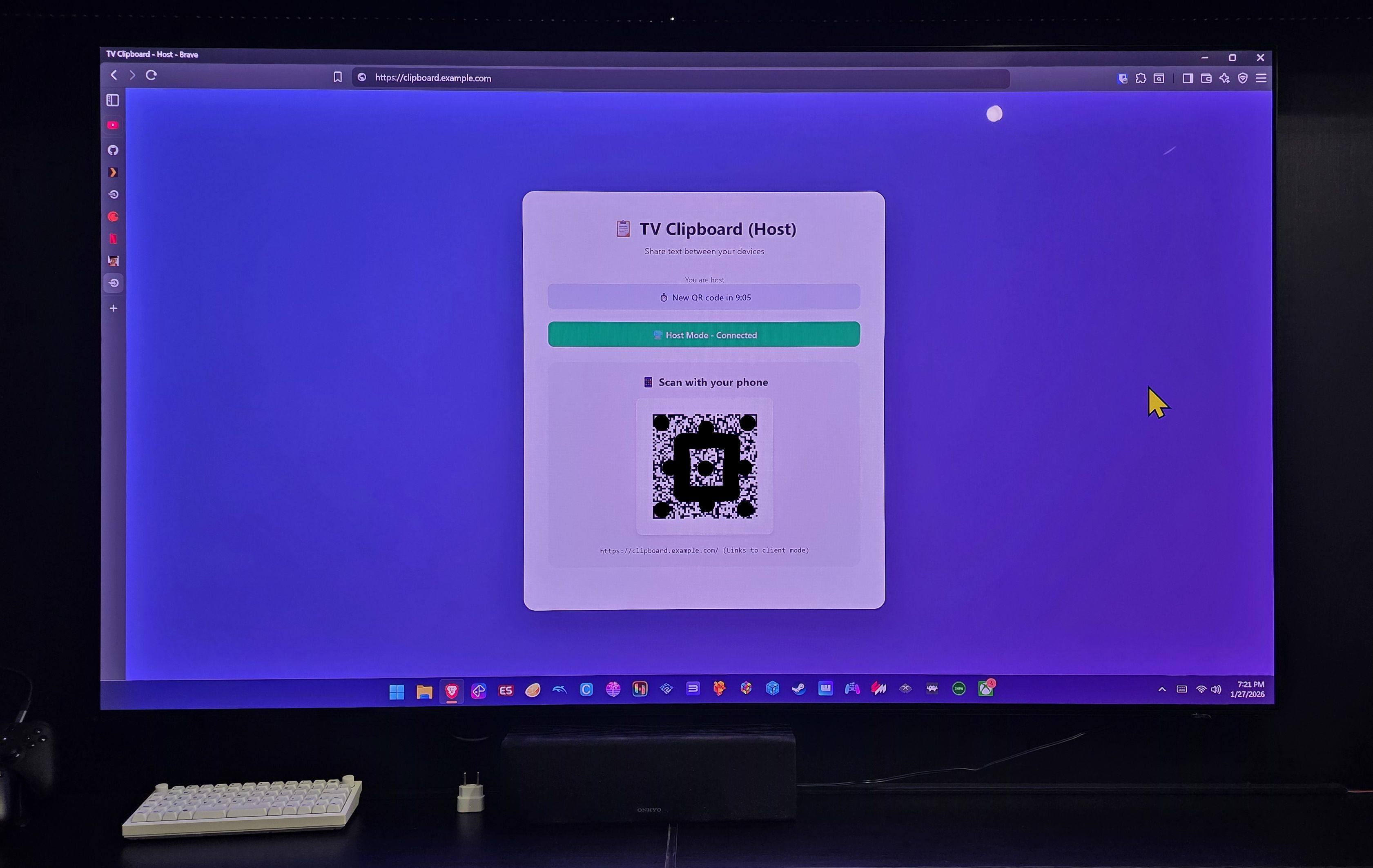
Either I have to grab my bluetooth keyboard, or use the Windows on-screen keyboard. Both options are inconvenient in a living room. BUT, what if I could open a website (that’s already in my bookmarks), a QR Code shows up, I scan it with my smartphone and from there I can type or paste whatever is in my mobile clipboard and transfer it to the mini-PC clipboard instantly? That’s the app:
Then I open the camera on my phone, scan that QR Code and it opens this page:
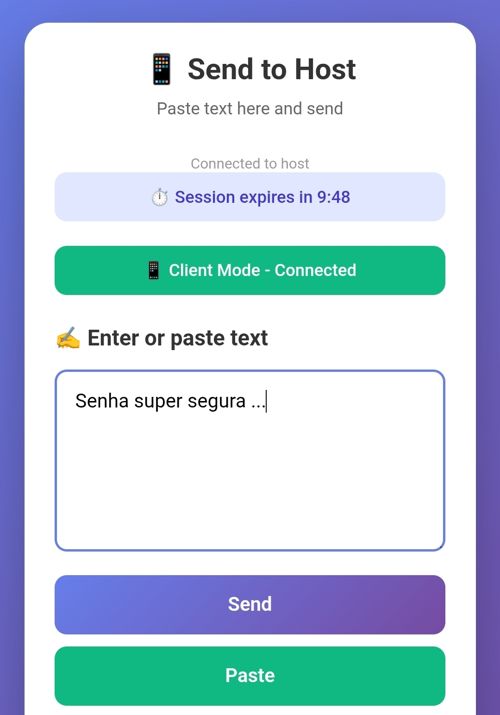
Done. Now I can type anything or paste the password from my password manager (by clicking “paste”) and when I send it, on the TV I’ll see this:
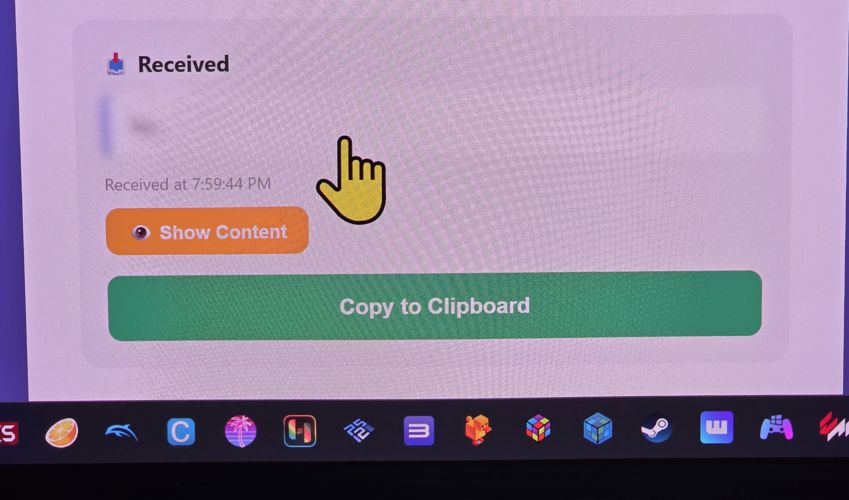
It shows that it was received, and it goes straight to the TV clipboard automatically. It shows it “blurred” because if it’s a password I don’t want it legible in large text on the TV - and yes, the mouse cursor is gigantic because it’s easier for me to see on the TV.
This is useful not just for the TV, but for any situation where I want to send text from my phone to one of my PCs. A lot of people end up using WhatsApp or other messengers for this. I, for instance, have a “Just me” group that only has me in it, where I keep sending links and silly stuff from my phone. Then I always keep WhatsApp Web open in a tab on my PC and I can grab it from there. WhatsApp for me is a remote clipboard.
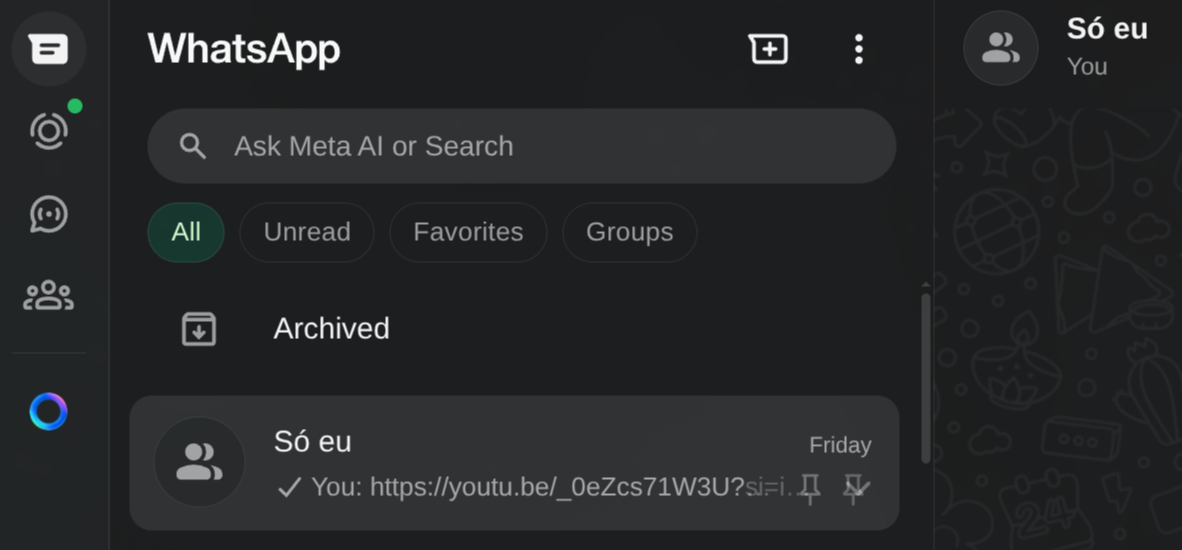
But that’s not safe for sending things like passwords, crypto addresses, or any other sensitive message. WhatsApp is a company with zero transparency. The advertising “claims” they have end-to-end encryption, but I don’t believe it. It’s equally likely they open everything in transit and keep it logged - it’s data worth money, even more in this era of LLM training.
Recommendation: NEVER COMMUNICATE ANYTHING IMPORTANT VIA WHATSAPP.
For file transfers I already use LocalSend:
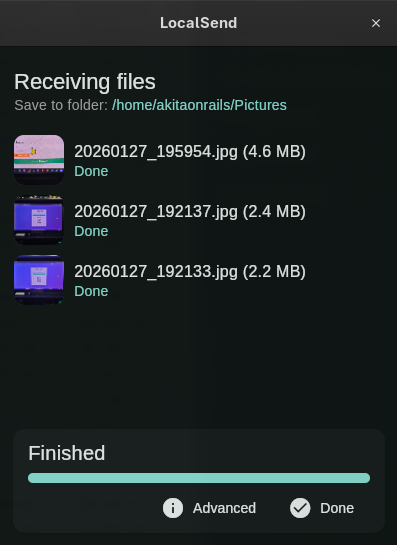
That’s where the inspiration came from: I wanted a LocalSend for Clipboard. I’m sure there are already dozens of apps that do exactly this. But I wanted to take the opportunity to do this exercise.
The Plan: 100% Vibe Code
Honestly, I know enough about front-end, I started my career as a “webmaster” in the 90s. But I hate front-end. It’s slow, it’s tedious, yuck. In particular, I hate dealing with CSS. Even more particularly, I take no pleasure in writing Javascript. So I’m always lazy about starting a web app from scratch. But with Vibe Coding, this is one of the parts I can finally get rid of, especially if I don’t care about the exact look as long as it’s not crooked.
While we’re at it, I’m going to use a language I know the basics of but don’t have enough experience in, much less fluency (meaning, on my own I’d be slow): GoLang. Why Go:
- it compiles to a native binary: I don’t even need the performance, but having a compiler helps the LLM get feedback on obvious errors.
- no dependencies: later I’ll want to deploy it to my home server, and it’ll be infinitely easier to set up Docker with a dependency-free binary compared to something like Ruby or Python where you have to install a ton of stuff.
- full standard tooling: besides the compiler it already has a formatter, linter, tests and everything else that also gives good feedback to the LLM
- simple, short and unambiguous syntax. I like how Go is Python-like. I don’t consider either of them “pretty” (aesthetically, I much prefer Swift, Kotlin or Ruby). But unlike Javascript and even Rust, it’s much less verbose and much less ambiguous.
- rich standard library. Unlike Javascript, you don’t have to keep installing 500 external libs for basic things.
- since I’m going to use websockets, GoLang’s channels will make my life easier. Its async mechanism is simpler, more robust and better than Node’s reactor.
- most importantly: because I want to. It’s a personal project, that only I’ll use, I pick whatever I feel like and that’s that.
By the way, since I’m not fluent in Go, I’ll probably let some bad practice or obvious anti-pattern slip through. If that happens, you Go senior reading this, don’t hold back, comment below and explain what you think.
If you want to see the end result now, all the code is on this GitHub. I’ll be linking snippets from it all the time.
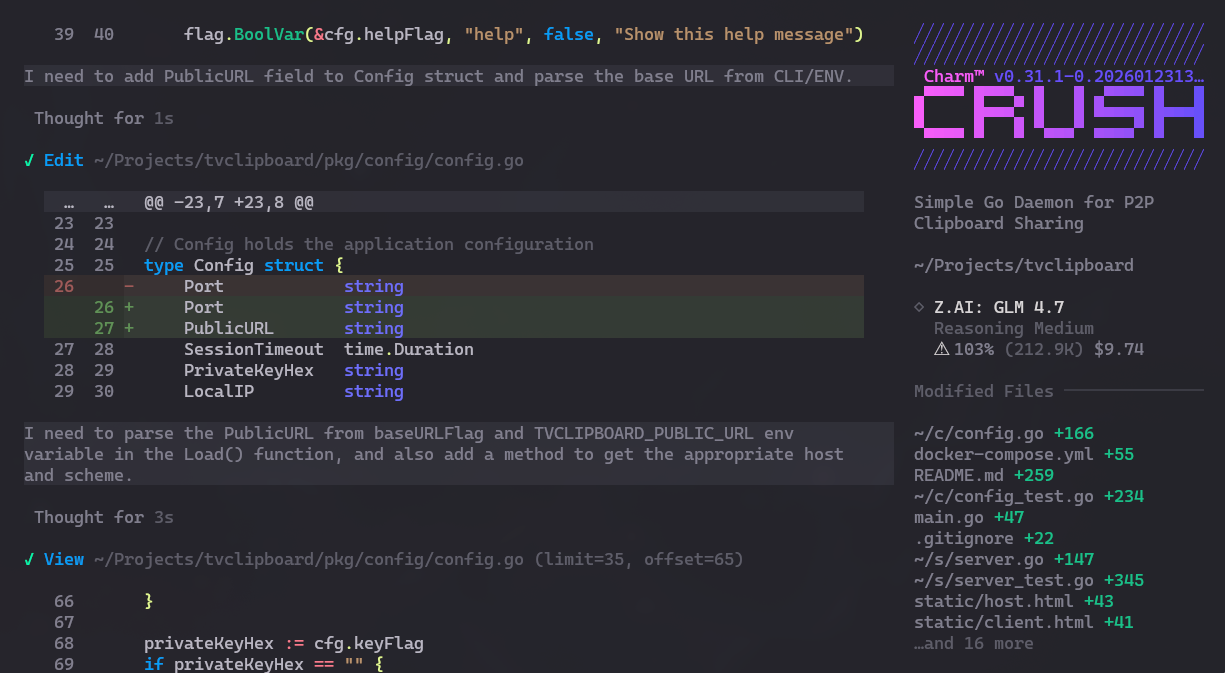
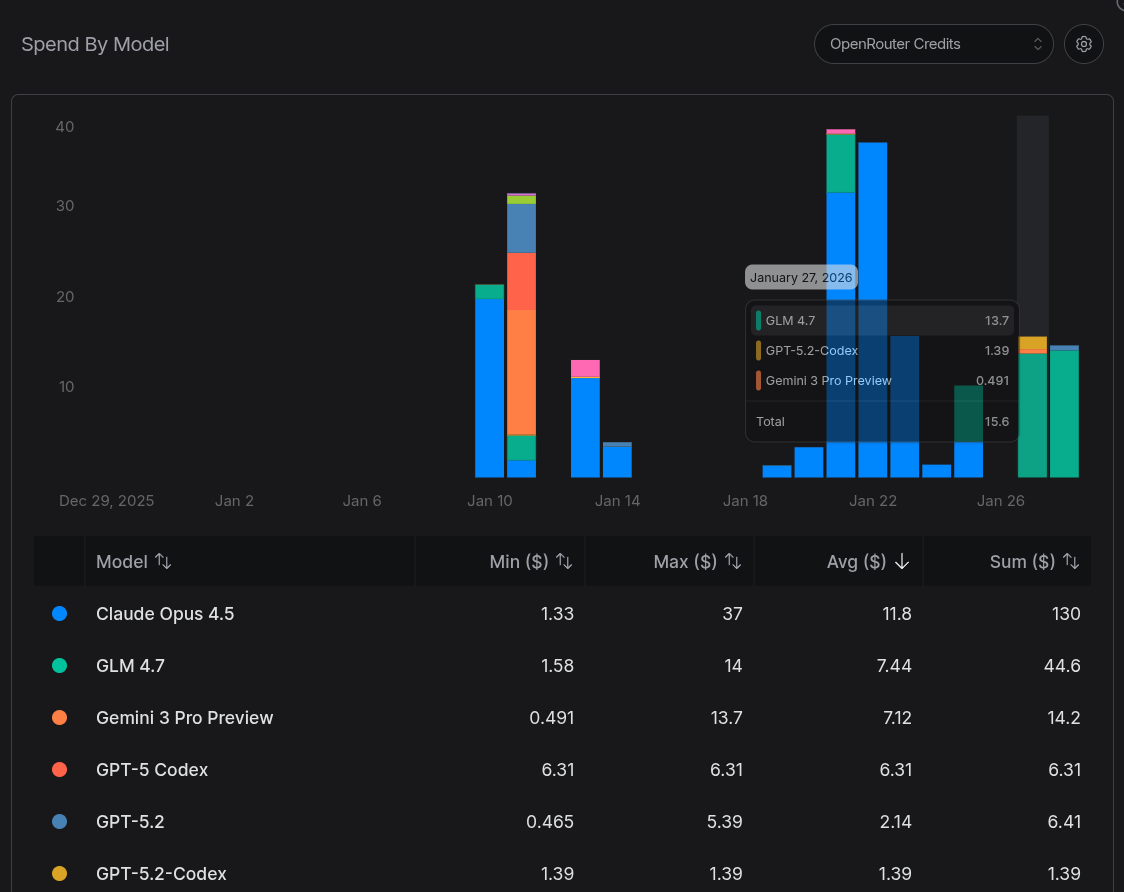
Another goal is to test how good the famous GLM 4.7 really is. I’ve written posts and tweets about it before. I’ve tried running the Flash version on my local PC (it’s good, but VERY slow). Overall, my impression is that it has similar quality to Claude Opus, GPT Codex, Gemini, but it’s WAY slower (at least 2x slower). Meaning if I had used Gemini or Claude, I’d get the same result but probably in half the time, though at a higher token cost (GLM is “cheaper”).
Let’s get to the TL;DR: it managed to implement the app the way I wanted, but it was SLOW. I spent an entire day, having lunch and dinner in front of the PC while Crush kept thinking, a total of more than 10 HOURS. And, according to OpenRouter, I spent just over USD 40 (over 200 reais). It was neither fast nor cheap, considering the app’s scope. Reminder: it’s simpler than a To-Do List.
In terms of size, even a simple app like this one resulted in more than 3,000 lines of code (LOC) of GoLang:
=== Code Statistics ===

Total Go code: 3493 lines

Production code: 1431 lines
Test code: 2062 lines
Test ratio: 1.44:1

Top 10 largest files:
  3493  total
  602  ./pkg/server/server_test.go
  560  ./pkg/hub/hub_test.go
  385  ./pkg/token/token_test.go
  304  ./pkg/hub/hub.go
  283  ./pkg/server/server.go
  263  ./i18n/i18n.go
  262  ./pkg/config/config_test.go
  253  ./pkg/QR Code/QR Code_test.go
  243  ./pkg/config/config.go
And for Javascript it came out to more than 1,000 LOC:
=== JavaScript Code Statistics ===

Total JavaScript code: 1360 lines

Production code: 787 lines
Test code: 573 lines
Test ratio: 0.73:1

All JavaScript files:
  1360  total
  573  static/js/test.js
  313  static/js/client.js
  249  static/js/host.js
  114  static/js/common.js
  111  static/js/i18n.js
Oh right, out of curiosity, I added loc.sh and loc-js.sh scripts to do this counting.
Phase 1: Making It “Work” - what does that mean?
Contrary to what many amateurs might think, it’s not enough to type a description of the application (like I did in the previous section) as a prompt, throw it at the LLM and it will automatically come out with a working app: IT WON’T.
This is what I was saying 2 years ago and it’s still true: it doesn’t matter how much more LLMs evolve. They might get a bit faster, a bit more efficient, but the architecture is still the same since 2022: transformers are glorified text generators, with a random sampling factor that always embeds entropy into the process (it will never be exact, deterministic). There will ALWAYS be a need for human intervention (and a lot of it).
Now I’ll demonstrate with a real example what that means.
In the end, I stopped this project after 43 commits. I followed the process I always say is the best: small prompts, one feature at a time, verify that it works and is correct, have it git commit, then move on to the next feature or requirement.
On a back-of-the-envelope count, each commit took about half a dozen prompts on average. Let’s say 43 commits x 6 prompts = nearly 258 prompts over more than 12 hours. Some prompts were a simple sentence that got solved in 2 seconds. Most took minutes and multiple iterations from the agent (Crush).
GLM 4.7’s context window is average: around 200k tokens. Crush has a mechanism where, when usage gets well past 90%, it asks to summarize the context so far so it can reset and reload from that summary to keep going. But it still has bugs and sometimes crashes and loses context:

Then I have to recover the last prompt, sometimes type part of the interrupted context myself, so it can pick up where it stopped. It’s tedious and you have to keep paying attention. This is a problem that Gemini suffers from less because its context window is MUCH larger (but attention in the middle degrades as it gets bigger, it’s a trade-off).
“Ah, Akita must be dumb. I built a Todo app and it didn’t even get close to 250 prompts. He did it wrong.”
Now let’s get to the part that separates the boys from the men. Indeed, to “make it work” you don’t need all those prompts. Of the 43 commits that took 10+ hours, I already had an app that “worked” after 10 small commits, which took about 1 hour.
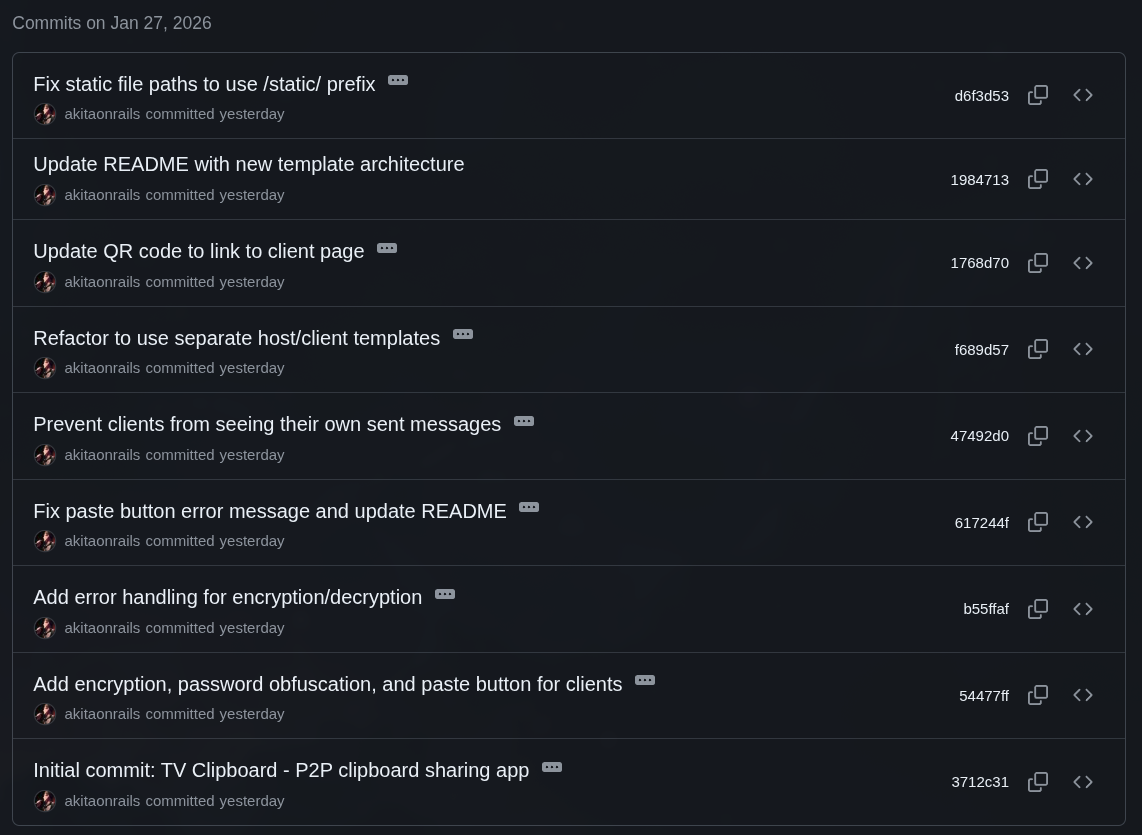
If you want to see the “v0.1” version, just do this:
git clone https://github.com/akitaonrails/tvclipboard.git
cd tvclipboard
git fetch --tags
git checkout v0.1
This version has 1,827 LOC of Go and 255 LOC of Javascript. But the Go backend itself is only 549 LOC vs 1,431 LOC at the end. And that’s because in this minimal version I had already added backend unit tests (1,278 LOC), which most beginners never bother with. So you could “solve” my problem in just over 800 LOC, less than 1 hour and half a dozen prompts.
The project structure looked like this. Save this image to compare with how it ends up at the end:
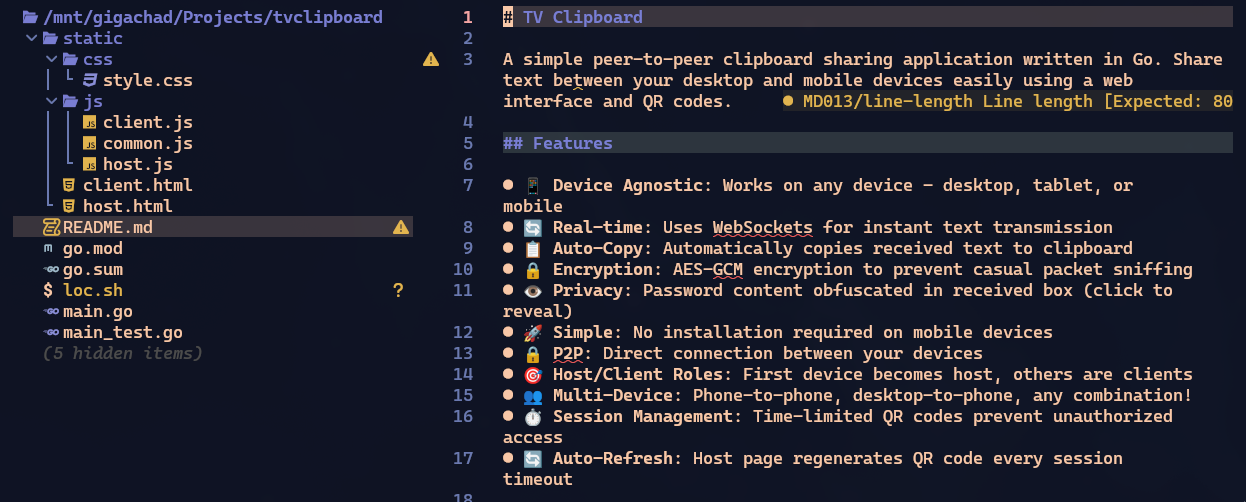
In this version it already opens what I call the “host” page, which is the page that would open on my TV, showing the QR Code to connect. It already has the “client” page, which is what the QR Code opens on my phone. And it can already paste text on the client, send it to the host and copy it to the host’s clipboard. Pretty simple.
This is where 99% of people would stop and call it done.
Phase 2: Going beyond “just working”
Let me repeat: this project is simpler than a todo list and was built exclusively for me alone to use, at home, on my local network. Anyone thinking “ah, all of this is unnecessary for this app” - I KNOW!.
The idea is to demonstrate the minimum you have to think about for a real project. If you’re building a toy just for yourself alone, quality doesn’t matter.
For Go seniors, or Javascript seniors (because I’ll use it on the front), I know you’ll think “ah, he should have used framework X or library Y” - I KNOW!! 😅 At the end there will be a section where I’ll discuss some of those other options, wait before commenting!!
Back to the Pareto concept. I said 20% of the most important work costs 80% of the time, but that’s just an order of magnitude. In my example, the whole project took more than 10 hours and “to make it work” took only 1 hour. So it’s closer to 90/10 than 80/20.
What the hell cost 90% of the time if 10% “already worked”??
1. Token Management
The first thing I think about when I see a QR Code is that the link inside it should be disposable and volatile. It’s not a rule and obviously depends on the app. For my little app it’s definitely “overkill” but I’ll do it as an example. (I won’t keep repeating “yes, for my app it wasn’t needed”, this is the last time).
I don’t want a visitor who uses my app at home to be able to bookmark the link and use it from outside (I’ll expose my service on the internet to be able to use it from anywhere later). I want each use to be unique and to expire after a few minutes, requiring a new QR Code.
So I need some kind of token system that expires.
This article is already going to be very long, so I won’t keep copying the full code of every feature. I’ll always point to the commit where I implemented it so you can look it up later, and only show snippets for illustration.
Anyway, the goal will be to have a URL like http://clip.example.com/?token=blablabla. Nothing out of this world.
Yes, it could be a JWT, but my use is very simple so I had it built from scratch, and GLM 4.7 came up with a JSON structure with a random private key and a timestamp, which it decided to encrypt with AES (it really wasn’t necessary) and encode in hexadecimal to be the token (it ends up hyper long, more than 100 characters).
It turned out to be a little monster like this:
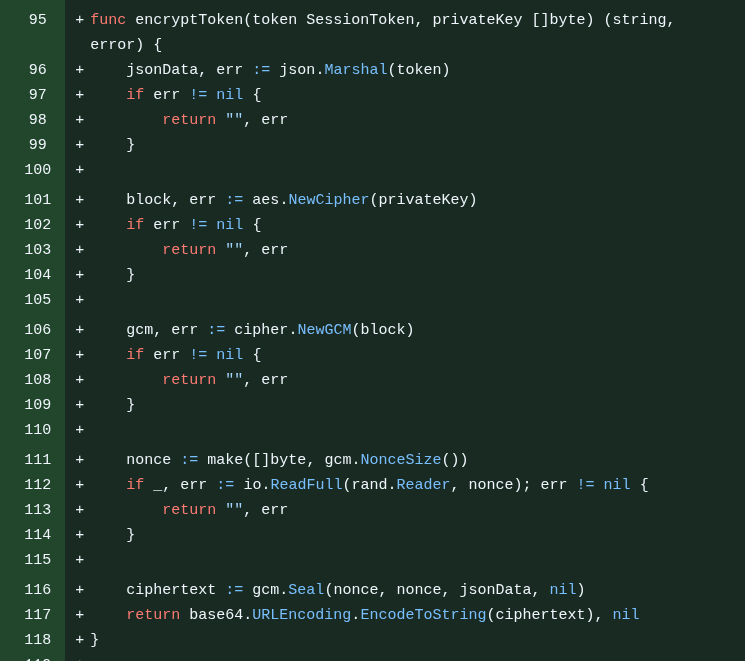
I didn’t like it but I decided to leave it because it’s working. I can mess with it later - in fact, a lot of things were done “out of order” because I just did them as I remembered them. I didn’t have a step-by-step plan written beforehand. I literally pulled it out of my head in real time.
The goal of this is to remember that Session Management is a concern every dev must have in mind in a real system.
2. First Refactor
The main code was already over 500 LOC, the tests over 1000 LOC. That’s too big to stay in a single file. So I asked GLM to refactor it into packages. This kind of thing I know Claude Code handles more easily, but GLM did well too. In the end it looked something like this:
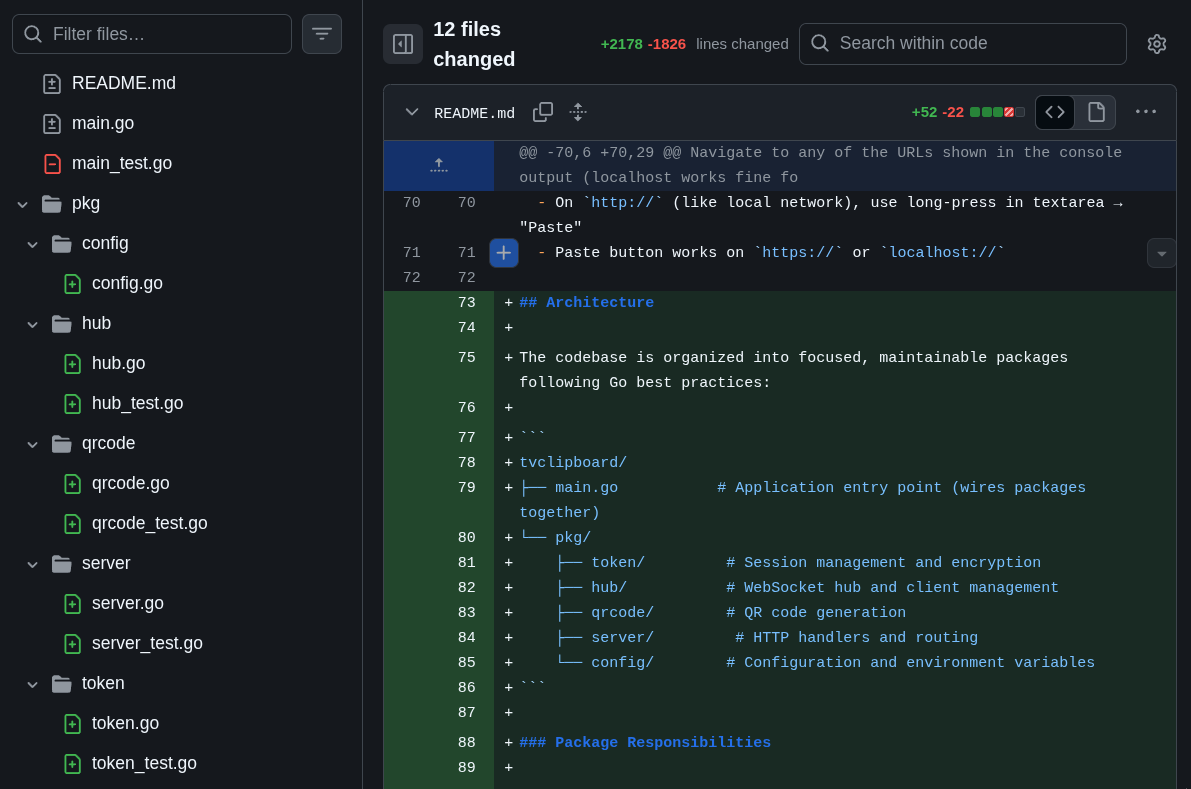 This is what we call “Separation of Concerns”. Each package has an isolated domain. One package to deal only with configuration options, another to handle only the HTTP server, another to handle only QR Code generation, and another to handle only token management. Each with unit tests in the same package.
Asking for tests from the start was a huge help to the LLM, because every so often it would run the test, get confused about why it wasn’t working and the penny would drop that it needed to adjust the implementation. All automated feedback is important for the LLM to have context to work with.
And refactoring isn’t something you do only once. It’s a process that has to be done from time to time to consolidate and simplify the code, improving maintainability.
The goal here is to remember that “just because it works” doesn’t mean the code is frozen and you never touch it again.
3. Docker Support
Since I was going to run it on my home server, Docker support is mandatory. But regardless of that, it’s good practice to keep a Dockerfile that works. It’s another kind of “automated test”: see if you can “build” an image and run it. And document it for another user so they don’t need to install anything on their system to run it, just run Docker:
docker run -d \
  --name tvclipboard \
  -p 3333:3333 \
  akitaonrails/tvclipboard:latest
In fact, the command above works, in case you want to test it right now. I uploaded the image to my Docker Hub account.
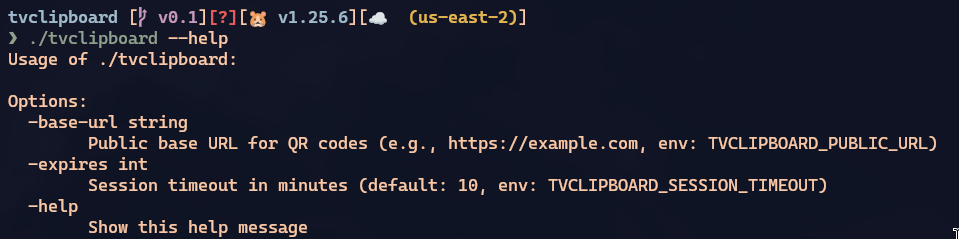
And if you hadn’t already implemented it this way, this also forces you to add configuration options as environment variables (like TVCLIPBOARD_SESSION_TIMEOUT) or via command-line arguments (like --expires), exposing what is configurable.
The goal here is to remember how important it is to automate builds and document how to use it for other people.
4. Organizing Javascript and adding Cache Busting
To “just work”, way back at the beginning, all you had to do was make an “index.html” and go writing if host or if client in the middle of the HTML and JS. But at least GLM started out by duplicating a host.html and a client.html. But the javascript was all inline between <script>...</script> tags and duplicated in both files, so another refactoring step was to ask it to separate common.js, client.js, host.js.
This is the bare minimum of maintainability. Again: refactoring doesn’t end in a single step.
But I could run into a problem. Being a very simple little system, I had no ETAGs implemented and no asset pipeline like WebPack or similar.
In a dynamic web framework, most will support generating CSS and JS files dynamically, changing their names to things like /assets/host-20260128123456.js, and every time we edit some JS, the pipeline regenerates that file with a different name.
When we open it in a web browser, the browser always tries to “cache” static assets like images, JS, CSS, so it doesn’t keep asking for the same thing all the time. If it already downloaded host.js, on the next “reload”, if the same file is requested, it just pulls from the cache instead of asking the server again.
The problem with that is if you change the content of the file and keep the same name. The browser will think it’s the same thing and you’ll spend hours scratching your head thinking “damn it, I already fixed that, why isn’t it showing up??” - and it might be cache.
To avoid this, there are Cache Busting techniques, like ETAG headers. But the most common is just to add some kind of timestamp indicator in the URL, for example /static/js/host.js?v=20260128120431. This way, every time my server restarts, the timestamp will change (it’s not the best rule, but for now it works). The URL will be different and the browser will be forced to download the newest version, making sure I don’t waste time hunting down cache issues.
Again, any minimally competent web framework with HTML template support will have this, but I asked to do it from scratch:
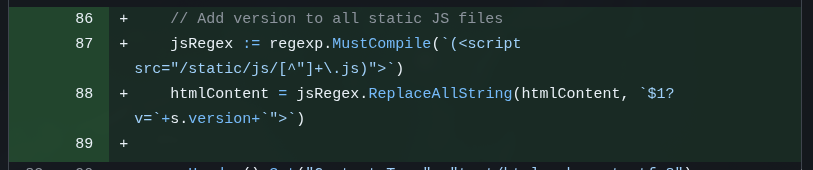 Since I serve static HTML pages, my server code needs to modify the URLs before sending them to the browser, and that’s what the commit above does.
While writing this post, I noticed it added cache busting for “.js” files but forgot about “style.css”, which was left without it. I didn’t notice because I barely touched the original CSS it made. But again, to show that LLMs are never perfect and you have to keep constantly checking if it didn’t forget anything or leave anything behind. I had it fix this in this last commit
The goal here is to remember that you can’t just drop files on the server without knowing how they’re being served. Every front-end dev needs to know how a browser works. “Knowing HTML” isn’t enough.
5. Adding Command-Line Arguments and doing more cleanup
The next three commits are nonsense I should have squashed into a single commit.
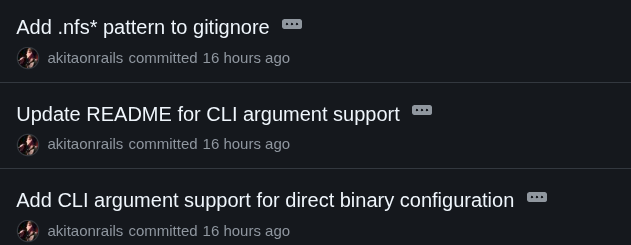
This is more of a reminder that it’s not entirely bad to let an agent like Crush do git commits automatically, but you need to pay attention because you might have to tell it to undo (git has ways to redo commits, with options like -amend).
I just added command-line options. Now the binary has this support:
And since it forgot to document it in the README, the other commit is for that. This is why I said the right thing to do was to squash into a single commit, because they’re the same task.
6. Dev vs Production environment configuration
This is another point every beginner ignores. The classic “ah, but it works on my machine”.
On the web, especially, “your machine” is always going to be a localhost, or 127.0.0.1 or 0.0.0.0 (watch my Networking playlist to understand the difference).
The problem: if I run this app locally on my PC, I access it via http://localhost:3333. When the QR Code gets generated, it’ll use “localhost”. Now imagine your phone trying to load a “localhost” link. Obviously, it won’t work. Because your phone doesn’t have the app running on that port on localhost. I need my PC’s IP. So the first thing I have to ask to fix is that, if it’s localhost, it should look up my PC’s IP - which will be something like 192.168.0.xxx. With my PC and my phone on the same DHCP, on the same network, they can find each other via that private IP.
But what about when I run it in Docker? The internal IP of a Docker container is different from the external IP (the container is always either on NAT or on Bridge). The container’s “external” IP will be something like 192.168.xxx, but the internal IP will be something like 172.xxx. Again, if the QR Code uses the internal IP, there will be problems.
So I need a new configuration, usually called PUBLIC URL or PUBLIC HOST or just HOST. Where I explicitly declare it.
For example, when I’m done, as I said, I’ll leave my service exposed on the internet using a real personal domain. Something like https://clip.example.com with TLS support and all. So I need my docker-compose.yml to have an option like:
- TVCLIPBOARD_PUBLIC_URL = https://clip.example.comAnd that way the QR Code is generated with this name instead of having to guess. But at the same time, if nothing is passed, it assumes “localhost”.
In this first commit it doesn’t yet do all of this - I built it little by little. But that’s how you start this kind of feature.
The goal here is to remember that “running on my machine” (localhost) means nothing. We don’t put “your machine” into production. “Working” means “working OUTSIDE your machine”.
7. More code cleanup
I’m deliberately mentioning “code cleanup” all the time so it’s very clear that a considerable part of the work of programming is “cleaning up” code that has already been written.
The next four commits are just maintenance.
For example, the LLM inadvertently left a duplicated snippet inside the code. It didn’t break anything because it was in the Docker Compose configuration:
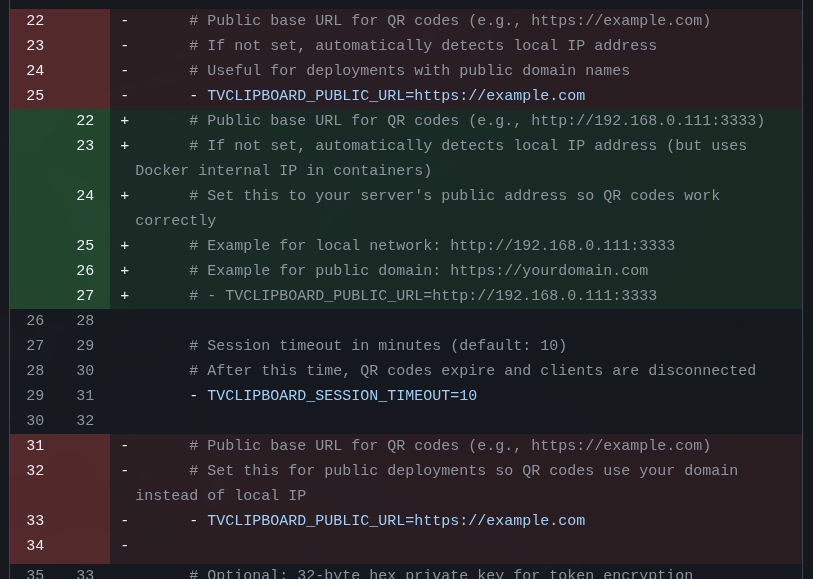 On top of that, there’s an accidental behavior in the way this app works that I decided to keep as a “feature”. There always has to be a browser that opens first and automatically becomes the Host and displays a QR Code. The next browser to open needs the link from that QR Code and becomes the “client”.
But when the host closes, the client loses the connection and is automatically promoted to host. I didn’t ask for that but it ended up working out, so I asked to keep it and document it.
The goal here is to remember that LLMs aren’t perfect, they’ll leave leftovers behind, and you need to keep monitoring all the time.
8. Optimizing Javascript
The next three commits are about cleaning up the Javascript.
Last time we touched it, I had only asked it to pull the inline Javascript out of the HTML and separate it into reusable “.js” files. But the time came to take a look at them.
Right off the bat, I could see there was duplication between client and host, so I asked to deduplicate and move things into “common.js”.
On top of that there were several small issues:
- a bunch of variables and functions in the global scope (global pollution: bad practice)
- websockets that open but with nothing checking the close
- timers being started but never cleared (leaks)
Javascript code that “just works” is always like this: everything global, everything open, nothing checked, multiple leaks. That’s normal and every LLM will do it this way.
I also don’t think you need to start from the beginning demanding SOLID and everything else. First make it work, then make it work properly, finally make it work fast. It’s always in that order, especially in a simple scope like this.
That’s why now it’s time to ask it to refactor. And the first thing to do is always to isolate the scope, for example, in a block like this:
(function() {
  'use strict';
  ...
})();
The problem with this is that every function the HTML was calling, like “onclick”, will fail because there’s nothing in the global scope anymore. Once everything is hidden, now you have to expose only what actually needs to be public.
This is called IIFE Encapsulation (Immediately Invoked Function Expression). There are thousands of practices like this that Javascript needs to get “cleaner”. I know, I should be using modules, Typescript, blah blah, but this is a simple example.
The goal here is to remember that, just because it “works” doesn’t mean it’s “good”, especially with Javascript.
9. Optimizing the Golang
This is the longest section. The Golang code already “works”, but it’s not good yet. I know it has race conditions in channels, I know the error handling is bad, I know there are still micro security issues, so I want to fix what I can.
The next 6 commits deal with:
- Refactor: Improve error handling, race conditions, and graceful shutdown
- Fix: Critical race conditions, memory leaks, and security issues
- Security: Add message size validation and rate limiting to prevent abuse
- Config: Tighten security limits and add origin validation
- Fix: CORS origins, Web Crypto API fallback, and clipboard issues
- Fix: QR code uses correct port from PublicURL and document Web Crypto API HTTPS requirement
GoLang itself has a tool to check for race conditions, the Data Race Detector. Just pass the --race option to commands like go build or go test. And luckily GLM was smart and immediately used this tool when I asked it to check for these issues.
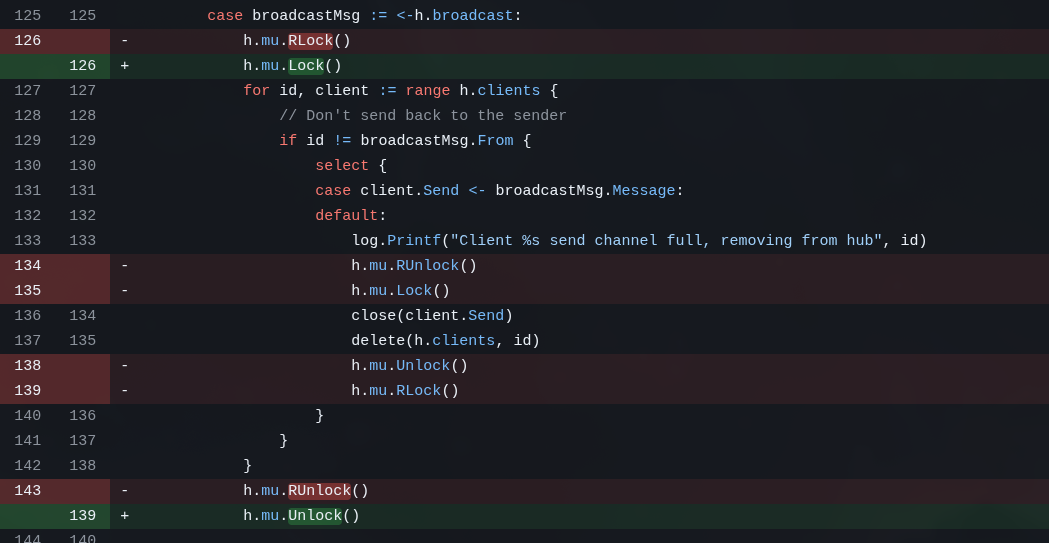
Race conditions happen when two asynchronous tasks try to modify the same data structure, for example. One way to “fix” them is to put Locks or Mutexes on structures that can only be modified synchronously. Any application with anything asynchronous will eventually have race condition issues. It’s not “maybe”, it’s “when”.
A server has to be “well-behaved”, it can’t just “crash” or “panic”. But the first “working” code GLM wrote had several snippets like this:

This is wrong. Besides that, we need the server to correctly accept system signals like SIGINT, SIGTERM, etc. This is when we hit “Ctrl-C”, for example, or when Docker tells the container to shut down. It won’t simply crash the program, first it asks the program to shut itself down, giving it a chance to do cleanup, like flushing files, closing ports and things like that.
This is called Graceful Shutdown.
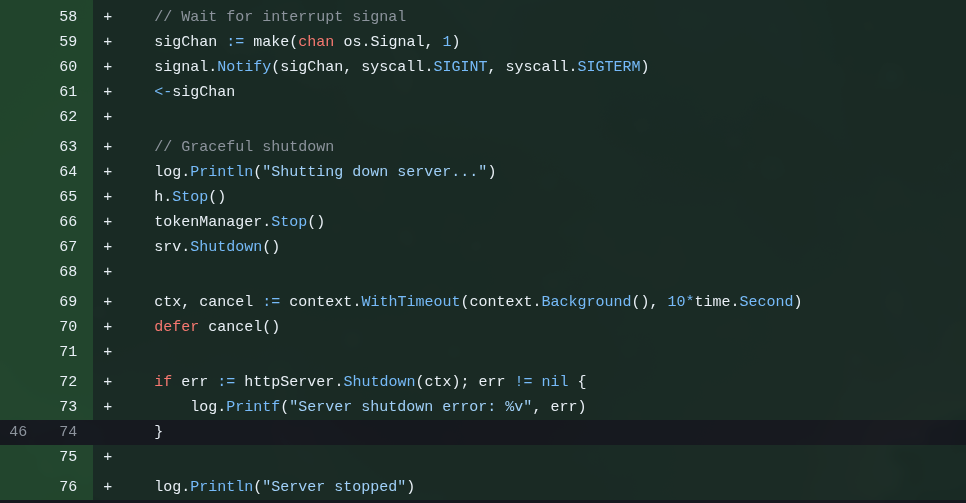
I didn’t stop to check how right GLM was but according to itself, some of the issues it itself found in the code it itself wrote included things like:
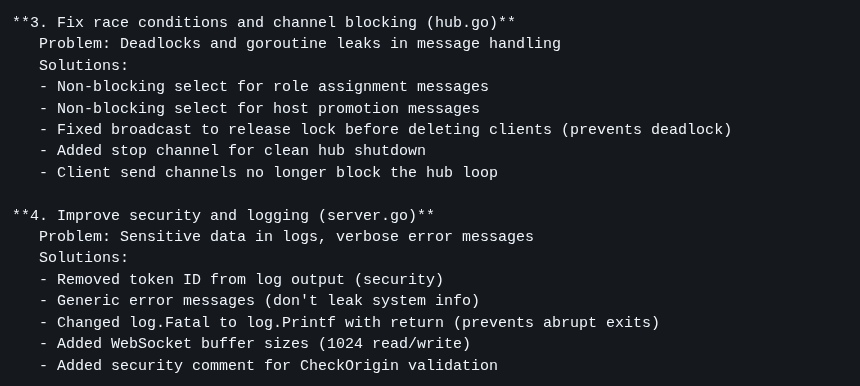
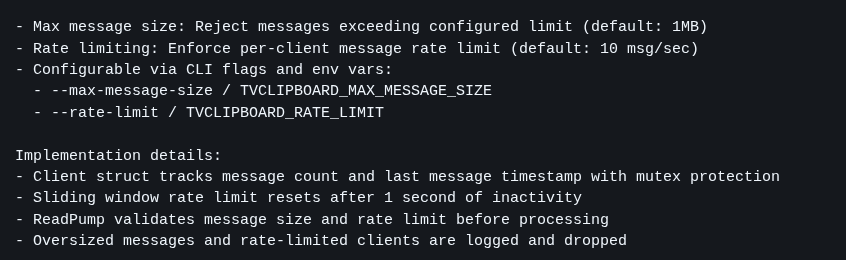
As you can see, just because it “compiles” doesn’t mean it’s ok. Just because it “runs” doesn’t mean it’s ok. Even asking it to check MULTIPLE TIMES, the LLM doesn’t catch all the errors in one go. Each of these commits took hours to resolve and I had to intervene multiple times, and even so I’m still not sure it caught everything (I’d have to review more carefully - but I wanted to publish this article quickly 😂).
10. Adding Security Systems
Again, none of this is necessary in a system that only I will use on my local network, but you as a developer have to take responsibility.
ALWAYS assume every user of your system is MALICIOUS! That’s the RULE, not the exception.
A silly example: the user can paste and transmit any text over websockets to my server. The 3 most obvious things that immediately crossed my mind were:
a) When the host receives the text, it renders it into the HTML in the “Received” box
What if the user sends a <script>....</script>? That will render into the HTML and the browser will EXECUTE it. That’s how Code Injection works. That’s how XSS (Cross-Site Scripting) works. This was very common in old forums or comment systems. To avoid it you must SANITIZE everything coming from the user.
Luckily, the way GLM did it is already sanitized because it writes the content with textContent instead of innerHTML, so the text is written literally without being executed:
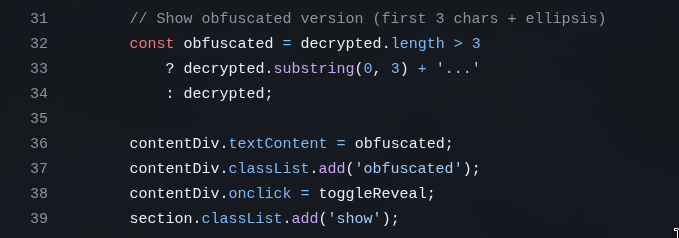 It happened to get this right on the first try, but you need to check because it could have done it wrong.
b) There was no message size check
A user should never be able to send text of any arbitrary size. They can always try to POST a gigabyte file directly to see if it blows up some Overflow error on the server, exposing some security exploit.
EVERY user field needs limits and it needs to be checked not only on the client/front-end, but more importantly, on the backend:
 c) You have to reject Spammers!!
Again, you can’t assume everyone will use your web app nicely. The rule is to expect everyone to try to take it down or break in. And one way to do that is to write a script to keep making thousands of POSTs per second to try some kind of Denial of Service, where the server queues up so many requests it blows up.
The right thing is to configure this in another service that sits in front of yours, like Cloudflare.
But it doesn’t hurt to implement a fallback in your application itself. A way to configure how many requests a single user can make at a time (e.g. 4 requests per second - no one is going to paste text that many times per second in an app like this).
If they try more than that, the app has to immediately REJECT and drop the connection, without wasting time processing any more, freeing resources for other real requests. This is called RATE LIMITING.
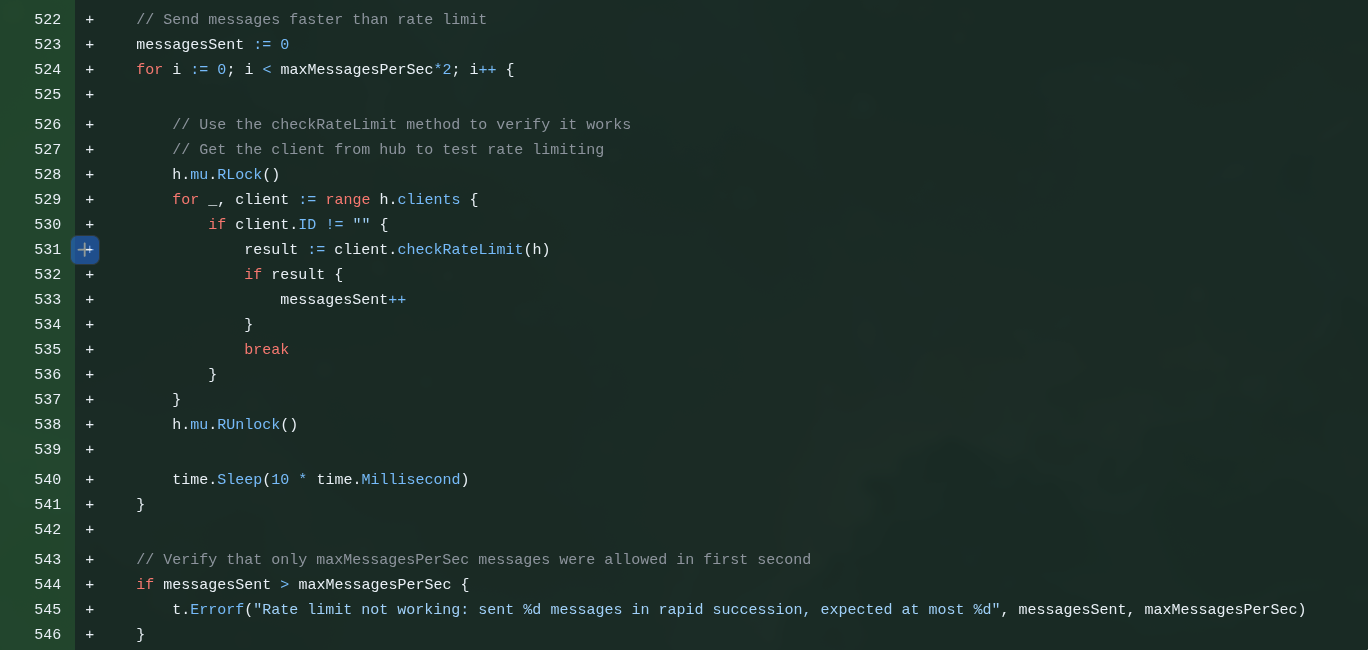 d) Another issue beginners don’t stop to think about is CORS and Origin Check.
As I said before, we have Javascripts like /static/js/common.js. It’s not a huge problem if someone else uses them because they don’t have any big secrets in them. But at the very least I don’t want some site like “http://malware.pk/index.html” to include https://clip.example.com/static/js/common.js inside it and for me to end up paying for its traffic.
I want only the SAME ORIGIN, in this case “clip.example.com”, to be able to load files from the same server. No one from outside is welcome and that’s the BEST PRACTICE. Study CORS (Cross-Origin Resource Sharing). This is more important if your system spans multiple domains where one depends on the other, then you want - in a controlled way - to allow only certain other domains that are under your control.
The rule for everything on networks is DENY ALL and then ALLOW [specific]. It should NEVER be ALLOW ALL.
Implementing this took a while, because GLM kept tying itself in knots over how to allow “localhost”, but also “192.168.xxx:3333”, but also “clip.example.com” (via port 443), etc. It’s not hard, GLM just got itself all tangled up and I had to intervene several times with prompts to steer it in the right direction. It ended up taking multiple commits for it to get it right.
e) Another little thing beginners don’t think about: browser resource PERMISSIONS.
Every time you load this system on “localhost” and it receives a message to drop into the clipboard, this alert pops up asking for permission:
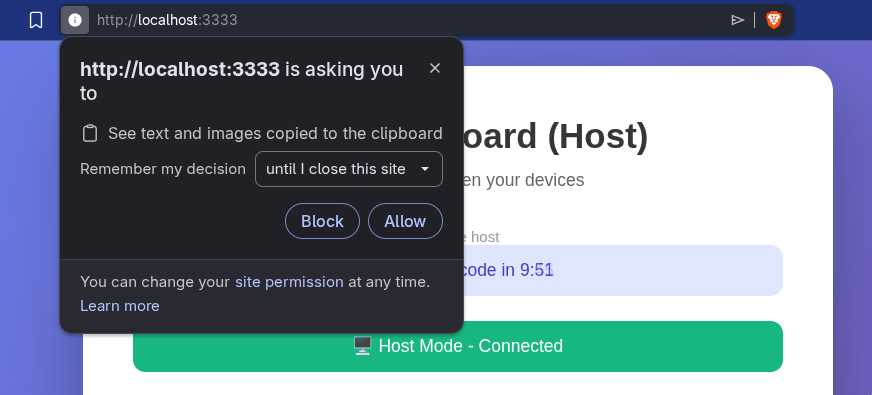
And that’s normal and correct: nothing should have access to things outside the browser. That’s why the Javascript asks “send this to the clipboard”, the browser intercepts it, checks the permission and, if it doesn’t have it, asks for it. Every time it will ask. But if you use a real domain (e.g. clip.example.com), it asks once and then remembers per domain. That’s one of the reasons I’m going to expose it on the internet: to have a real domain.
Exposing services on the internet is DANGEROUS. That’s why I wrote this article explaining how to use real domains and this other article about using Cloudflare Zero Trust.
f) There was another security factor which is “overkill” but I wanted to implement anyway.
Let’s say I want to run only on localhost. Let’s say it’s a private but shared network (guests, roommate, office, etc). Running on localhost there’s no TLS, meaning HTTP packets travel in plain text.
Anyone with Wireshark can “sniff” the packets on the network and intercept mine. And if I happen to be passing sensitive data, like a password, it will be visible in the clear.
The right thing is to run with TLS (HTTPS). But just as a “stopgap”, I asked GLM to implement a simple obfuscation (it’s not a fully secure process, but it uses AES-GCM), which is enough to not be obvious with a sniffer. For this it uses the Web Crypto API.
But there’s a catch: Web Crypto API is only available if the site opens over HTTPS or if it’s localhost. But if I try http://192.168.xxx:3333, it won’t be available. For that there’s this commit that deals with this and documents it.
The goal here is to show that security, optimization, and maintainability aspects are much more than a beginner thinks. In fact, they’ll never think about them, because you need to have studied beforehand to even know they exist.
11. Open Source Licenses
This topic alone would be material for a long article, but in practice I tend to think simply:
- if it’s a project where I don’t care whether anyone contributes or not, I just open it with PERMISSIVE licenses, like BSD, MIT
- if it’s a project where I’d like contributions and that no one uses commercially, I just put a RESTRICTIVE license on it, like GPL
- if it’s restrictive and it’s an app that could turn into a SaaS (so the code isn’t distributed, so there would be no obligation to contribute), then I add AGPL (Affero)
That’s what I did here: I licensed it under AGPL 3.0.
The warning is to not let LLMs write the license file. Always take texts on laws, regulations and rules from the official site. The LLM always produces a shortened or incomplete or even wrong version. Legal documents need to be EXACT, they can’t have wrong words and ambiguous meanings or incomplete statements.
LLMs are not good at producing correct legal text on the first try, there will always be errors. Always assume such text is wrong: there’s no “compiler” for laws.
12. Fixing the problem of overly long tokens
Way back I said that the tokens GLM generated for me are too big (over 100 characters). This results in super gigantic links.
It’s not a problem because no one has to type this and it’s not meant to be bookmarked. This is more of a personal choice: I like short tokens in URLs.
The advantage of the long token is that I don’t need to implement any kind of “database” (key-value store, or KV Store - Memcached, Redis). That’s because all the session info (ID and expiration timestamp) is encoded inside that token, which is why it’s long. It’s a json struct, encrypted with AES, converted to Hex.
Trying to keep the same concept, in this first commit I only asked it to try to optimize the size of the structure. So GLM on its own chose to try to change from UUID (36 chars) to a random 24-char Hex ID. Swap standard ISO timestamp (24 chars) for UNIX (10 chars). This went from 130-140 chars down to around 112 chars. A reduction on the order of 20% to 25%.
It wasn’t a bad attempt. But in the end I wasn’t really swallowing tokens that big (it could be a cookie too, I know, but I wanted to keep everything in the URL).
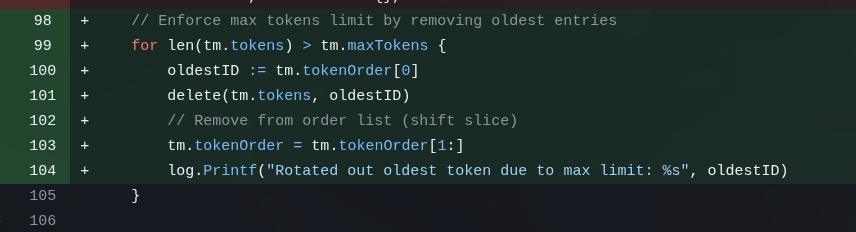
In the end I decided I wanted really short tokens (8 chars, base62) and so I’d need to keep the Session in some “storage”. I decided it would be “in-memory” (process-affinity, but I’m only going to run 1 instance, no load balancer, so it’s fine). And that would be a FIFO with rotation (older keys get discarded to make room for newer ones, and they expire that way).
This is the commit for that feature and I still had to intervene several times. For some reason it thought it would be a good idea to have a background goroutine cleaning up expired tokens from this storage. But that’s completely unnecessary if it’s a FIFO. It did it anyway, I had to tell it to undo. That’s the routine.
13. More refactoring and cleanup (almost done!)
The last 6 commits are MORE MAINTENANCE!!
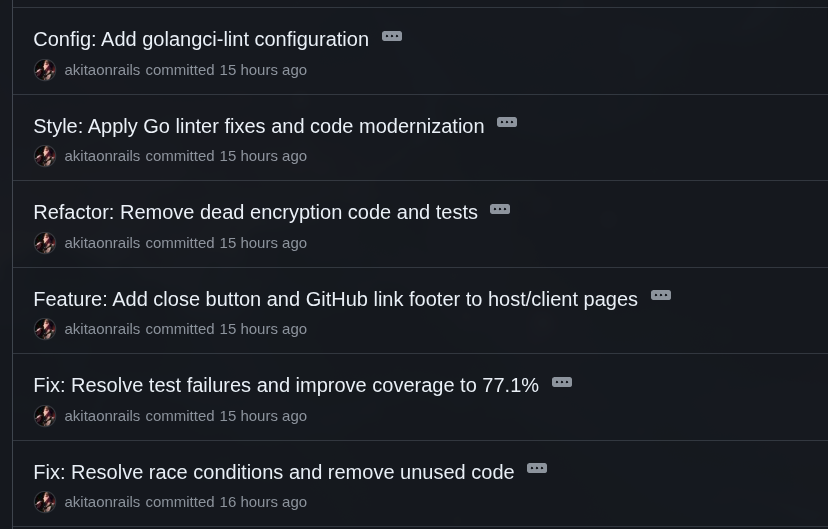
Sounds like a joke, but the amount of maintenance I did is actually small. In a real project this is part of the routine. Every time you add something new, you break something that was already there, and you need to adjust it to avoid accumulating technical debt.
Remember we ran the race condition check? We added new code, so it has to be checked again. And it found more issues fixed in this commit. I don’t remember now whether these were already there way back and it skipped them without fixing, or whether the last edits ended up creating these new bugs.
After adding so many things and refactoring, I decided to bump up Go code coverage a bit more. The go test command has the -coverprofile option to help check which parts of your code haven’t been tested yet. So I asked GLM to add tests for new features like Rate Limiting, message size check, origin check and other things.
I asked for a trivial thing which is a Close button on the client side, to not keep piling up tabs on my smartphone.
After I had it swap the token system, there’s no more need to encrypt the timestamp structure. But it left behind unit tests about that. So I told it to remove them. Again: LLMs will leave things incomplete behind. A lot of times it doesn’t know whether to keep code so as not to break the test, or to drop the test because the code is no longer needed.
Then I asked Go to run the linter and support golangci-lint for last-pass checks. A Linter is a sort of formatting, syntax and good-practice check for a particular language. But most of the adjustments were extra whitespace, a few bad indentations and stuff like that. Nothing major.
One last thing that was my own negligence is that I was forgetting to add Javascript tests. A considerable part of the code is front-end dealing with WebSockets and everything. I had to add them, and that was in this commit.
Since I was doing it all in one go, I also asked it to add ESLint, and to prioritize testing everything only unit-wise, with mocks and stubs so everything is headless and doesn’t need to load Chromium. Just test the publicly exposed functions. This raised front-end test coverage from zero to 73%, which is great coverage. See the commit to see how it turned out.
14. Last thing: I18n
This is something I remembered while I was already writing this article. Completely unnecessary, but I wanted to see if GLM could do it. And it “did”. I didn’t detail how I wanted it and I let it come up with the solution. I would have had the Go server swap the strings before sending the HTML to the client.
But GLM preferred to add this on the front-end side and swap the strings via Javascript. It’s not wrong, but it’s not the best way.
Language translation is exactly one of the things AIs were originally built to be good at: Natural Language Processing (NLP). I had it extract all the English strings and then make a Brazilian Portuguese version, and I can say it did it well:
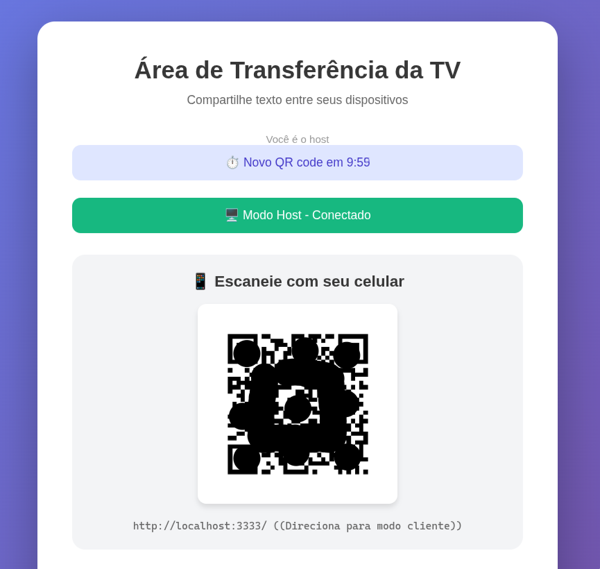
In a real web app this is something we always need to worry about: not leaving user-facing messages “hardcoded” and always extracting and testing them. Which brings me to the last part:
Wouldn’t it have been better to use Framework X or Library Y?
The Go crowd might not like that I didn’t use Gin, Fiber or another web framework. But really in this case the app is too simple. There are no more than 3 endpoints. The most complicated part would be the WebSockets, which wouldn’t look much different using a framework. Or bigger checks like CORS, which also wouldn’t have much less LOC.
On the Javascript side, maybe I18n would have been worth importing a ready-made package, but again, it’s very simple. There was no major feature I had to reinvent.
Of course, this is because this app is miserably small, as I said at the beginning. For a real larger app, I would indeed recommend using a popular framework with good community support, well documented and so on. But things the size of a ToDo List really don’t make a difference unless the exercise was about learning a particular framework.
Thinking about that, you have to be careful because no LLM will pick for you. If you start with small prompts, one feature at a time (which is the right way), it tends to write things all from scratch, without importing any library.
You have to know beforehand which library to ask for each thing!
Again, a beginner wouldn’t know, so they’d end up reinventing the wheel dozens of times instead of using popular libraries.
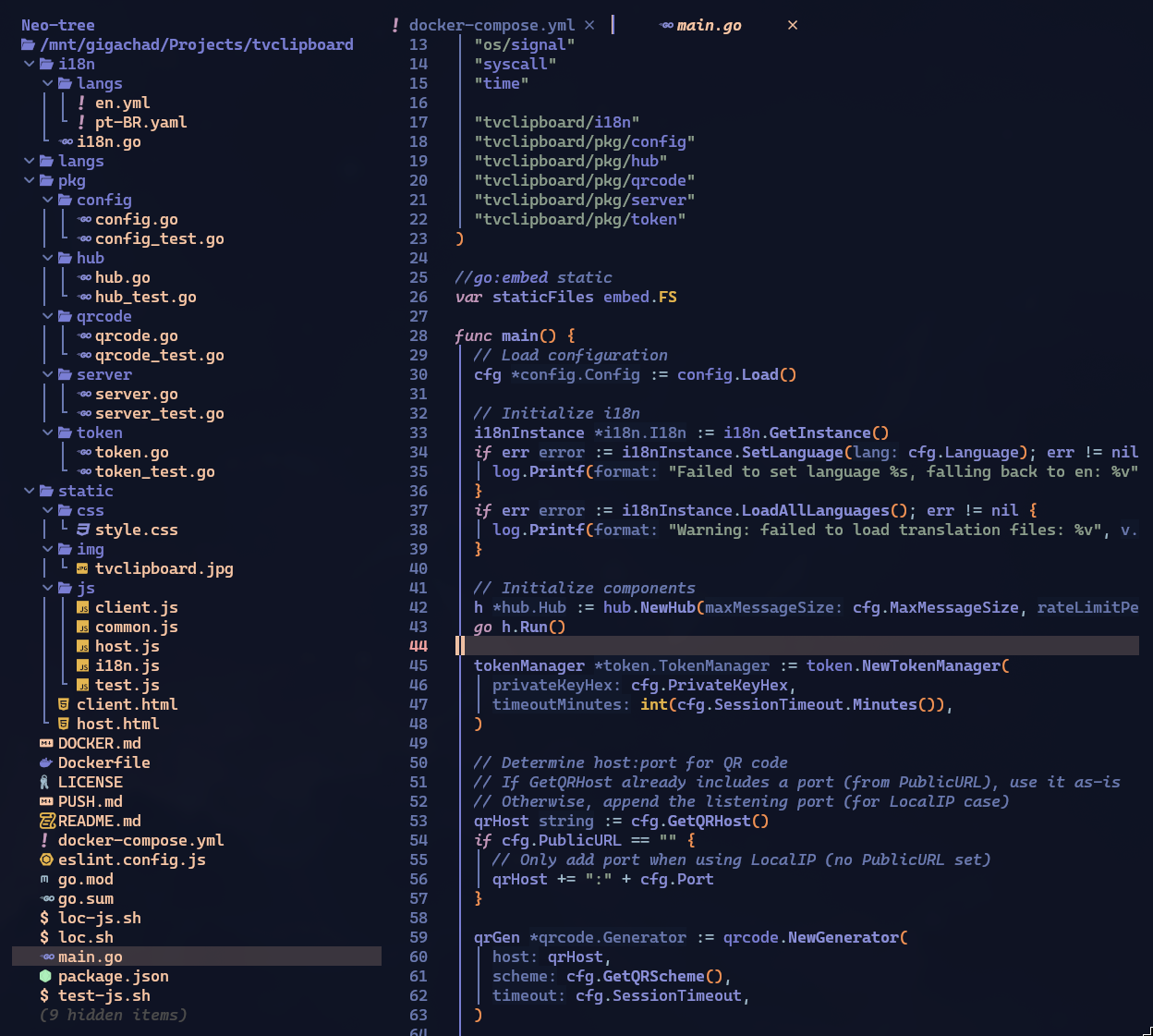
Remember I said, way back at the beginning, to save the structure of the project in version v0.1 that “already worked”? Here’s how it looks at the end in a real project:
Conclusion
Phew! That was long! Congrats if you made it this far!
My experience on this little project was like having a super motivated intern that I needed to spend the whole day looking over the shoulder of, and every other minute saying:
“Whoa! Stop everything, this is wrong!” “Whoa! Undo it and do it again but this other way!” “Whoa! No, you already did this wrong before and you’re repeating it!”
I’m not kidding when I said it was more than 250 prompts. And that’s a low estimate, I think I wrote MANY more than that.
As soon as I finished the Vibe Coding process, I pushed to GitHub and started writing this article, so there are still hours of REVIEW of the whole code, from beginning to end, to see if I missed anything. You couldn’t put it in production without doing that! If anyone sees weird things in the code, feel free to post in the comments.
It really felt like I was mentoring an intern. But with one problem: unlike a real intern, the LLM has already forgotten everything I taught it.
When I do a new project with GLM, it will make practically ALL the same mistakes and mix-ups. It’s like I was mentoring a blind intern with the memory of a goldfish.
It’s extremely exhausting!!
In the end it took around 12 hours to code everything, and I have the impression that a senior Go developer would have done it on their own in half the time. A junior would have taken this long over 2 or 3 days (stopping to research).
I already knew this, I’ve repeated it dozens of times, but the notion of:
“I don’t need to hire programmers anymore, AI does everything by itself.” - is a GIANT FALLACY.
And it’s not going to get much better than this. We’re already at the top of the S curve I’ve explained in every podcast I’ve been on and in videos on my channel. It costs orders of magnitude more energy to train the next version than it took for all previous versions combined, for incremental progress.
While the architecture stays the same, it’s not going to get past this. There needs to be some NEW BREAKTHROUGH (which hasn’t happened to date, since 2021 when Transformers came out).
A Claude Code will be a bit faster than GLM. The next version of GLM will be a bit faster. Maybe the 12 hours I spent will turn into 6 hours (for this miserable app). But the PROCESS will be the same: it does it wrong, I tell it to fix it, and it does this ad eternum.
There will never be such a thing as writing a single prompt and out comes a perfect, secure, optimized app. It will ALWAYS come out buggy on the first try. That’s why someone who is not a programmer should not build software to put in production with only Vibe Coding: it must go through review by a real experienced programmer.
This is not optional.
Post-Mortem
This section was written the day after publishing the original article. Once I was done, I asked Claude Code to do a deep quality analysis, focused on security and tests. And it found SEVERAL errors. Remember when I said you couldn’t put it in production without reviewing carefully first?
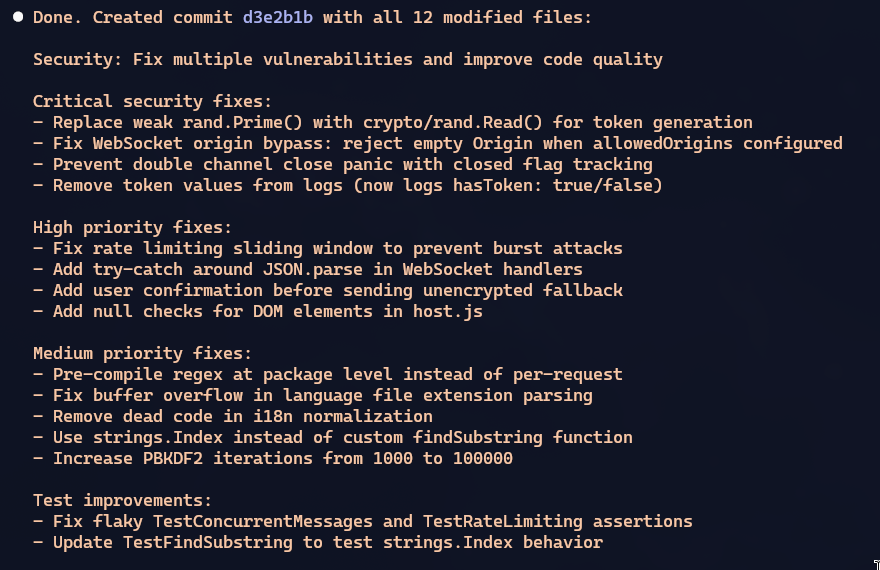
This is the commit with the fixes, take a look.
So it “already worked” in Phase 1, with a ton of problems. I intervened and spent 90% of the time in Phase 2 adding the foundation. I didn’t review it properly and I published the file, now I came back and there are still problems.
Software is NEVER “done”.
Even what Claude Code found doesn’t mean it fixes EVERYTHING. It means it fixes SOME THINGS. No software ever has “a guarantee” of being perfect. That doesn’t exist.
Even if I had started with Claude Code, as I said before, it would indeed have been faster. But it all depends on what you ask it. If you don’t know exactly the requirements and specs for security, or performance, or scalability, or maintainability BEFORE asking, it will do SOME THINGS. Not necessarily the PERFECT THINGS, just SOME THINGS.
Then someone might say “See? Now that you’ve reviewed it with Claude Code, it’ll be perfect”
So, afterwards I also asked GPT 5.2 Codex to do the same extensive analysis and guess what: it also found more little issues. Far fewer, of course. But look at it: after GLM 4.7 and Opus 4.5, GPT 5.2 still found more things. IT NEVER ENDS!
In particular, remember how earlier I had tokens encrypted, then I changed the requirement asking for them not to be and to stay in-memory on the server? Old code from that feature was left behind. GPT 5.2 thought the intention was to finish implementing the encryption and started putting it back. I had to interrupt it and tell it to stop and remove it. Not even Opus 4.5 had removed this dead code.
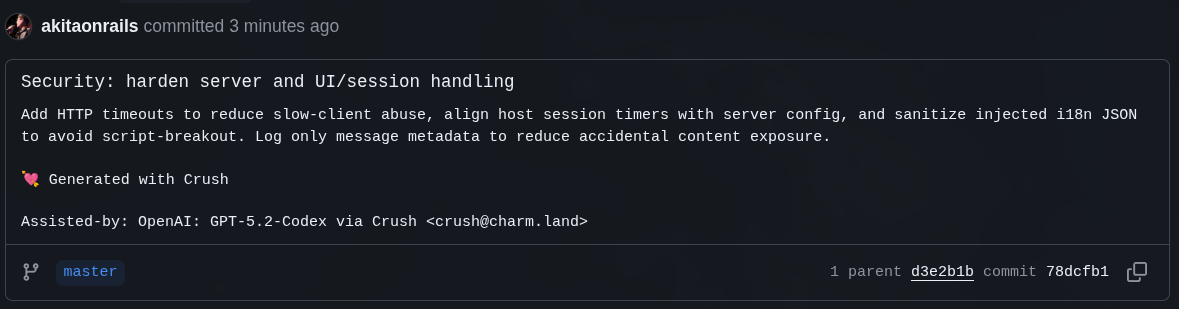
Always, you who ask are the one responsible for asking exactly and checking afterwards.